EzWoW - Bags
- By
Categorized bags, alt bags and banks, profession use labels and auction prices for WoW Forever.
2026-10-21 21 17 47.png
2026-10-21 21 17 36.png
Description
English
Overview
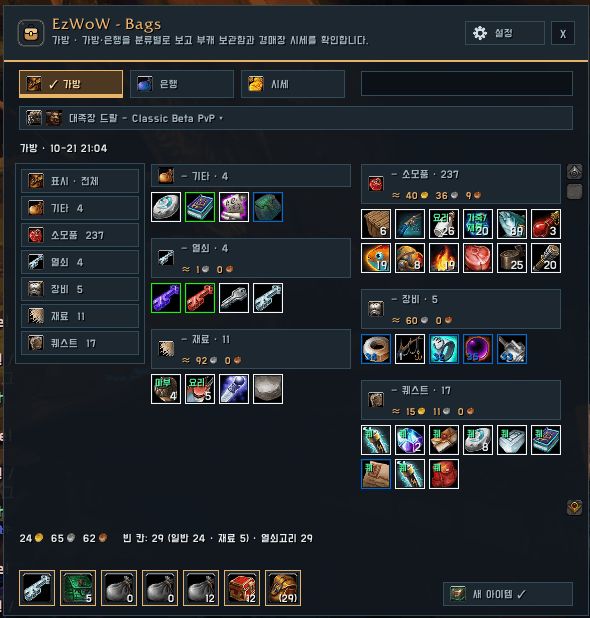
A bag addon that shows your bags and bank in one window, grouped by category. Icons carry a short purpose label (quest, BoE, recipe, or the professions that use a reagent), you can open other characters' bags and banks read-only, and saved auction prices appear in tooltips and category totals.
Screenshots
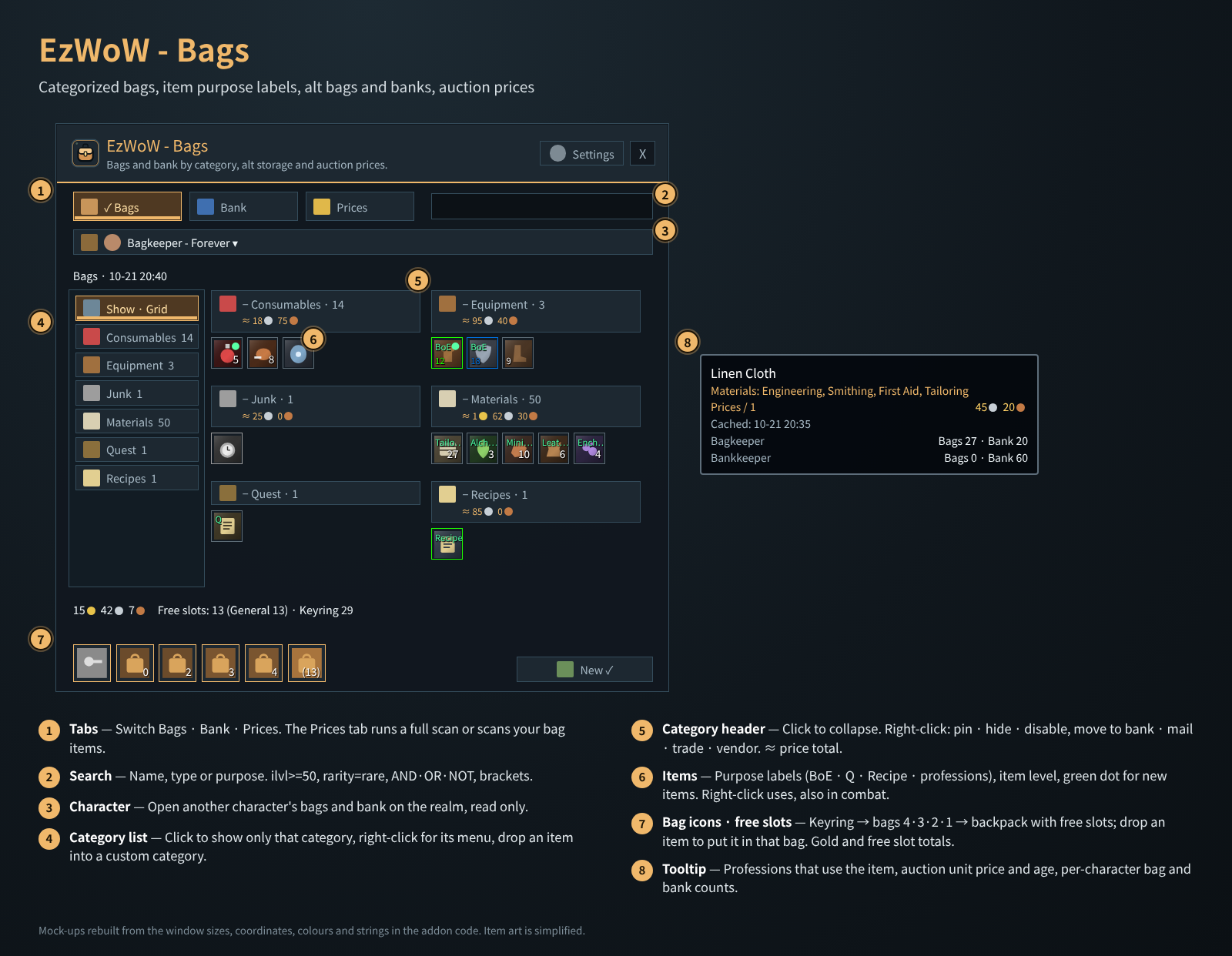
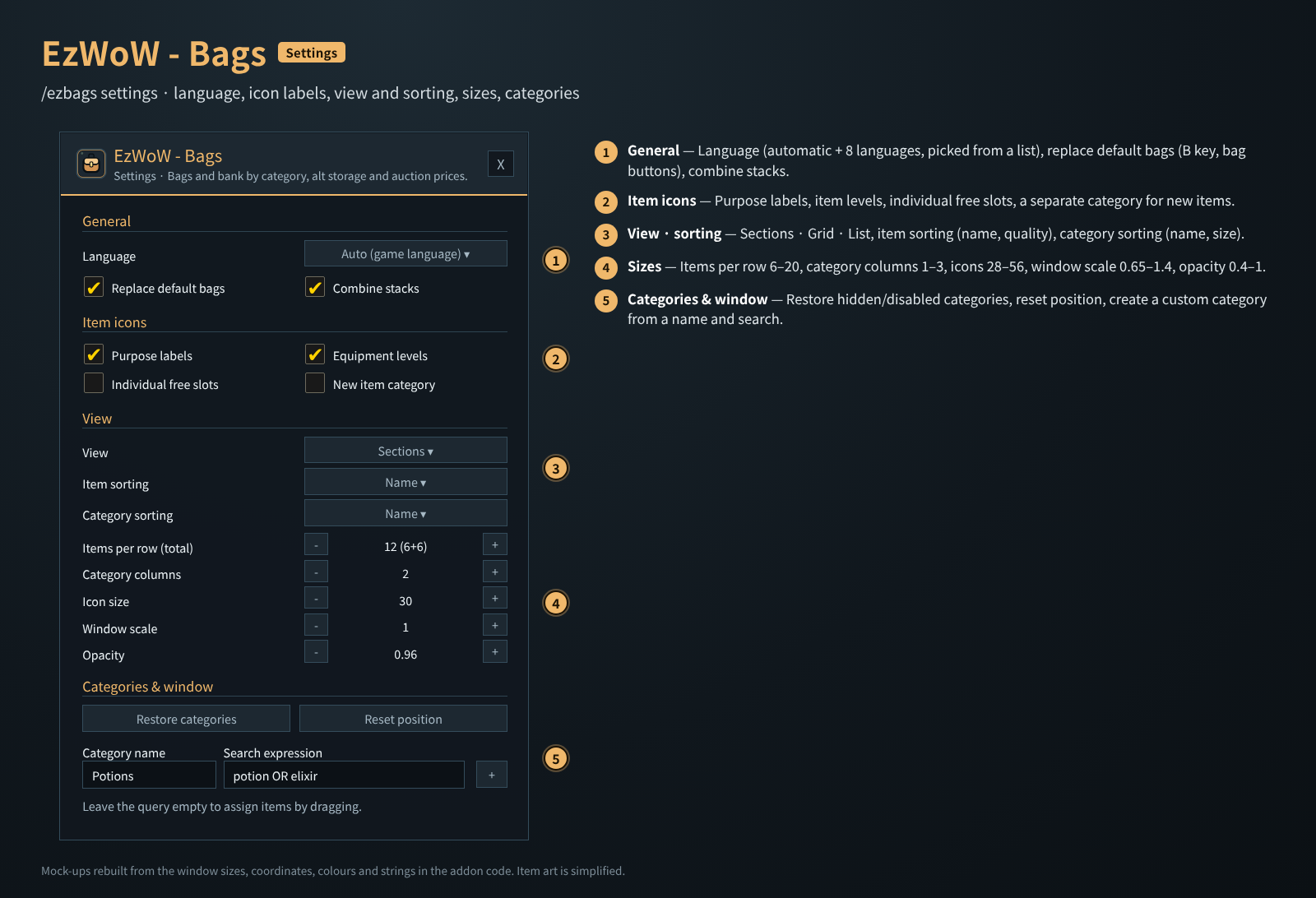
These are mock-ups rebuilt from the window sizes, coordinates, colours and strings in the code. Item art is simplified; character names and prices are examples.
Installation
- Copy the
EzWoW-Bagsfolder intoInterface/AddOns/(final pathInterface/AddOns/EzWoW-Bags/EzWoW-Bags.toc). - Enable it in the AddOns list on the character select screen. Turn off other bag replacement addons.
- Press B or a bag button to open the window.
How to use (numbers in the picture)
| No. | Part | Description |
|---|---|---|
| ① | Tabs | Switch between Bags · Bank · Prices. |
| ② | Search | Name, type or purpose. Supports ilvl>=50, rarity=rare, AND / OR / NOT, brackets and quotes. |
| ③ | Character picker | Pick another character on the same realm to see its last saved bags and bank, read only. A bank is saved once you open it on that character. |
| ④ | Category list | Click to show only that category; right-click for its menu; drop an item on a custom category to put it there. |
| ⑤ | Category header | Click to collapse. Right-click: pin · hide · disable, custom category order/search/delete, move to bank · mail · trade · vendor. Shows a total (≈) for items with a known price. |
| ⑥ | Items | Purpose label on the icon (BoE · Q · Recipe · professions), item level, green dot for new items. Left-click picks up, right-click uses (potions, food, Hearthstone — also in combat), Shift-click links or splits. Works on your current character's real bags and an open bank. |
| ⑦ | Bag icons · free slots | Keyring → reagent bag → bags 4·3·2·1 → backpack, with free slot counts; drop an item on a bag to put it there. Gold and free-slot totals above, New ✓ clears the green dots. |
| ⑧ | Tooltip | Professions that use the item, auction unit price and when it was seen, per-character bag and bank counts on the realm. |
- Prices tab: Full scan (whole auction house) or Scan bag items. The auction house must be open. Filter by item class on the left.
- With EzWoW - Tooltip enabled, Tooltip collects prices and Bags shares them (Tooltip also shows the price line).
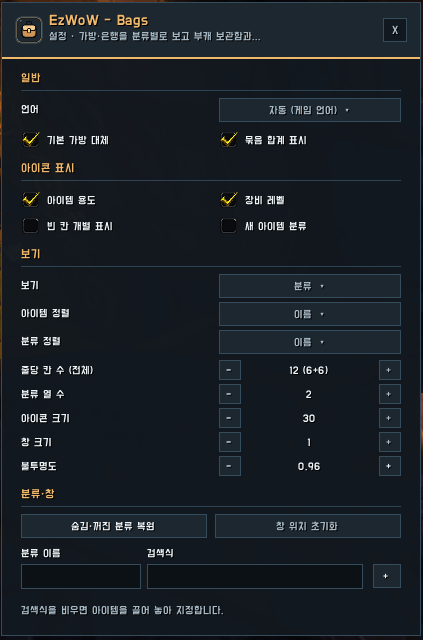
Settings window (/ezbags settings)
| No. | Option | Default |
|---|---|---|
| ① | Language (automatic + 8 languages) | Automatic |
| ① | Replace default bags (after login or /reload) |
On |
| ① | Combine stacks | On |
| ② | Purpose labels · Equipment levels | On |
| ② | Individual free slots · New item category | Off |
| ③ | View: Sections · Grid · List | Sections |
| ③ | Item sorting: Name · Quality / Category sorting: Name · Size | Name · Name |
| ④ | Items per row (total) 6–20 · Category columns 1–3 | 12 · 2 |
| ④ | Icon size 28–56 · Window scale 0.65–1.4 · Opacity 0.4–1 | 30 · 1 · 0.96 |
| ⑤ | Restore categories · Reset position | - |
| ⑤ | New custom category: name + search (leave the search empty to assign items by dragging) | - |
Slash commands (/ezbags, /ezb)
| Command | Description |
|---|---|
/ezbags |
Open/close the window |
/ezbags bank |
Show the saved bank |
/ezbags settings |
Settings |
/ezbags scan |
Full price scan while the auction house is open |
/ezbags debug |
Bank/auction API state and scan progress |
Saved data
EzWoW_BagsDB: settings, every character's bags, bank and gold, auction prices per realm and faction.- A price is the lowest buyout per item and the time it was seen — not a guarantee of what you can buy now.
- Profession use comes from the WoW Forever recipe data of EzWoW - Profession Recipes (529 reagents; no need to install it).
한국어
개요
가방·은행을 하나의 창에서 분류별로 보여 주는 가방 애드온입니다. 아이콘 위에 아이템 용도(퀘·비귀속·책·연금·재봉 같은 전문 기술)를 표시하고, 다른 캐릭터의 가방·은행을 보기 전용으로 열어 볼 수 있으며, 경매장 시세를 저장해 툴팁과 분류 합계에 보여 줍니다.
화면 미리보기
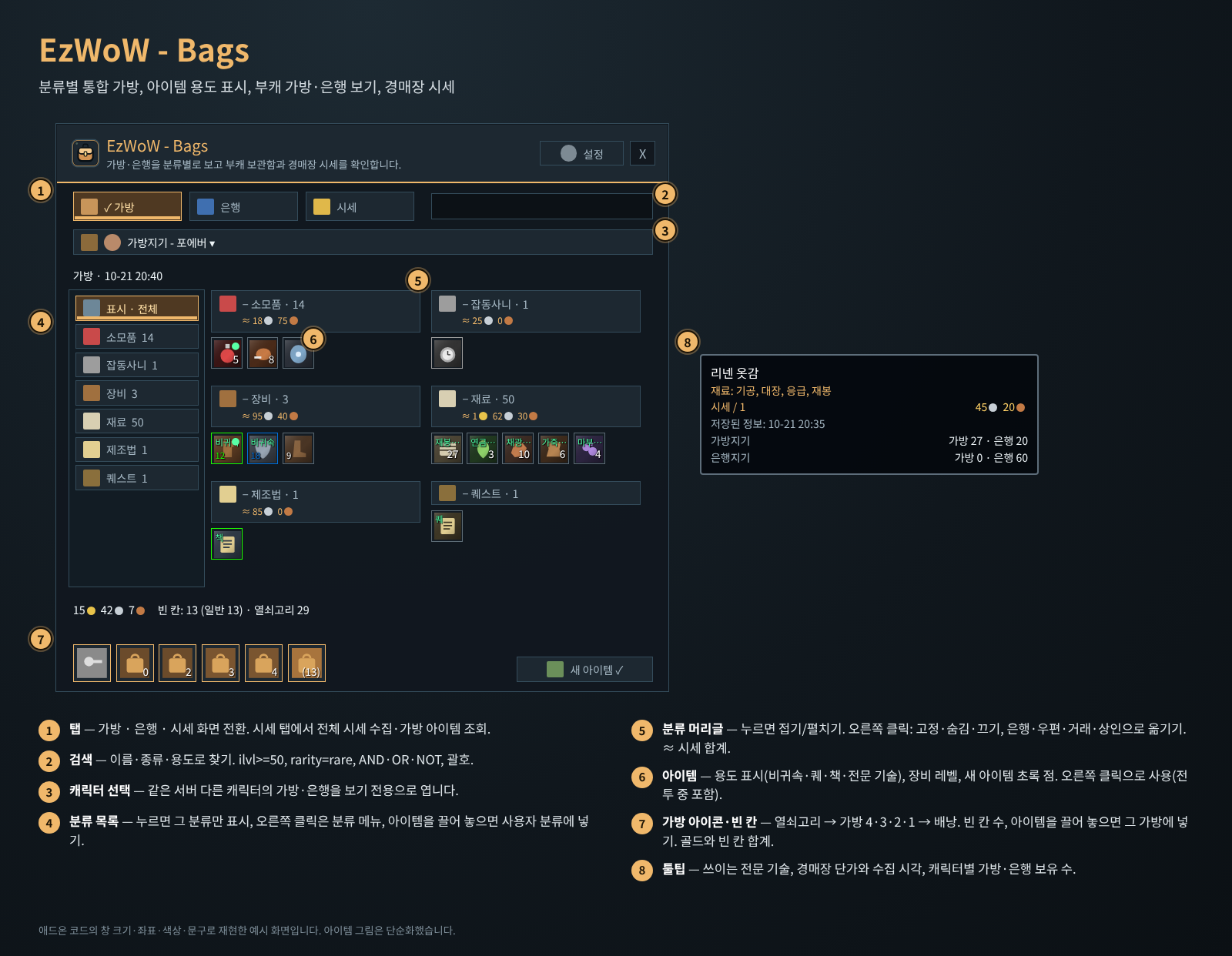
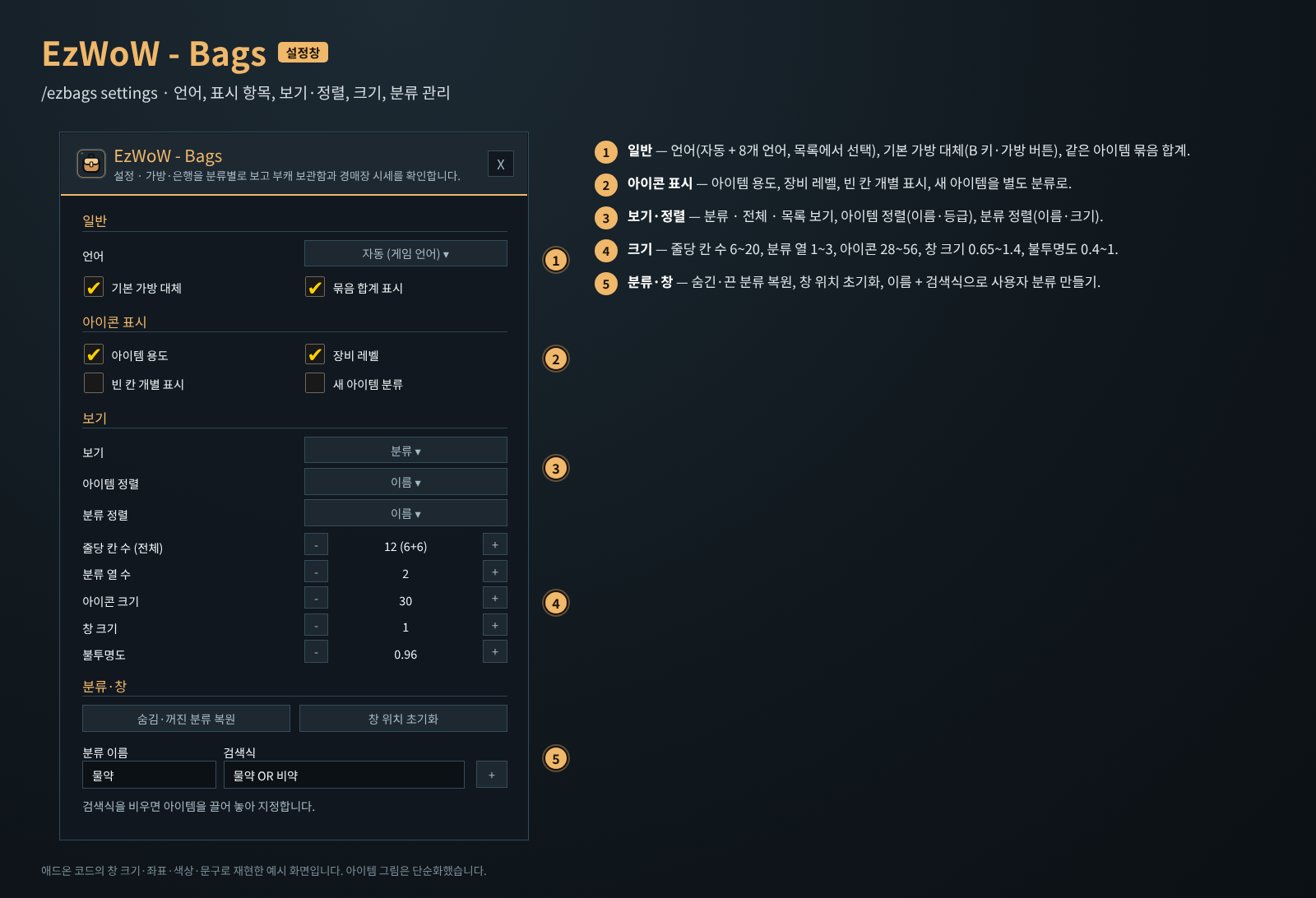
이미지는 애드온 코드의 창 크기·좌표·색상·문구로 재현한 예시 화면입니다. 아이템 그림은 단순화했고, 캐릭터 이름·시세 숫자는 예시입니다.
설치
EzWoW-Bags폴더를Interface/AddOns/폴더에 넣습니다. 최종 위치는Interface/AddOns/EzWoW-Bags/EzWoW-Bags.toc입니다.- 캐릭터 선택 화면의 애드온 목록에서 켭니다. 다른 가방 대체 애드온은 꺼 두세요.
- B 키 또는 기본 가방 버튼을 누르면 통합 창이 열립니다.
사용법 (위 그림의 번호)
| 번호 | 부분 | 설명 |
|---|---|---|
| ① | 탭 | 가방 · 은행 · 시세 화면을 바꿉니다. |
| ② | 검색 | 이름·종류·용도로 찾습니다. ilvl>=50, rarity=rare, AND / OR / NOT, 괄호, 따옴표를 쓸 수 있습니다. |
| ③ | 캐릭터 선택 | 같은 서버의 다른 캐릭터를 고르면 그 캐릭터가 마지막으로 저장한 가방·은행을 보기 전용으로 보여 줍니다. 은행은 그 캐릭터로 은행을 한 번 열어야 저장됩니다. |
| ④ | 분류 목록 | 누르면 그 분류만 보여 줍니다. 오른쪽 클릭은 분류 메뉴입니다. 아이템을 끌어다 놓으면 그 사용자 분류에 넣습니다. |
| ⑤ | 분류 머리글 | 누르면 접고 펼칩니다. 오른쪽 클릭: 고정 · 숨김 · 끄기, 사용자 분류 순서·검색식·삭제, 은행·우편·거래·상인으로 옮기기. 시세를 아는 아이템은 합계(≈)를 보여 줍니다. |
| ⑥ | 아이템 | 아이콘 위에 용도(비귀속 · 퀘 · 책 · 전문 기술), 장비 레벨, 새 아이템 초록 점을 표시합니다. 왼쪽 클릭 집기, 오른쪽 클릭 사용(물약·음식·귀환석 등, 전투 중에도), Shift 클릭 링크·나누기. 현재 캐릭터의 실제 가방과 열린 은행에서만 동작합니다. |
| ⑦ | 가방 아이콘 · 빈 칸 | 열쇠고리 → 재료 가방 → 가방 4·3·2·1 → 배낭 순서. 빈 칸 수를 표시하고, 아이템을 끌어 놓으면 그 가방에 넣습니다. 위에는 골드와 빈 칸 합계, 오른쪽 새 아이템 ✓는 초록 점을 지웁니다. |
| ⑧ | 툴팁 | 쓰이는 전문 기술, 경매장 단가와 수집 시각, 같은 서버 캐릭터별 가방·은행 보유 수. |
- 시세 탭: 전체 시세 수집(경매장 전체) 또는 가방 아이템 조회(가방에 있는 아이템만). 경매장이 열려 있어야 합니다. 왼쪽에서 아이템 종류로 거를 수 있습니다.
- EzWoW - Tooltip이 켜져 있으면 시세 수집은 Tooltip이 맡고 Bags는 그 가격을 함께 씁니다(툴팁 시세 줄도 Tooltip이 표시).
분류 머리글로 옮기기
은행·우편·거래·상인 창이 열린 동안 머리글 오른쪽 클릭 → 옮길 곳을 고르면, 아래쪽 다음 아이템 버튼을 누를 때마다 실제 묶음 하나씩 옮깁니다. 상인에게는 판매가가 있는 일반·하급 아이템만 팔고, 퀘스트·직접 지정한 아이템은 빼고 팝니다.
설정창 (/ezbags settings)
| 번호 | 항목 | 기본값 |
|---|---|---|
| ① | 언어 (자동 + 8개 언어) | 자동 |
| ① | 기본 가방 대체 (다음 접속 또는 /reload 후 적용) |
켬 |
| ① | 묶음 합계 표시 | 켬 |
| ② | 아이템 용도 · 장비 레벨 | 켬 |
| ② | 빈 칸 개별 표시 · 새 아이템 분류 | 끔 |
| ③ | 보기: 분류 · 전체 · 목록 | 분류 |
| ③ | 아이템 정렬: 이름 · 등급 / 분류 정렬: 이름 · 크기 | 이름 · 이름 |
| ④ | 줄당 칸 수 (전체) 6~20 · 분류 열 수 1~3 | 12 · 2 |
| ④ | 아이콘 크기 28~56 · 창 크기 0.65~1.4 · 불투명도 0.4~1 | 30 · 1 · 0.96 |
| ⑤ | 숨김·꺼진 분류 복원 · 창 위치 초기화 | - |
| ⑤ | 사용자 분류 만들기: 이름 + 검색식 (검색식을 비우면 아이템을 끌어 놓아 지정) | - |
명령어 (/ezbags, /ezb)
| 명령어 | 설명 |
|---|---|
/ezbags |
통합 창 열기/닫기 |
/ezbags bank |
저장된 은행 보기 |
/ezbags settings |
설정창 |
/ezbags scan |
경매장이 열린 상태에서 전체 시세 수집 |
/ezbags debug |
은행·경매 API 상태와 수집 진행 상황 |
저장 데이터
EzWoW_BagsDB: 설정, 캐릭터별 가방·은행·골드, 서버·진영별 경매 시세.- 시세는 즉시구매 가격을 수량으로 나눈 최저 단가와 수집 시각입니다. 현재 살 수 있는 가격을 보장하지 않습니다.
- 전문 기술 용도는 EzWoW - Profession Recipes의 포에버 제조법 데이터에서 뽑은 재료 529종입니다(따로 설치할 필요 없음).
Support / 후원
If you find this addon useful, you can support its development.
애드온이 도움이 되셨다면 개발 후원으로 응원해 주세요.

EzWoW - Bags Team