EzEmotes
- By
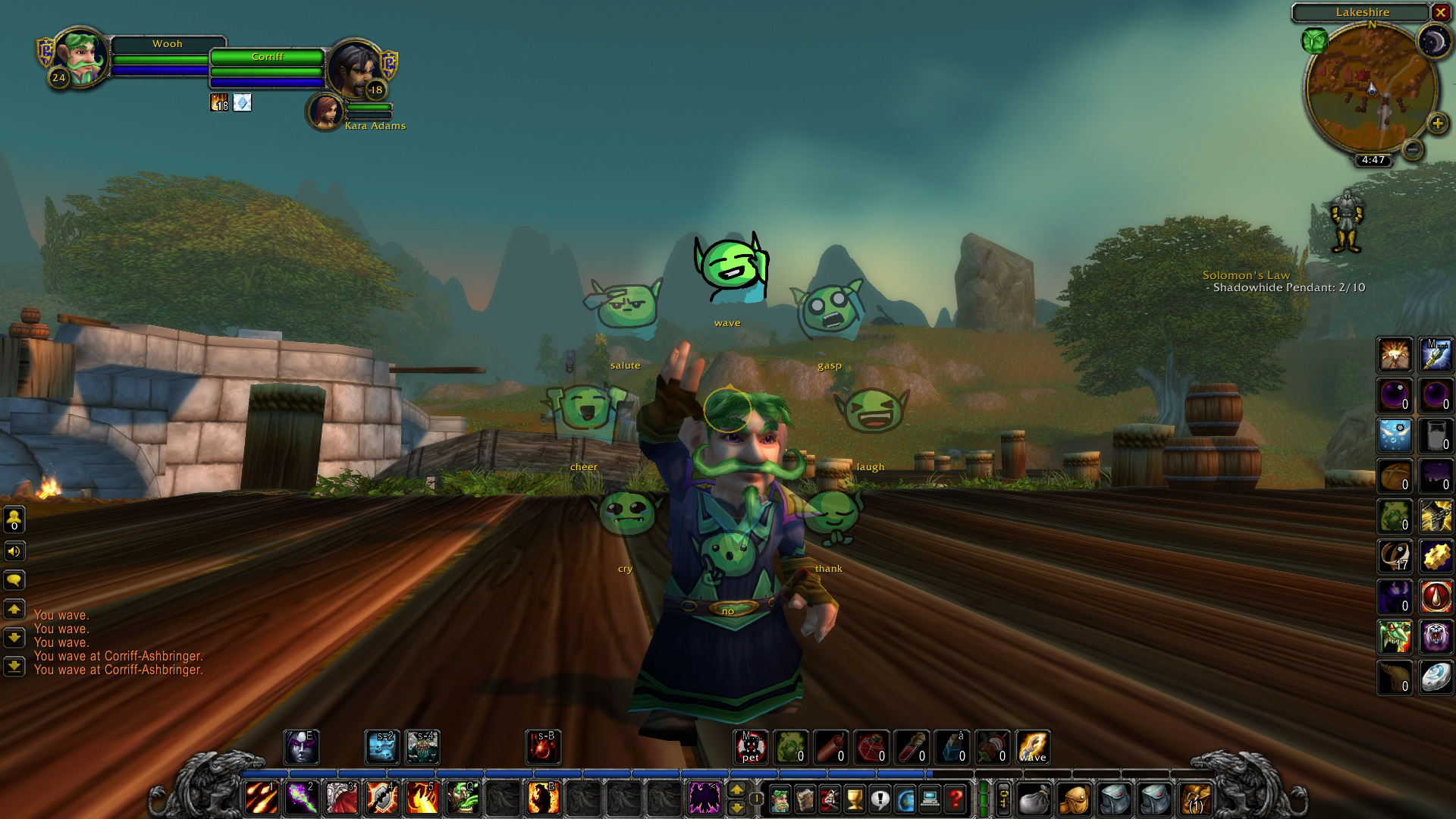
EzEmotes adds a niche customizable emote wheel with easy hotkeys for quick access to fun emotes. Supports 4- or 8-way layouts, multiple pages, and custom emote sets. Lightweight, user-friendly, and perfect for enhancing social interaction in WoW.
EZEmotes: Simple, Customizable Emote Wheel for World of Warcraft
Supported Versions: Classic (Retail support untested)
Description

EZEmotes provides a clean and easy-to-use emote wheel that lets you quickly select from 4 or 8 emotes per page. Switch between two pages of emotes for a wider range of expressions, all accessible via keybinds or a simple radial menu.
Also features an instant emote reply button that lets you quickly respond with the same emote another player uses on you. This feature is disabled by default and can be enabled in the settings.
Easy to Set Up
16 total emotes with images are already available for you to use. The default keybinds are set to 6 and 7, and can be changed by clicking the green owl icon on your minimap.

Usage
- Hold the keybind down to show an 8-direction emote wheel
- Move your cursor to an emote and release the key to trigger it
- Default keybinds: hold down 6 = show Emote Page, click 7 = go to next emote page
Key Features
- Drag your mouse to quickly select and trigger emotes
- Choose between 4 or 8 emotes per page for quick selection
- Two emote pages let you store up to 16 emotes
- Minimap button provides access to settings (same as
/ezemotes) - Custom icons are included for many emotes
- Emotes without icons are still usable — missing images won’t block functionality
- Lightweight and unobtrusive with minimal performance impact
- Classic supported – Retail is untested but may work
Configuration
- Open the settings with
/ezemotesor by clicking the minimap icon - Assign emotes to pages and set custom keybindings
- Use the radial wheel interface for fast, intuitive selection
Roadmap
- More emotes and custom icons will be added in future updates
EZEmotes makes expressing yourself in WoW fast and simple.


EzEmotes Team