ExtraResourceBars
ExtraResourceBars
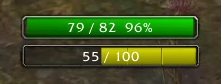
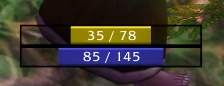
A Vanilla WoW AddOn Displays an extra customizable, moveable HP and Power bar.
Customization is saved per character. Video for the addon: https://www.youtube.com/watch?v=MjyhXCvZSxw
Examples


Instructions
- Download the addon
- Unpack the file
- Put the renamed folder into the AddOns folder: World of Warcraft\Interface\AddOns
- Start or restart WoW if already running
IF YOU CANT MOVE A FRAME THEN SET ITS "under" VALUE TO NIL
For example, if you can't move the power bar then run this command:
/run ERB_options.erb_pp.under = nil
Changeable options and accepted inputs
``` hide (true or false) barResize ("LEFT", "CENTER", "RIGHT") width (Any number) height (Any number) fontSize (Any number) textType (0, 1, 2, 3, 4) textAlign ("LEFT", "CENTER", "RIGHT") under ("erb_hp" or any other frame, for example, "PlayerFrame", set to nil to be able to move the bar again) spacing (Any number, for example, 5 or -10) bar (1-26, 0 for no bar texture) border (1-4, 0 for no border texture) background (true or false) backgroundColor (Accepts 3-4 numbers from 0-1 like this (Red, Green, Color, Alpha): {0, 0, 0, 0.45} ) only_combat (true or false) Defaults to false fade_in_time (Any number) (example: 0.4) fade_out_time (Any number) (example: 0.4)
Unique for HP bar: color (Accepts 3-4 numbers from 0-1 like this (Red, Green, Color, Alpha): {0.2, 0.2, 1} ) Only works if gradiantHP is set to false. gradiantHP (true or false) Gradiant hp color change from green to yellow to red.
Unique for the Power bar: powers = { mana (Accepts 3-4 numbers from 0-1 like this (Red, Green, Color, Alpha): {0.2, 0.2, 1} ) rage (Accepts 3-4 numbers from 0-1 like this (Red, Green, Color, Alpha): {1, 0, 0} ) energy (Accepts 3-4 numbers from 0-1 like this (Red, Green, Color, Alpha): {1, 1, 0} ) main = ("mana", "energy", "rage") The target power to track (changes automatically with druid shapeshifting) } ```
Changing the options
Consult above information for correct values.
To change an option for hp bar you type like this:
/run ERB_options.erb_hp.[OPTION]=[VALUE]
Example:
/run ERB_options.erb_hp.width=150
/run ERB_options.erb_hp.backgroundColor={1, 0, 0, 0.55}
First example will change the HP bar's width to 150.
Second example will change the background's color to red with 45% transperancy.
To change an option for power bar you type like this:
/run ERB_options.erb_pp.[OPTION]=[VALUE]
Example:
/run ERB_options.erb_pp.powers.main="energy"
Will change the power tracking to energy (A must for rogues, druids bar will change automatically)
Run this to reload UI to apply changes:
/console reloadui
ExtraResourceBars Team