
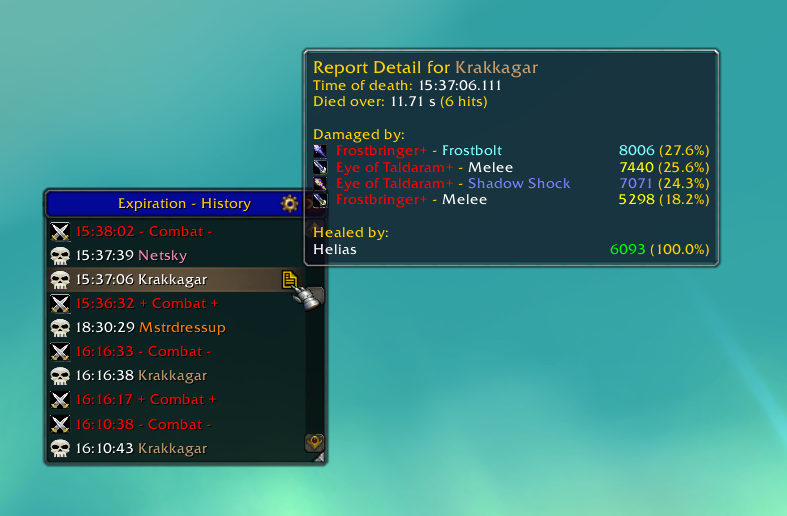
When selecting a report in the history window, a small page icon appears on the right side. Hover over this icon to show a summary of the report, including damage taken, healing received, and an estimation of the burst length.
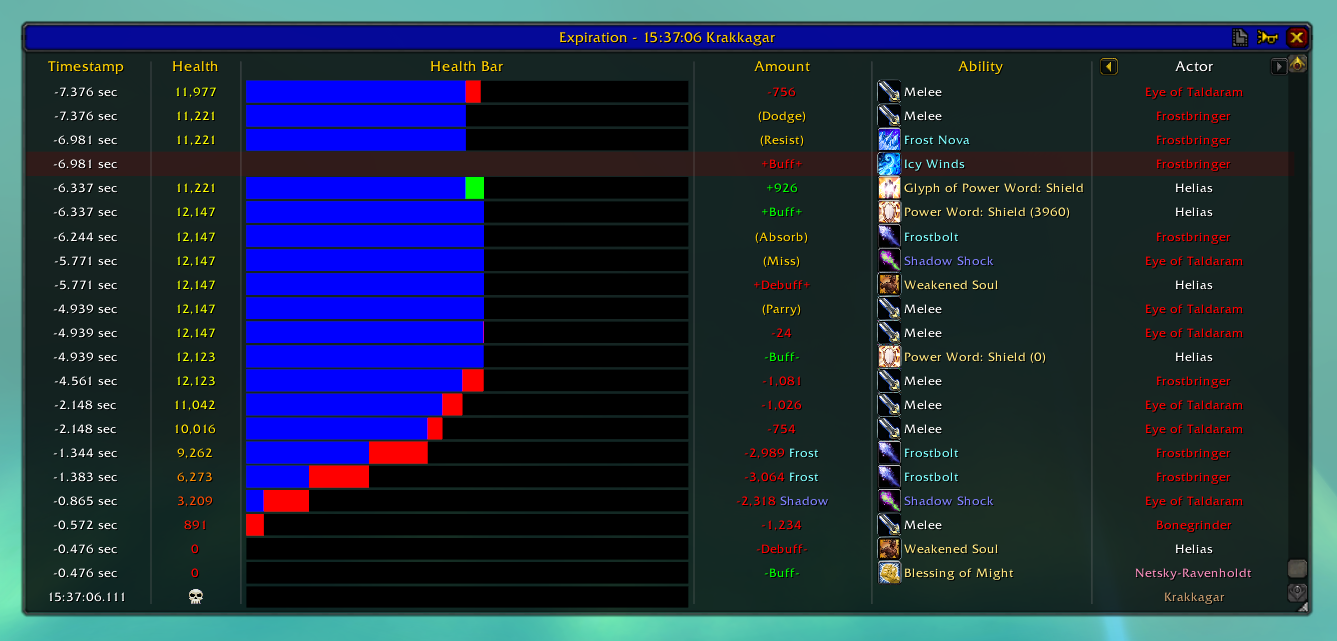
The new death report display. The major difference as of 2.2 is the icons along the top. The buttons for the fight and player browsers are gone (functionally replaced by the history window). The options button has moved to the history window. The rep...
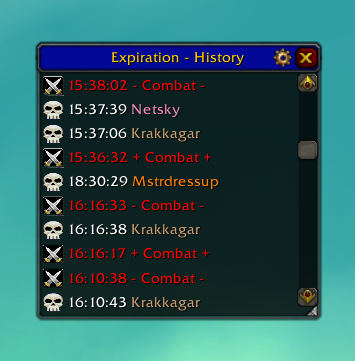
This window is opened by the basic slash command (/expiration or /exp). It shows the currently recorded report history, with combat start and stop times to separate fights.
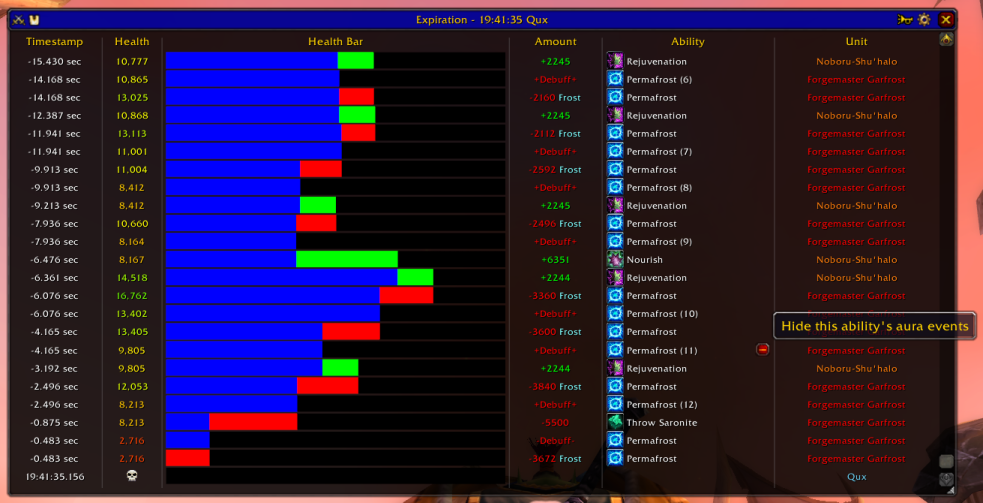
A sample death report showing combat events leading up to the mage's death. Individual columns should be fairly self explanatory; also shown is the mouse hovering over a Permafrost debuff gain event. The minus button will hide all aura events with th...
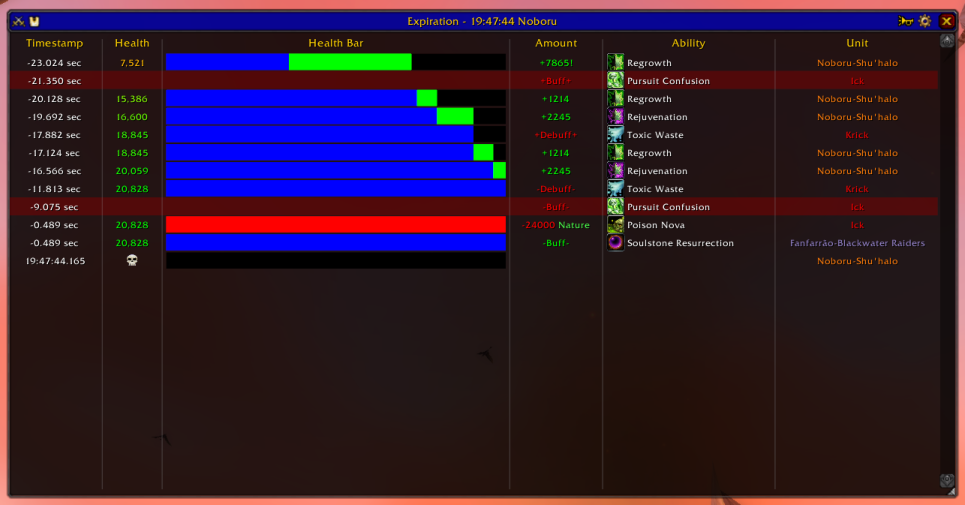
Another sample death report; this one has had most of its events filtered out and it is a very simple death situation. This report also shows another feature of Expiration, which is hostile NPC buff tracking. Here you can see Ick starting and then st...
Description
Expiration is a player death analysis mod. It tracks your group members and records combat events about them. When a player dies, the combat history leading up to their death is saved for later review.
History
The original Expiration arose a few years ago out of a thread on Elitist Jerks discussing how to best learn from player deaths during the actual attempts. Thus, a simple proof-of-concept death tracking mod was created and it was soon followed by a number of other mods in the same vein. After not touching the original for a while, it was picked up and maintained by Shadowed, another addon author (Much thanks for keeping it working in the interim!). Recently, my role as a tank has once again caused "Why did I die, and who was healing me?" to become a pressing question. And so, I rewrote Expiration from scratch with a plan!
Basics
At its heart, Expiration does three simple things:
Tracks your group members' combat events
When an interesting combat event happens to you or someone in your party or raid, Expiration saves information about that event. "Interesting" generally means an event that could have been instrumental in their death; so while you will see a monster attacking you, you will not see your attacks back.
Saves snapshot reports of combat on death
When you or one of your group members dies, Expiration saves a snapshot of the last 30 seconds (user configurable) of combat for that player. These snapshots are further grouped into fights based on combat and what dealt the most damage.
Displays and filters death reports
Opening the Expiration user interface lets you browse saved death reports by fight or by player. Selecting a report will take you to the report page, which displays a list of the events in the report. Each column can be shown/hidden or moved around via the interface. The 'Ability' column will let you see spell tooltips and link spells into chat. It will also let you filter out specific types of events for specific spells; for example, you can hide when players gain/lose Rejuvenation, but not the ticks that heal them. This is useful for cutting down on the unimportant information in a death report.
Usage
Simply run the mod and it will capture death reports automatically. You can configure how many seconds of history to report and how many fights to keep in the Blizzard addon configuration panel.
Chat commands via /expiration or /exp
- /exp - Shows the Expiration user interface
- /exp fights - Browse death reports by fight
- /exp players - Browse death reports by player
- /exp config - Show Blizzard configuration page
- /exp help - Show help message
The Expiration 2 Team

