ExpansionUtils (Character Overview and more) (Retail/MISTS/TBC/Classic Era/Forever)
- By
Character overview, weekly progress, Great Vault shortcuts, Valeera XP, and expansion conveniences.
Description
All WoW Versions:
Retail:
ExpansionUtils by D4KiR combines a character overview with shortcuts and small improvements for World of Warcraft expansion features. Track your alts, weekly progress, professions, money, and played time in one place.
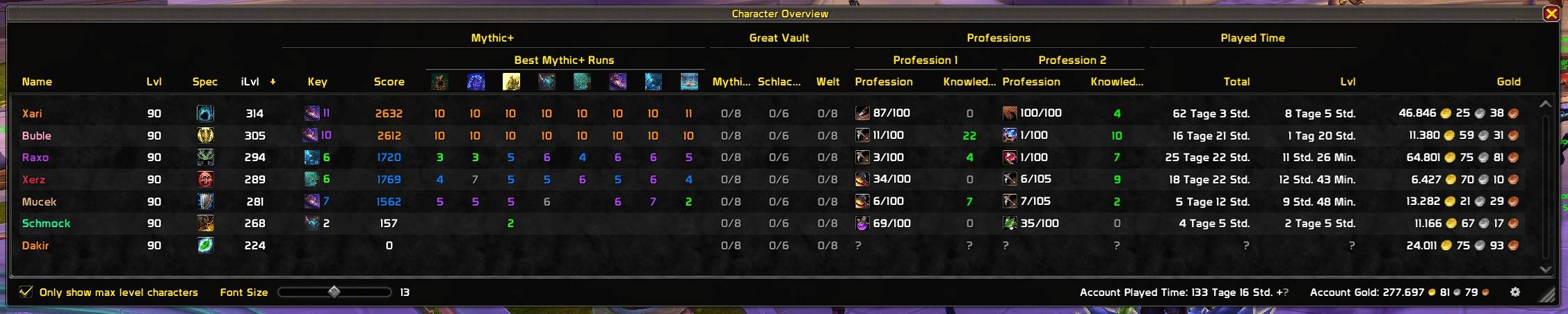
Character overview
The overview stores data from characters you log into with the addon enabled. It includes the following columns where the corresponding game systems are available:
- Character: class-colored name, level, specialization, and equipped item level.
- Mythic+: rating, best runs for the current season's dungeons, and current keystone.
- Raids: weekly progress and expansion-wide boss progress, separated by supported difficulty.
- Professions: both primary professions, skill levels, and unspent knowledge points where supported.
- Great Vault: raid, dungeon, and world activity progress. Unclaimed rewards appear as a green "Rewards waiting" message across the visible vault columns.
- Played time: total time played and time played at the current level.
- Money: gold, silver, and copper for each character.
Click column headers to sort the list and hover over cells for additional details. The footer shows total money and played time for the stored characters, including recorded Warband bank money where supported.
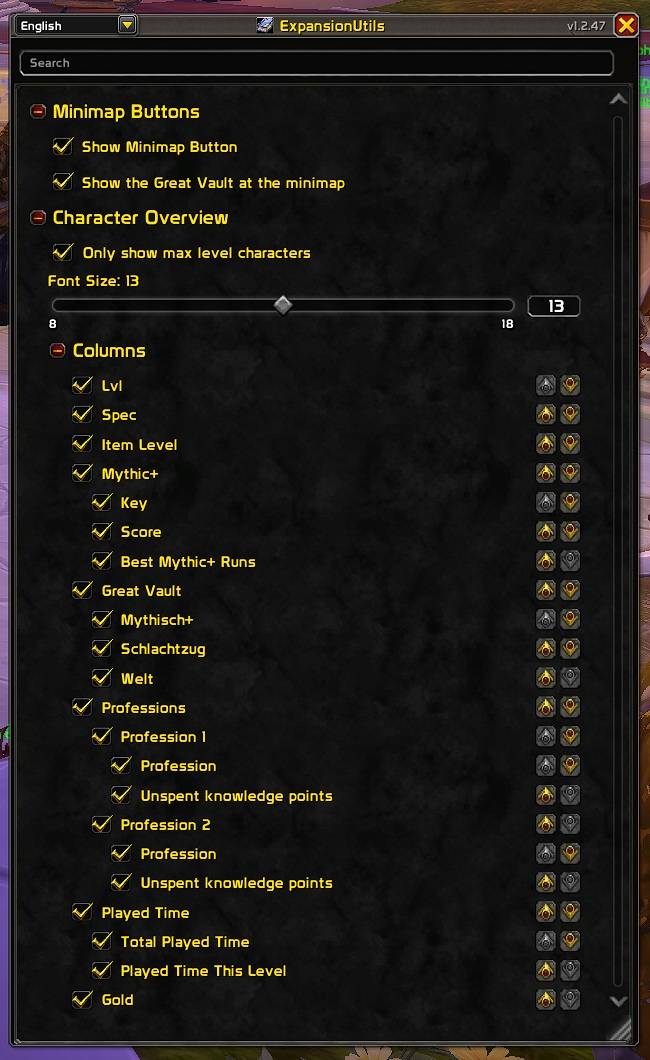
Customize the overview through its footer and settings:
- Filter the list to max-level characters.
- Adjust the font size from 8 to 18.
- Show, hide, and reorder column groups and their subcolumns.
- Resize the window and open settings with the footer's gear button.
Alt data reflects the last time each character was updated; log into an alt to refresh it. Missing values appear as ?, and weekly data is marked as outdated after a reset. Account totals use the characters already recorded by the addon.
Great Vault
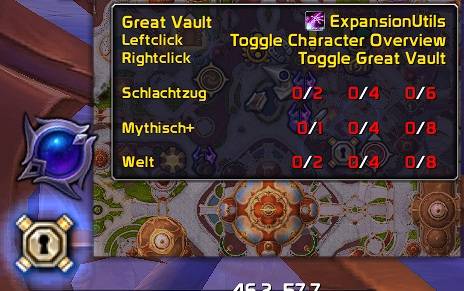
On Retail, the Great Vault minimap button provides quick access to the overview and the vault. Its tooltip shows activity progress, example reward item levels when available, and whether rewards are waiting.
| Button | Action |
|---|---|
| Left-click | Toggle the character overview |
| Right-click | Toggle the Great Vault outside combat |
The button can be shown or hidden in settings and is omitted where the Great Vault system is unavailable.
Valeera XP bar
On Retail, a movable XP bar tracks Valeera's Delve companion level and progress toward her next level. It appears while she is an active companion and has XP left to earn.
The bar and its tooltip show current XP, remaining XP, XP gained during the current Delve, and saved XP highscores by Delve and tier. Drag the unlocked bar outside combat to move it; its position is saved account-wide.
Other conveniences
- Reshii Wraps: on Retail, a shortcut beside the back slot in the character window opens the upgrade interface while Reshii Wraps are equipped.
- Mythic+ preparation: the keystone window gains a ready-check button with group readiness feedback and countdown buttons for 10, 5, and 3 seconds. Countdowns use DBM, BigWigs, or the built-in party countdown when available.
- Non-interruptible casts: on non-Retail clients, target and focus cast bars gain a shield indicator and gray coloring for non-interruptible casts, including support for DragonflightUI cast bars.
Settings and access
On Retail, use the main ExpansionUtils minimap button:
| Input | Action |
|---|---|
| Left-click | Toggle settings |
| Shift + left-click | Toggle the character overview |
| Right-click | Hide the main minimap button |
Open settings with either command:
/exut/expansionutilsDiscord
ExpansionUtils (Character Overview and more) (Retail/MISTS/TBC/Classic Era/Forever) Team

Owner