ExpansionGlow
- By
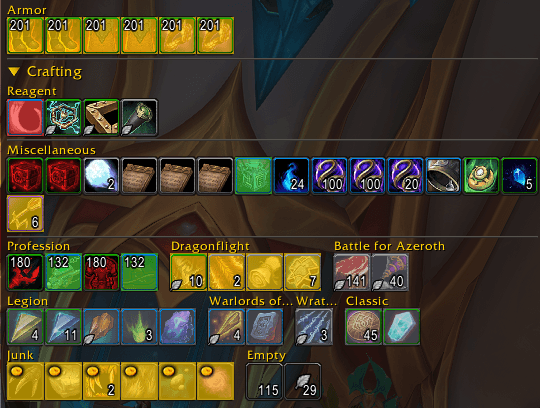
Tints item icons in your bags and bank by how many expansions old they are, so leftover legacy gear and reagents are obvious at a glance.
Wow_CGaqFmUiQF.png
Wow_glpjTft3Y1.png
Wow_I5I8IxNS7R.png
Description
ExpansionGlow
Every item in your bags and bank gets a colour based on how many expansions old it is, so you can tell current-expansion loot from leftover clutter without opening a single tooltip. Gear you are still farming this season is left alone even when it comes from an old dungeon.
How items are graded
Items are sorted into four tiers, measured against whatever the current expansion happens to be:
| Tier | Default colour |
|---|---|
| One expansion back | Green |
| Two expansions back | Amber |
| Three expansions back | Red |
| Four or more expansions back | Grey |
Current-expansion items are left unmarked. Your bags stay quiet, and only the older items draw the eye.
Because the tiers are worked out relative to the live expansion rather than being hardcoded, everything re-grades itself the day a new expansion launches. Nothing to update, nothing to reset.
Or one colour per expansion
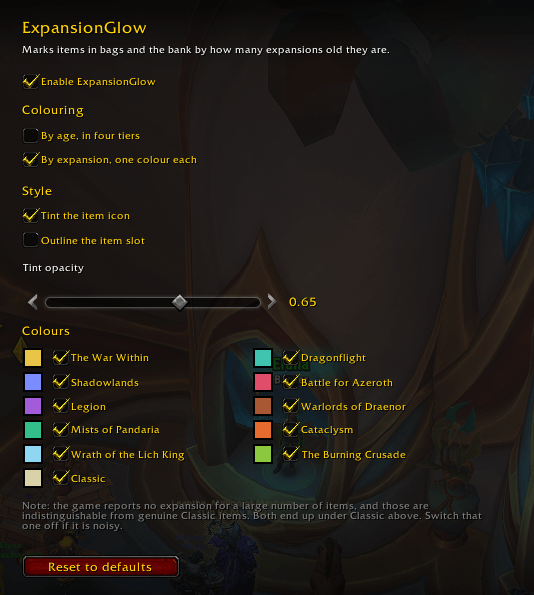
If four tiers is too coarse, switch to per-expansion colouring and every past expansion gets its own colour instead. Battle for Azeroth, Legion, Warlords and everything older stop sharing a single "old stuff" colour and become individually identifiable.
The list builds itself from the expansions the client knows about and uses the game's own expansion names, so it stays correct and extends itself as new ones ship. Current-expansion items stay unmarked either way.
This season's Mythic+ loot stays unmarked
Dungeons come back into the Mythic+ rotation carrying their original loot, so a Battle for Azeroth belt or a Dragonflight staff can be current-season gear while the game still reports it as years old. Grading purely by age paints those as clutter, which is exactly backwards.
ExpansionGlow reads this season's dungeon pool from the game and, for every piece of loot in it, notes the item level that dungeon's heroic difficulty drops at. An old item is then left unmarked only when both things are true:
- it is loot from a dungeon in the current Mythic+ pool, and
- the copy in your bag is at or above that item's heroic item level
The second condition is what makes it trustworthy. The same item covers the copy you looted this week and the one that has been in your bank since that expansion was current — only the item level tells them apart, and the old one stays marked. Mythic+ drops sit above heroic, so they qualify too.
This is on by default and can be switched off, in which case everything is graded purely by age. It only ever removes a marker; it never adds one.
It covers Mythic+ dungeons only — raid, world, crafted and PvP gear are graded by age as before. Pets, toys and decorations from a returning dungeon stay marked, because their item level is the same whenever you got them, so there is nothing to tell the copies apart.
Mythic Keystones are never marked either. Blizzard reuses one itemID for every keystone, dating back to Shadowlands, so by age alone it would read as years old no matter which dungeon it currently unlocks.
Two styles
- Tint — washes the item icon with the colour.
- Outline — draws a coloured border around the slot and leaves the icon completely untouched.
Options
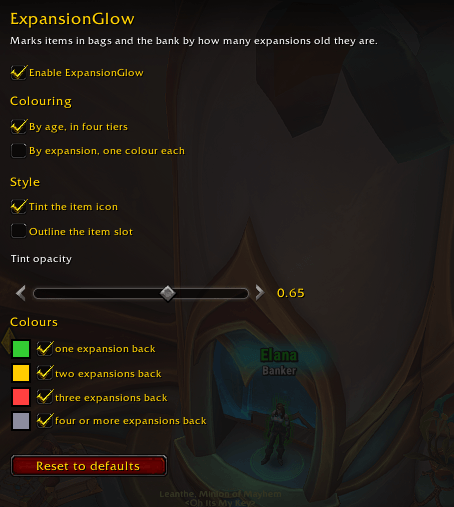
An in-game panel under Escape → Options → AddOns → ExpansionGlow, or /expglow:
- pick between age tiers and per-expansion colouring
- a colour picker for every tier and every expansion
- tint opacity
- outline width and distance from the slot
- switch any individual tier or expansion off
- skip this season's Mythic+ loot, on by default
- reset to defaults
The panel only shows the controls that apply to what you have selected, so the expansion list and the outline sliders appear when they actually do something.
Everything is available as a slash command if you prefer typing:
| Command | Effect |
|---|---|
/expglow |
open the options panel |
/expglow status |
print current settings |
/expglow toggle |
all markers on or off |
/expglow prev1|prev2|prev3|ancient |
toggle that tier |
/expglow prev1|prev2|prev3|ancient <hex> |
set that tier's colour, e.g. 33cc33 |
/expglow mode age|expansion |
four age tiers, or one colour per expansion |
/expglow style tint|border |
colour the icon, or outline the slot |
/expglow alpha <0-1> |
tint strength |
/expglow thickness <0-10> |
outline width in pixels |
/expglow outset <0-10> |
outline distance outside the slot |
/expglow season |
skip this season's Mythic+ loot, or grade it by age like everything else |
/expglow season rebuild |
reread this season's dungeon loot |
/expglow purge |
clear the cached item expansions |
Anything unrecognised prints the list, so /expglow help works.
Where it works
Blizzard's own bags and bank need no extra addon:
- the default bags, both separate and combined
- the character bank and the warband bank
Replacement bag UIs are supported individually:
- Baganator
- Bagnon
- BetterBags
- ArkInventory
- ElvUI's bags and bank
- EllesmereUI's bags, reagent bag and bank
Each one gets its own small file that does nothing at all unless that addon is loaded, so you pay nothing for a bag addon you do not use. Other bag addons built on Blizzard's item buttons are picked up automatically.
AdiBags is not supported, as it has been unmaintained for some time.
Built to stay out of the way
ExpansionGlow draws only textures it creates itself. It never touches the item quality border, upgrade arrows, the new-item flash, search overlays, or corner widgets belonging to other addons. The tint is drawn above the icon art but underneath the quality border, item overlays and the stack count, so nothing already on your item buttons gets covered up.
Each item's expansion is looked up once and remembered between sessions, so opening your bags does not re-query the client for items it has already seen.
The Mythic+ pool is read through the Encounter Journal, which is shared with the journal window you use. The read happens once per season, waits until the journal is not on screen, and puts back the difficulty, class filter and selected instance exactly as it found them. The result is cached and only rebuilt when the season's dungeon list changes.
A note on untagged items
The game reports no expansion at all for a large number of items. In tier mode those read as "four or more expansions back", which is broadly true. In per-expansion mode they are indistinguishable from genuine Classic items and land under Classic, which is a more specific claim than the data supports — the options panel says so next to the list. If it turns out noisy either way, switch that one colour off and the rest keep working.
ExpansionGlow Team