Expanse Raid Tools
- By
Multi-tool raid utilities. Healer mana tracker with configurable visibility and display. Raid Organizer and Raid Buff tracker. More to come!
Expanse Raid Tools - Mod 3.jpg
Expanse Raid Tools - Mod 2.jpg
Expanse Raid Tools - Mod 1.jpg
Description
Expanse Raid Tools
Expanse Raid Tools is a collection of raid-focused tools built to make organizing, inviting, buffing, and monitoring your raid easier.
1. Healer Mana Watch
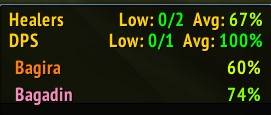
Shows a movable window with the current mana of your raid’s healers and tanks.
To use it properly, run a Role Check and ask your healers and tanks to select their correct roles.
Features:
- Shows healer mana in one easy window
- Also includes tanks
- Sorts low-mana players toward the top
- Shows average mana
- Helps raid leaders quickly decide whether to pull or wait for mana
2. Raid Organizer, Auto Invites, and Group Assigning
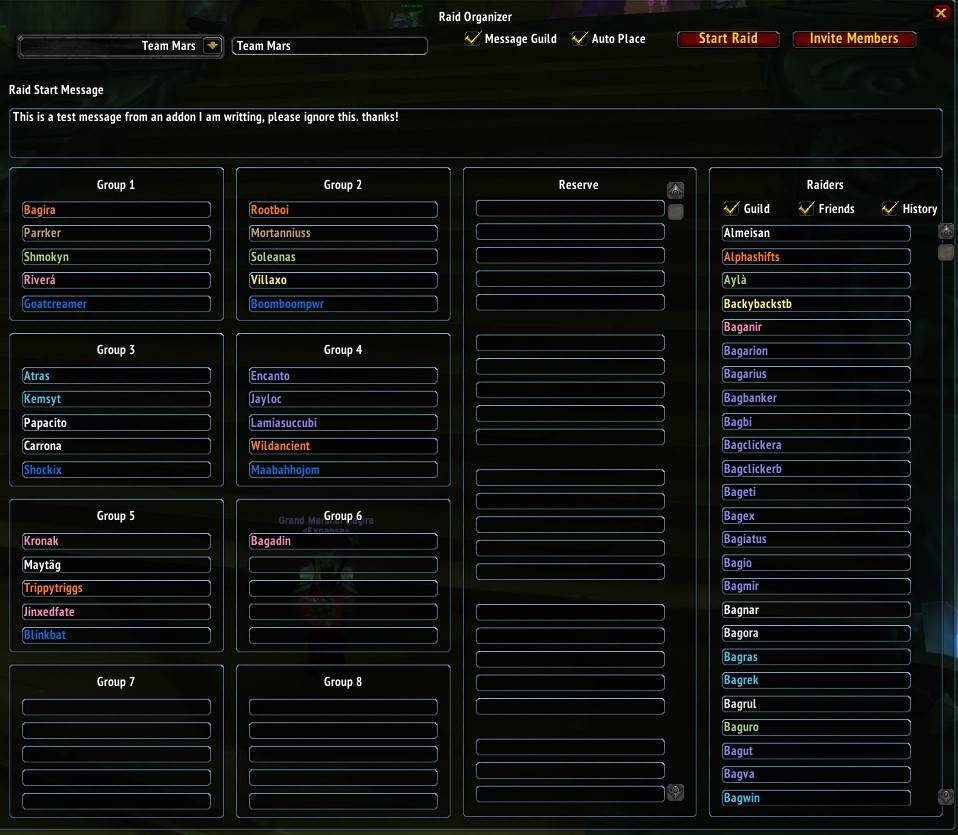
Lets you create raid rosters, assign players to groups, and invite your raid faster.
Open it with the minimap button by right clicking on it or running the following command in chat:
/exprtorgFeatures:
- Create and save raid setups
- Assign players to specific raid groups
- Invite planned raid members with one button
- Announce in guild chat that raid invites are open
- Allow players to whisper invite keywords such as
invorinvite - Automatically convert party to raid, if enabled
- Automatically set Master Looter, if enabled
- Automatically move players into their assigned groups after they join
3. Raid Buff Watcher
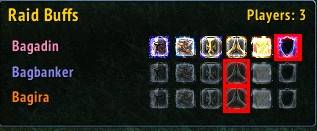
Shows a window listing raid members who are missing buffs that your character can cast.
Examples:
- Druids see missing Mark/Gift of the Wild
- Druids also see Thorns, but only for players marked as Tank through Role Check
- Mages see missing Arcane Intellect / Arcane Brilliance
- Priests see missing priest buffs they have learned (Ex: Divine Spirit won't show if you can't cast it)
- Paladins see missing blessings they can cast
The addon checks equivalent buff families correctly. For example:
- Gift of the Wild counts as Mark of the Wild
- Arcane Brilliance counts as Arcane Intellect
- Prayer of Fortitude counts as Power Word: Fortitude
- Greater Blessings count as their normal blessing versions
Paladin support:
- Paladin buffs are handled differently because multiple Paladins can buff the same player.
- If a player already has your blessing, they are hidden from your list.
- If a player has a specific blessing from any Paladin, that specific blessing icon is hidden.
- If you use PallyPower, assigned blessings are highlighted with a red effect so you can quickly see what you are responsible for.
Click-casting:
- Left-click an icon to cast the long-duration/group version when available.
- Right-click an icon to cast the short-duration/single-target version.
- Example: for Druids, left-click casts Gift of the Wild, while right-click casts Mark of the Wild.
- The addon uses the highest rank your character has learned.
Range behavior:
- Icons are grayed out when the target is out of range.
- Out-of-range icons cannot be cast accidentally.
Role Check note:
- For role-based buffs like Thorns on tanks, run a Role Check and ask tanks to select the Tank role.
The Expanse Raid Tools Team