


EvokeTracker
- By

evoketrackernobg.png
ev.jpeg
Description
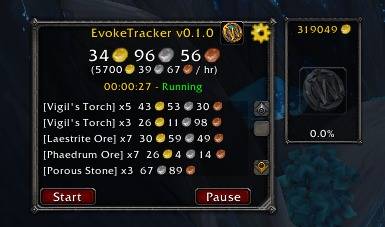
Track your farming sessions with precision using current market values, gold-per-hour calculations, WoW Token progress and customizable filtering.
EvokeTracker is a simple-to-use addon designed to determine an item's value the moment it's looted within a farming session. It leverages your preferred pricing source (TSM or Auctionator) to track the total asset value of your farming run, including a real-time Gold Per Hour (GPH) calculator and a WoW Token progress tracker.
The addon was built to solve common issues with pricing accuracy, offering smarter filtering for "Warband" items and "Junk" to ensure your session value reflects close to realistic earnings, not inflated vendor bugs.
Price Sources (Dependencies)
EvokeTracker currently supports two major pricing addons: TradeSkillMaster (TSM) and Auctionator. The addon will automatically detect which one you have installed and default to TSM if both are present. You can easily switch between them in the settings.
Addon Features
- Real-Time Session Tracking: Tracks every item looted and calculates its market value instantly.
- Gold Per Hour (GPH): Displays a live "Gold Per Hour" metric to gauge your farming efficiency (toggleable).
- WoW Token Progress: A unique visual panel that tracks your session's value against the current WoW Token market price.
- Smart Filtering:
- Rarity Filter: Configure minimum item rarity (Poor/gray to Legendary/orange).
- Value Threshold: Set a minimum gold value (e.g., ignore items worth less than 10g).
- Soulbound Handling: Option to ignore Soulbound items or value them at vendor price.
- Junk Accuracy: Automatically forces Vendor Price for Poor (Gray) items to prevent false market spikes.
- Clean UI: A resizable interface with a gold-alert sound effect for high-value drops (>5000g).
Command Line Usage
-
- Toggles the main window./et -
- Alternative command to toggle the main window./evoketracker
Minimap Icon:
- Left-Click: Open/Close the Main Window.
- Right-Click: Open the Settings Menu to configure Price Source, filters, and display options.
Addon is at a very early stage of development. If you find bugs or want to see new features. Please leave a comment here or reach out to evokestwow@gmail.com.
EvokeTracker Team
