EventHorizon_Continued
- By
EventHorizon displays all of your class/spec's rotational abilities on a common time scale.
See EventHorizon_Infall for the rewrite for Midnight!
EventHorizon is now updated and working for The War Within. This addon does not include any customization templates, which are now contained a separate EventHorizon_Continued_Configs addon.
If you are a new user to EventHorizon, download and install both this addon and the EventHorizon_Continued_Config addon. If you make customizations to the configuration files contained in your Addons/EventHorizon_Configus/ directory DO NOT LET CURSE REINSTALL OR UPDATE the EventHorizon_Continued_Config addon, as it will wipe our your customizations.
For old users of EventHorizon you will already have manually created all the EventHorizon_Config directory and files and can safely download the most recent version from Curse without affecting your customizations.
EventHorizon has a Discord: https://discord.gg/mR8xUUK. Come say hi!
EventHorizon_Continused is on github https://github.com/calenbraga/EventHorizon_Continued -- You can find the latest changes there, but releases will be updated on Curseforge as they become available.
Many thanks to Brusalk (Kilrogg-US) for keeping this addon alive for so many years.
If you have and comments, concerns, questions, suggestions, anything, don't hesitate to contact me either through comments here or via discord.
If you feel that the class config for your class is not up to snuff then please let me know why and update it yourself!
There is now a how-to on class configuration below!
There is also a how-to on customization of how EH looks below as well. Check it out!
Brusalk once intended to I'm rewrite this addon from scratch but addon development has had to take a backseat to real life. Another member of the discord is working on a completed rewrite since Brusalk retired from the game.
This version has been made to work for TWW but is largely untested for most classes for the past few months though I've been working on it as much as I can. (Also, coming in the rewrite is an in-game configuration menu as well as the ability to alter class-configs in-game to make it easier to customize EH.)
If you have a few extra bucks this month and you appreciate all the work Brusalk has done consider chipping in 

What does EventHorizon do?
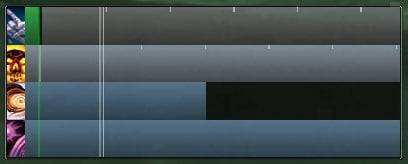
EventHorizon displays all of your class/spec's rotational abilities on a common time scale. This means that instead of seeing a regular percentage-based timer bar, EH shows you exactly what is happening in relation to everything else. If that sounds complicated at all, just look at the screenshots.
The basic idea: An ability that lasts 12 seconds and has 6 seconds remaining shouldn't look exactly the same as one that lasts 5 minutes and has 2.5 minutes remaining.
Videos showing EH in action:
Dezzimal posted a great instructional video using a Shadow Priest for reference.
breakingsong demonstrated EH on a Destro Warlock.
Also, for instant gratification, here's a quick snippet showing a Shadow Priest's rotation at 1 frame per second, using an older layout: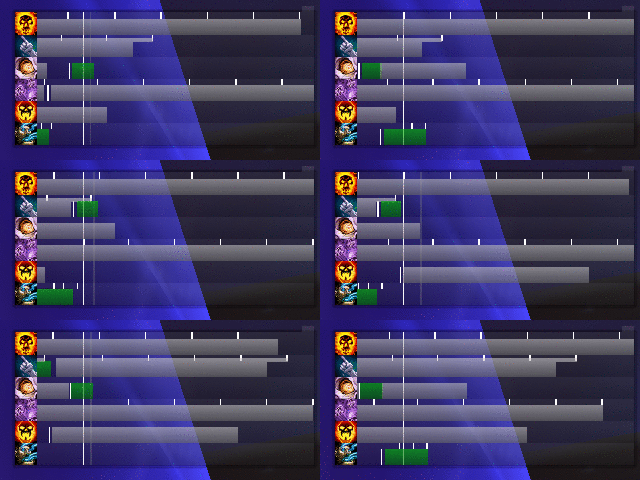
The big white line is the current time. Future events are on the right side, past events on the left. As time goes by, the events scroll from right to left.
The green bars are your cast bars. They use exactly the same times that your normal cast bar would display, with all haste modifiers applied.
You can also see cooldowns, DoTs, and their ticks (predicted in the future, and from the combat log in the past). EventHorizon is extremely intelligent when dealing with most things DoT/HoT-related.
The white lines that appear before the cast times are the times when you press the button (send the cast message to the server). The difference between this line and the start of the cast is your lag.
How do I set it up?
EventHorizon does not include an in-game configuration UI. However, it really doesn't need one - Everything should "just work".
Power users and those wishing to theme EventHorizon for a specific UI, please read on to the advanced portion of this section. Don't worry, it's easier than it may seem.
The basics:
* The window may be moved via the drag-handle on the upper right frame corner. It may be a little hard to see at first, but will light up as soon as you mouse over it.
* You can show/hide EventHorizon manually by using /eventhorizon or /ehz.
Advanced configuration:
Note: I would highly recommend an advanced text editor such as VS Code if you wish to edit the configuration files. While this isn't required by any means, an editor with syntax highlighting makes changing the files MUCH easier.
To avoid having customizations wiped out when you update this EventHorizon_Continued addon via curse, all core and class customization files are now in your addons ./EventHorizon_Configs/ directory. Note that if you reinstall EventHorizon_Continued_Configs addon the configs you edited will be wiped out.
Files
There are 2 files which you can edit to change the physical appearance of EventHorizon for each class, including colors, size, global functionality and other things. I'm going to assume that you have the most recent version of the configuration files provided in the most recent version of the companion addon EventHorizon_Continued_Configs.
EventHorizon_Configs\core_my_config.lua
You can think of this as the default settings of EventHorizon. This file contains every setting available for EH and is heavily commented to help tweak things to your liking. This file may be deleted and EventHorizon will maintain its functionality (not that I would ever recommend doing that).
EventHorizon_Configs\class_my_config.lua
This file can override any values in core_my_config.lua with the values changed inside it, allowing for different classes to have a different appearance if desired. So if you have config.width set to 375 in core_my_config.lua and config.width set to 200 in druid_my_config.lua, EventHorizon_Druid will use 200 as the value.
The default class configuration files EventHorizon_Configs\class_my_config.lua are by default empty! If you want to make advanced class configuration changes, you must first copy the contents of the default class configuration into the class configuration file.
For example, if you want to customize the order of bars etc for a druid, then:
- Copy the contents of EventHorizon_Druid\config.lua into EventHorizon_Configs\druid_my_config.lua
- Edit the contents of EventHorizon_Configs\druid_my_config.lua and the changes will override the default configuration.
Making Configuration Changes
In order to change settings of something you just have to change the text after the equals sign on the line with the setting you want to change.
For example if you wanted to change the width of the addon you would change EventHorizon_Configs\core_my_config.lua which normally reads (by default)
Code:
config.width = 375 -- Width of a single bar....
to
Code:
config.width = 200 -- Width of a single bar....
And now EventHorizon will have a width of 200 rather than 375.
Other variables are well explained in the text which comes after the -- on the lines respective to their variables.
Altering your classes configuration to fit your specific needs!
The settings where classes/specs bars are located are in the EventHorizon_Configs/class_my_config.lua where class in the filename is for the class you are changing. (Example: EventHorizon_Configs/monk_my_config.lua) For examples I'll use the priest configuration. This is written for use with the new configuration system in mind so if things don't quite match up that is why. You can either use what I've written here or alter what you already have by trial and error
Order:
Bars are added to EventHorizon in the order which they are called for the player's class. So the order of the bars that appear in EventHorizon is dependent on the order in which you add them in the config.lua.
How to add new bars
This is done by calling self:newSpell(). self:newSpell() is a function which takes in a table of bar configuration options.
For example, in the priest configuration we add a bar which has Vampiric Touch/SWD CD with the following:
Code:
-- Vampiric Touch/swd cd
	self:newSpell({
		debuff = {34914,3},
		cast = 34914,
		cooldown = 32379,
		refreshable = true,
		hasted = true,
		requiredTree = 3,
		requiredLevel = 28,
		stance = 1,
	})
Here we add a new bar with the options debuff, cast, cooldown, refreshable, hasted, requiredTree, requiredLevel, and stance
The values of the options is represented by what appears after the = sign and before the ,. cast is set to 34914 which is the spellID of Vampiric Touch. As a result the bar will now show Vampiric Touch casts on this new bar. Any calls of self:newSpell() before this one will appear before this bar, and any calls after this one will appear after this bar in-game.
Altering existing bars:
Simply change values, delete lines of options you want to remove, or add options/values you want to add.
Comprehensive list of options and acceptable values and what they do:
itemID:
Display the cooldown of the item with itemID provided. If more than one itemID is provided in a table, then EH will show the longest.
Example(s):
Code:
self:newSpell({
        itemID = 1543
})
EH will show as a cooldown on this bar the cooldown of item with itemID 1543
Code:
self:newSpell({
       itemID = { 1543, 1544, ... , 1243 },
})
EH will show as a cooldown on this bar the longest cooldown of the items with itemIDs 1543, 1544, ... , 1243
slotID:
Display the cooldown/internal cooldown/playerbuff of the item located in the slot of slotID provided
slotIDs:
ChestSlot = 5
FeetSlot = 8
Finger0Slot = 11
Finger1Slot = 12
HandsSlot = 10
HeadSlot= 1
LegsSlot = 7
MainHandSlot = 16
NeckSlot = 2
SecondaryHandSlot = 17
ShirtSlot = 4
ShoulderSlot = 3
abardSlot = 19
Trinket0Slot = 13
Trinket1Slot = 14
WaistSlot = 6
WristSlot = 9
Example(s):
Code:
self:newSpell({
        slotID = 13,
})
EventHorizon will show the playerbuff/internal cooldown/cooldown of the trinket located in the first trinket slot (slotID = 13)
cast:
Display the casts of the spell(s) provided on this bar.
Example(s):
Code:
self:newSpell({
        cast = 1543
})
EH will show the casts of the spell with spellID 1543
Code:
self:newSpell({
      cast = { 1543, 1544, ... , 1243 },
})
EH will show the casts of the spells with spellIDs 1543, 1544, ... , 1243
channel: (or channeled)
Display the cast of the channeled spell(s) provided on this bar.
Example(s):
Code:
self:newSpell({
        channel = {1543,3},
})
EH will show as a cast the channel with spellID 1543 that hits 3 times over it's full duration
Code:
self:newSpell({
       channeled = { {1543,2}, {1544,4}, ... , {1254, 6} },
})
EH will show as a cast the channel with spellID 1543 that hits 2 times, the channel with spellID 1544 that hits 4 times, ... , and the channel with spellID 1254 that hits 6 times over it's full duration.
cooldown:
A spellID or a table of spellIDs. EH will show the longest cooldown of the provided spellID(s)
Example(s):
Code:
self:newSpell({
        cooldown = 1543,
})
EH will show the cooldown of spell with spellID 1543,
Code:
self:newSpell({
        cooldown = {1543, 1642, ... , 1274},
})
EH will show the longest cooldown of the spells with spellIDs 1543, 1642, ... , 1274
debuff:
A spellID or a table of a spellID and it's unhasted time between ticks (if it's a DoT). Defaults to debuffs on the target.
Example(s):
Code:
self:newSpell({
        debuff = {1543, 3},
})
EH will show the debuff with spellID 1543 that has an unhasted time between ticks of 3 seconds.
Code:
self:newSpell({
		debuff = 1543,
})
EH will show the debuff with spellID 1543 that has no ticks. Just a simple debuff
playerbuff:
If there is no debuff defined for this bar, then EH will show the buff which appears on the player by default. Either a spellID or a table of a spellID and it's unhasted time between ticks
Example(s):
Code:
self:newSpell({
        playerbuff = {1543, 3},
})
EH will show a buff on the player of the buff with spellID 1543 and unhasted time between ticks of 3 seconds.
Code:
self:newSpell({
		playerbuff = 1543,
})
EH will show a buff on the player with spellID 1543 that has no ticks.
hasted:
true or false/nil. If true then the debuff/playerbuff for this bar has hasted ticks.
Example(s):
Code:
self:newSpell({
        debuff = {1543, 3},
        hasted = true,
})
EH will the debuff with spellID 1543 that has a unhasted tick time of 3 seconds that is affected by haste.
recast:
true or false/nil. If true then a recast line will appear at the end of the debuff/playerbuff indicating that the player should aim to have the cast finish within this area.
Example(s):
Code:
self:newSpell({
        debuff = {1543, 3},
        recast = true,
})
EH will show a recast line for the debuff with spellID 1543 that has an unhasted time between ticks of 3 seconds.
minstacks:
number or nil. If a number then the debuff/playerbuff defined for this bar must have greater than or equal to the number of stacks for it to show.
Example(s):
Code:
self:newSpell({
        playerbuff = {1543, 3},
        minstacks = 2,
})
EH will show a buff on the player of spellID 1543 that has an unhasted tick time of 3 seconds, but will only show if more than two stacks of the buff is on the player.
internalcooldown:
number or true or false/nil. If a number than EH will display an internal cooldown of number seconds for the slotID provided. If true then EH will display the internal cooldown of the trinket in the provided slotID that is defined in trinkets.lua. If false or nil then will not show an internal cooldown
Example(s):
Code:
self:newSpell({
        slotID = 14,
		internalcooldown = 45,
})
EH will show the internalcooldown of the trinket in slotID 14 as if it has an internal cooldown of 45 seconds.
unique:
true or false/nil. If true then EH will show buffs/debuffs on the target (by default) that are casted by anyone that match the provided debuff or buff ID. Normally debuffs are only shown if cast by the player
Example(s):
Code:
self:newSpell({
        debuff = {1543, 3},
        unique = true,
})
EH will show a recast line for the debuff with spellID 1543 that has an unhasted time between ticks of 3 seconds that is cast by anyone.
keepIcon:
true or false/nil. If true then EH will not change the icon from the icon that's first shown on login regardless of what's cast.
Example(s):
Code:
self:newSpell({
        debuff = {1543, 3},
        keepIcon = true,
})
EH will keep the icon of debuff 1543 regardless of what else occurs on this spellbar.
icon:
number or string. If a number than EH will always show as the icon for this bar the icon of the spell of spellID number. If a string then EH will always show the icon provided by the string. The string must be a path to a string. Look up frame:SetTexture() on wowprogramming for more information.
Example(s):
Code:
self:newSpell({
        debuff = {1543, 3},
        icon = 1544,
})
EH will show the debuff 1543 with unhasted time between ticks of 3 seconds, but will always show the icon of the spell with spellID 1544.
smallCooldown
true or false/nil. If true then the cooldown will use the height settings provided inside config.lua represented by smallCooldown rather than cooldown. Basically makes it so a cooldown is smaller than the normal height
Example(s):
Code:
self:newSpell({
        cooldown = 1543,
        smallCooldown = true,
})
EH will show a small cooldown of the spell with spellID 1543
Options to restrict when bars are shown:
You may have noticed how not all bars are shown at the same time. That's because of these options! Wooo!
requiredGlyph
spellID or false/nil. If not false/nil then in order for this bar to show the player must have the glyph with spellID provided.
Example(s):
Code:
self:newSpell({
        cooldown = 1543,
        smallCooldown = true,
		requiredGlyph = 12456,
})
EH will show a small cooldown of the spell with spellID 1543 if they have the glyph with spellID 12456 active.
requiredTree
A number, a table of numbers or false/nil. If a number between 0 and the number of possible specializations for the players class, then the player's active specialization must be the one represented by the number. 1 represents the first specialization (Disc for priests), 2 represents the second (Holy for priests), 3 represents the third (Shadow for priests) and 4 represents Resto if a druid. 0 represents no specialization.
Can also be a table of numbers in which case the player's active specilization must be one of the provided numbers in the table.
Example(s):
Code:
self:newSpell({
        cooldown = 1543,
        smallCooldown = true,
		requiredTree = 3,
})
EH will show a small cooldown of the spell with spellID 1543 if the player's active specialization is the third one for their class.
Code:
self:newSpell({
        cooldown = 1543,
        smallCooldown = true,
		requiredTree = {0,1,3},
})
EH will show a small cooldown of the spell with spellID 1543 if the player's active specialization is either none, the first, or the third for their class.
requiredLevel:
A number between 1 and max level or nil/false. If a number than the player must be at the level or higher for the bar to show.
Example(s):
Code:
self:newSpell({
        cooldown = 1543,
        smallCooldown = true,
		requiredLevel = 84,
})
EH will show a small cooldown of the spell with spellID 1543 if the player is 84 or higher.
stance
A number between 0 and the number of stances the player can use. The stances start at 0 for no stance, and then as you go right on the stance bar (default UI) the next stance is 1, then 2 and so on.
Can also be a table of numbers in which case the player must be in one of the stances for the bar to show.
Example(s):
Code:
self:newSpell({
        cooldown = 1543,
        smallCooldown = true,
		stance = 1,
})
EH will show a small cooldown of the spell with spellID 1543 if the player is in stance 1.
Code:
self:newspell({
		cooldown = 1543,
		smallCooldown = true,
		stance = {0, 1, 4},
})
EH will show a small cooldown of the spell with spellID 1543 if the player is in either no stance, stance 1, or stance 4.
A few last things in regard to class configs:
These are all individual options which can be combined together to form advanced functionality. The only interaction between the options to keep in mind is that playerbuffs will not show if a debuff is also provided for that bar. This is simply a technical limitation which can't be avoided.
I hope this has made it easier for you to understand how to configure EventHorizon to suit your individual needs!
What's changed from the original EventHorizon?
Check the changelog for the long version, but for a very quick summary of some of the changes:
* ALL classes and specs are now supported. This includes both healing and tanking.
* Class coloring has been implemented, giving a more personal touch to the addon and also providing a more differentiated layout.
* Glyphs that add time to an existing spell now display a stack count on the affected spell's icon. Check the Balance Druid screenshot for an example, it's on the Moonfire bar.
* Much more support has been added for custom spell configuration. Check out the class module code for examples, they're all over the place.
* DoT and HoT ticks are now recalculated every time they occur. This makes EH much, much more accurate than it was previously.
What still needs to be changed?
EventHorizon is past due for a complete rewrite. No one knows what the future holds for this addon, but for now please consider helping with testing and fixing class configurations so that we can get closer to a non-alpha release.
If you have a bug to report, please post it in the comments here.
If you would like to actively participate in EventHorizon's development come say hi in the discord!
All Rights Reserved
EventHorizon_Continued Team