EUI-Xloot
- By
EllesmereUI theme for XLoot: loot window, group rolls and loot monitor in the EUI style, with TSM item values and loot merging.
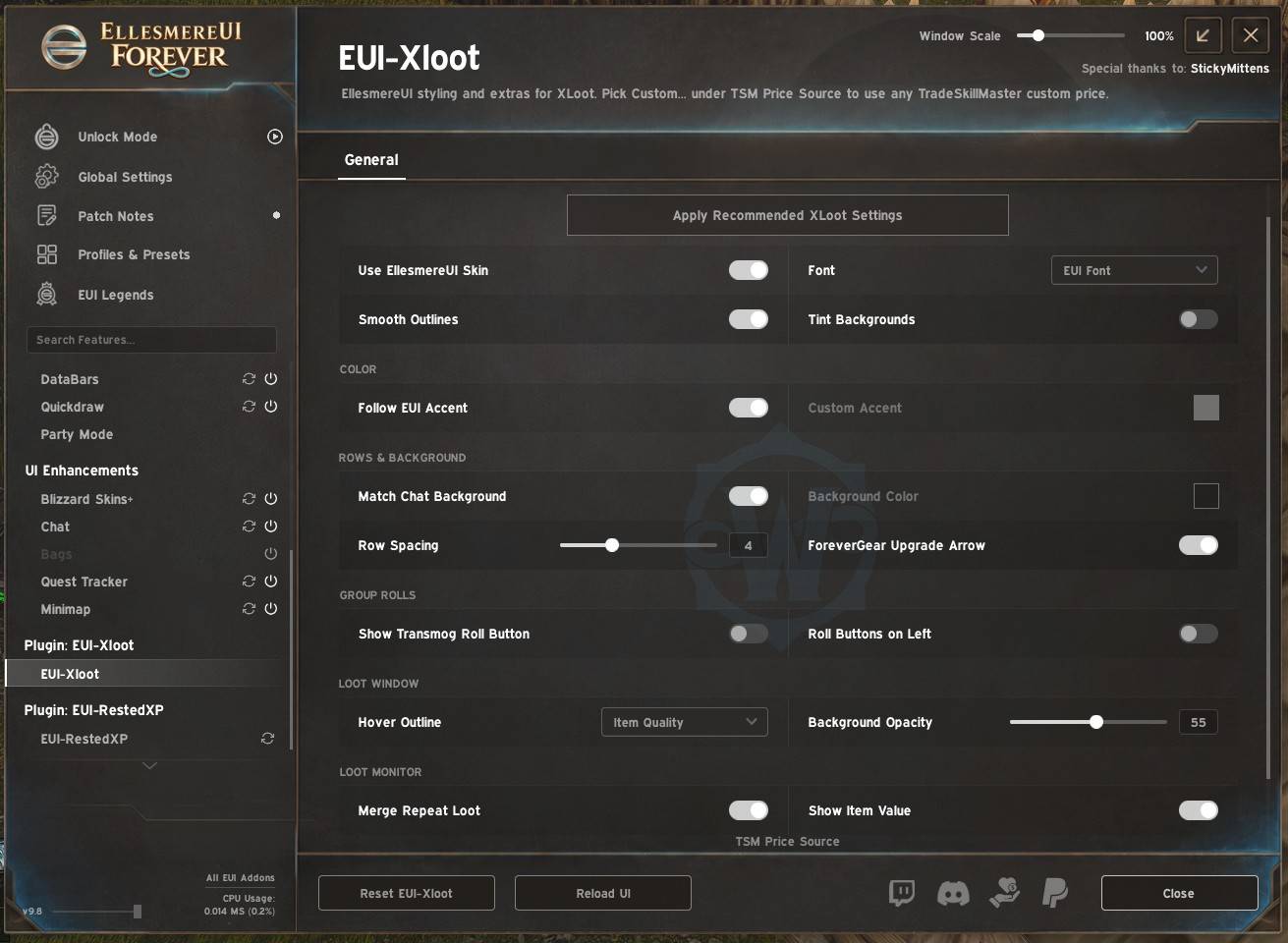
EUI Settings
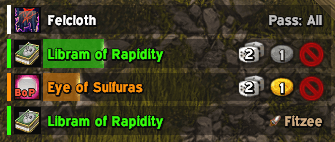
Group Loot
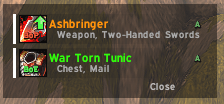
Loot Frame
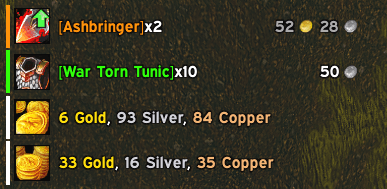
Loot Monitor
Description
EUI-Xloot
An EllesmereUI theme for XLoot. XLoot's loot window, group rolls, loot monitor and toasts take on EllesmereUI's look and follow your EUI theme, accent and font live. It also adds a few extras: item values in the loot monitor, merging of repeat loot, ForeverGear upgrade arrows, and an optional hidden Transmog roll button.
Settings live inside EllesmereUI's options window, under Plugin: EUI-Xloot.
Features
Look
- EllesmereUI skin for every XLoot frame: flat dark panels, square icons with a thin black edge, and quality-coloured edge bars.
- Loot window styled like the group rolls: a panel matching your EUI Chat background at its own opacity, a gap between rows, and a soft 1px outline on hover in the item's rarity colour or your accent.
- Loot monitor styled like EllesmereUI's Loot Feed: a quality-coloured edge bar, a fading background, square icons and a slide-in animation. Its size, row height, text size, bar width and background colour come from your EUI Loot Feed settings.
- Group rolls in the same style, with the roll timer kept as a soft fill. The Need, Greed and Pass buttons sit at the far right (or right after the icon, if you prefer), and after you roll the "who won" line takes their place. There's a small gap between rolls and a panel behind each one that matches your EUI Chat background, or a colour of your choice.
- Loot toasts in the same style as the loot window: a panel matching your EUI Chat background, a quality-coloured edge bar, your accent on the title, and a soft quality-coloured flash in place of the Blizzard glow. Turn toasts on in XLoot's own options (Toast).
- Follows EllesmereUI live: changing your EUI accent, theme or font repaints XLoot without a reload.
- Custom accent colour and an optional accent-tinted background, plus a font picker offering the EUI font, XLoot's own font, or any LibSharedMedia font.
Extras
- Item value in the loot monitor. It uses the TradeSkillMaster price source you pick from a list, or any TSM custom price you type in. It falls back to Auctionator, then shows the vendor price in grey. Items that bind on pickup show their vendor price only.
- Merge repeat loot. Looting the same item, gold or currency again while its row is still showing adds to that row instead of opening a new one.
- ForeverGear upgrade arrows. With ForeverGear installed, group rolls, the loot window and the loot monitor show its upgrade arrow on items that are an upgrade for you.
- Hide the Transmog roll button. Greed rolls Transmog on items whose look you can still collect.
Requirements
- XLoot (required)
- EllesmereUI (recommended): it provides the theme, the settings page and the Loot Feed sizes. Without it, the skin uses EllesmereUI's default colours.
- TradeSkillMaster or Auctionator (optional): needed for auction values.
- ForeverGear (optional): needed for the upgrade arrows.
Setup
Install XLoot and EUI-Xloot, then log in. That's it: the EllesmereUI skin turns on by itself, and a chat message tells you where the settings are.
On first login EUI-Xloot also fills in its recommended XLoot settings, for any XLoot setting you've never changed: rolls and the loot monitor at 1.2 scale, slimmer rolls, and the monitor showing Common loot (ores, herbs, cloth), gold, crafted items and skill-ups. Anything you've already set in XLoot is left alone. Apply Recommended XLoot Settings on the settings page applies them all.
All settings are in EllesmereUI's options under Plugin: EUI-Xloot, or type /xlooteui. To go back to another XLoot skin, turn off Use EllesmereUI Skin and /reload.
Slash commands
/xlooteui or /euixloot
| Command | What it does |
|---|---|
| (none) | Open the settings page, or apply the skin when EllesmereUI isn't installed |
skin |
Apply the EllesmereUI skin |
defaults |
Apply all the recommended XLoot settings |
transmog |
Show or hide the Transmog roll button |
font |
Switch between the EUI font and XLoot's own font |
merge |
Turn merging of repeat loot on or off |
value |
Turn item values in the loot monitor on or off |
price |
Show the current TSM price source |
price <source> |
Set any TSM custom price, for example price dbmarket |
price reset |
Go back to the default price source |
Notes
- EllesmereUI can switch the theme link off per addon, under Blizzard Skins+ > Window Skins > Third-Party Addons. The skin then keeps its built-in colours.
- This is an unofficial addon. It isn't made by or affiliated with the authors of XLoot or EllesmereUI.
License
MIT. See LICENSE.
EUI-Xloot Team