


ErenionGamingTools
- By
Description
English
Erenion Gaming Tools
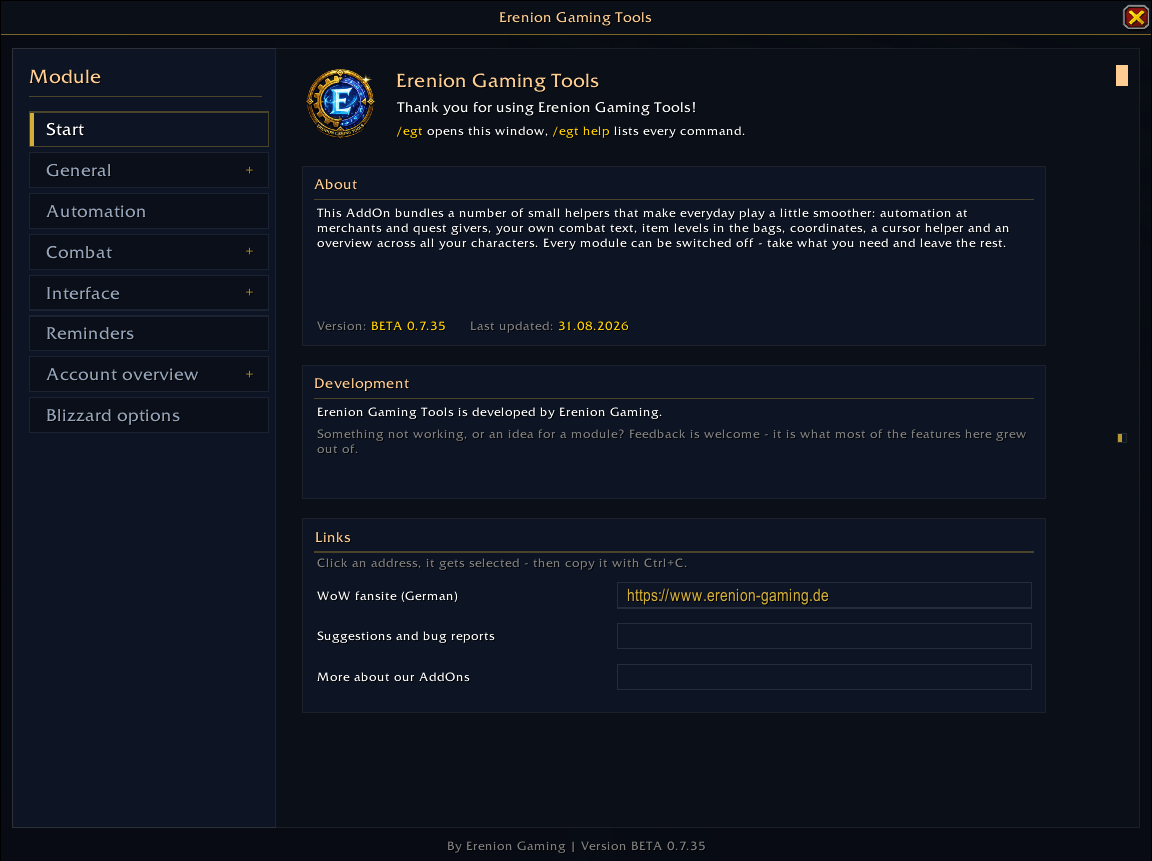
A quality-of-life toolkit for World of Warcraft Retail. Open it with the minimap button or /egt.
Every module has a ? button that explains what it does, how to use it, and where its limits are. In your language.
🔔 Reminders — never raid with your Mythic+ talents again
Give each type of content the talent selection it deserves: dungeons (Mythic+ included), raids, scenarios and delves, battlegrounds and arenas.
Walk in with a different one and a large warning appears, naming what is active and what should be. One button loads the right selection for you. The warning stays put until the selection is correct — it will not vanish while you are still wrong — and you can drag it wherever you want it.
Need a different build in one particular dungeon? Search for it, give it its own selection. That beats the general rule. Once you have been in the dungeon, the rule is tied to the instance itself, so it keeps working even on a client in another language.
🛠️ Automation
- Auto-repair at merchants, from your own gold or the guild bank.
- Auto-sell grey items.
- Auto-role in dungeon queues, with a timer bar so you can still change your mind.
- Housing loot: roll automatically on housing items in dungeon and raid groups — pass, greed or need, your choice.
- Quests: accept and turn in automatically. What counts as normal, campaign or repeatable comes from the game itself, not from guessing at quest titles. Hold SHIFT to pause everything and read in peace.
⚔️ Combat
- Combat text of the addon's own: incoming damage in red, healing in green, parry and block in white, plus separate windows for auras and cooldowns. Blizzard's own numbers are suppressed so nothing shows twice.
- Battle rez timer — how many combat resurrections your group has left and how long
until the next, as
CR 2 | 1:24. Read class independently, so it works on every character. - Combat timer — how long the current fight has been running.
🎒 Interface
- Item levels on the icons in bags, bank, character panel and loot frame. Size, position, uniform colour and a dark backing plate are all yours to set.
- Tooltip IDs for spells, items, NPCs, quests and currencies, optionally with enchant, bonus and set IDs.
- Copying that works: the addon selects the text, you press Ctrl+C. Blizzard blocks clipboard access for addons — no trick around it, so none is attempted.
- Cursor helper — reticles, ring, trail and modifier pings for anyone who loses the cursor in a busy fight.
- Map coordinates, double-click copies a
/waycommand.
👥 Account overview
- Gold and items across every character of the same WoW account: bags, bank and warband bank. The guild bank is deliberately left out.
- Hover the money in your bag frame for a breakdown per character.
- Stored characters show when they were last seen and can be deleted one by one.
- Played time per character and per class, seconds running live — and a share view built for screenshots: total time, distribution by class as a pie or a stacked bar, a table of your characters, and a footer. The controls sit outside the frame so they stay out of the picture.
⚙️ Global Blizzard options
Store Blizzard settings account-wide and have them applied on every character at login. A separate window lists what is stored, what the current character currently has, and Blizzard's own default — with a search field and editing in place. No more re-configuring nameplates on every alt.
🌍 Languages
English and German.
⌨️ Commands
| Command | What it does |
|---|---|
/egt |
opens the settings window |
/egt copy |
copies the tooltip under the cursor |
/egt unlock / /egt lock |
releases every movable display at once, and locks them again |
/egt help |
shows the full list |
Deutsch
Erenion Gaming Tools
Ein Alltagshelfer für World of Warcraft Retail. Öffnen über den Minimap-Knopf oder /egt.
An jedem Modul sitzt ein ?-Button, der erklärt, was es tut, wie man es benutzt und wo seine Grenzen liegen. In deiner Sprache.
🔔 Erinnerungen — nie wieder mit Mythisch+-Talenten in den Raid
Gib jeder Inhaltsart die Talentauswahl, die dort gelten soll: Dungeons (Mythisch+ inbegriffen), Schlachtzüge, Szenarien und Tiefen, Schlachtfelder und Arenen.
Betrittst du sie mit einer anderen, erscheint eine große Warnung, die nennt, was aktiv ist und was gelten soll. Ein Knopf lädt die richtige Auswahl für dich. Die Warnung bleibt stehen, bis die Auswahl stimmt — sie verschwindet nicht, während du noch falsch geskillt bist — und lässt sich hinziehen, wo du sie haben willst.
Du brauchst in einem bestimmten Dungeon etwas anderes? Such ihn heraus und gib ihm seine eigene Auswahl; die geht der allgemeinen Regel vor. Sobald du einmal dort warst, hängt die Regel an der Instanz selbst und hält damit auch auf einem Client in einer anderen Sprache.
🛠️ Automatisierungen
- Auto-Reparieren beim Händler, aus eigenem Gold oder aus der Gildenbank.
- Auto-Verkaufen von grauen Gegenständen.
- Auto-Rolle bei Dungeon-Einladungen, mit Zeitbalken — du kannst es dir noch anders überlegen.
- Gruppenbeute: automatisch auf Housing-Gegenstände in Dungeon- und Raidgruppen würfeln — passen, gierig oder Bedarf, wie du magst.
- Quests automatisch annehmen und abgeben. Was als normal, Kampagne oder wiederholbar gilt, sagt das Spiel selbst — nicht eine Vermutung anhand des Quest-Titels. SHIFT halten pausiert alles, damit du in Ruhe lesen kannst.
⚔️ Kampf
- Eigener Kampftext: eingehender Schaden rot, Heilung grün, Parieren und Blocken weiß, dazu getrennte Fenster für Auren und Cooldowns. Blizzards eigene Zahlen werden unterdrückt, damit nichts doppelt erscheint.
- Battle-Rezz Timer — wie viele Kampfwiederbelebungen deiner Gruppe bleiben und wie
lange bis zur nächsten, als
BR 2 | 1:24. Klassenunabhängig ausgelesen, funktioniert also auf jedem Charakter. - Kampf-Timer — wie lange der aktuelle Kampf schon läuft.
🎒 Interface
- Gegenstandsstufen auf den Symbolen in Taschen, Bank, Charakterfenster und Beutefenster. Größe, Position, einheitliche Farbe und eine dunkle Hinterlegung stellst du selbst ein.
- Tooltip-IDs für Zauber, Gegenstände, NPCs, Quests und Währungen, auf Wunsch mit Verzauberungs-, Bonus- und Set-IDs.
- Kopieren, das funktioniert: Das AddOn markiert den Text, du drückst Strg+C. Blizzard sperrt den Zwischenablage-Zugriff für AddOns — dagegen hilft kein Trick, also wird auch keiner versucht.
- Mauszeiger-Hilfe — Fadenkreuz, Ring, Spur und Modifier-Pings für alle, die den Zeiger im Getümmel verlieren.
- Kartenkoordinaten, Doppelklick kopiert einen
/way-Befehl.
👥 Accountübersicht
- Gold und Gegenstände über alle Charaktere desselben WoW-Accounts: Taschen, Bank und Kriegsmeutebank. Die Gildenbank bleibt bewusst außen vor.
- Im Taschenfenster über das Gold fahren zeigt die Aufschlüsselung je Charakter.
- Gespeicherte Charaktere zeigen, wann sie zuletzt gesehen wurden, und lassen sich einzeln löschen.
- Spielzeit je Charakter und je Klasse, mit mitlaufenden Sekunden — dazu eine Ansicht zum Teilen fürs Abfotografieren: Gesamtzeit, Verteilung nach Klasse als Kuchen oder gestapelter Balken, eine Tabelle deiner Charaktere und eine Fußzeile. Die Bedienknöpfe sitzen außerhalb des Rahmens und sind auf dem Bild nicht dabei.
⚙️ Globale Blizzard-Optionen
Blizzard-Einstellungen accountweit hinterlegen und auf jedem Charakter beim Einloggen anwenden lassen. Ein eigenes Fenster zeigt, was hinterlegt ist, was der aktuelle Charakter gerade hat und was Blizzards Standard ist — mit Suchfeld und Bearbeitung an Ort und Stelle. Schluss damit, auf jedem Twink die Namensplaketten neu einzustellen.
🌍 Sprachen
Englisch und Deutsch.
⌨️ Befehle
| Befehl | Wofür |
|---|---|
/egt |
öffnet die Einstellungen |
/egt copy |
kopiert den Tooltip unter dem Mauszeiger |
/egt unlock / /egt lock |
gibt alle verschiebbaren Anzeigen frei und sperrt sie wieder |
/egt help |
zeigt die vollständige Liste |
ErenionGamingTools Team
