
Equipment Set Manager
- By
Automatically equips your saved equipment sets and talent loadouts for Open World, Instanced PvE, and PvP.
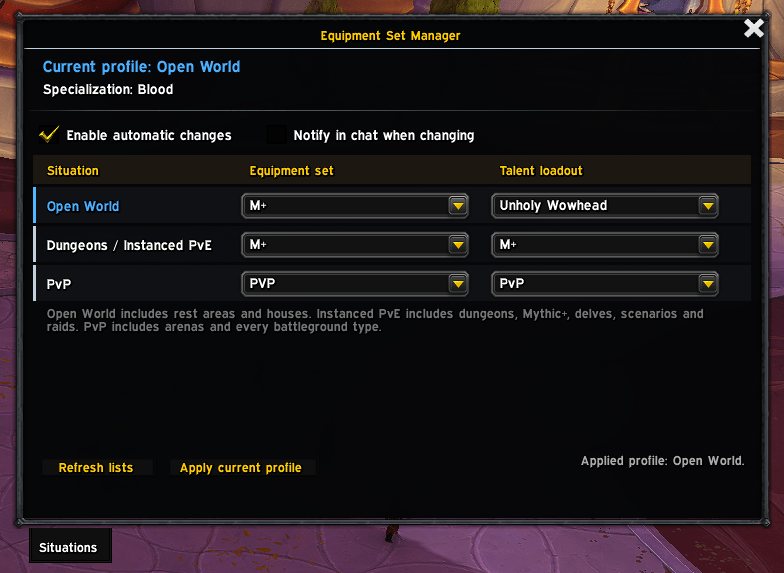
Captura de pantalla 2026-08-25 195417.png
Description
Equipment Set Manager
Small addon for the moment you zone into a battleground and realise you are still wearing your open-world set.
Equipment Set Manager watches the kind of content you are entering and applies the profile you assigned to it. It uses Blizzard's own Equipment Manager and saved talent loadouts.
How to
Type /esm, pick a set for each situation, and turn on automatic changes.
Three profiles:
- Open World — outdoor zones, cities, rest areas, neighbourhoods and houses.
- Dungeons / Instanced PvE — dungeons, Mythic+, delves, scenarios and raids.
- PvP — arenas, battlegrounds and rated battlegrounds.
Talent loadouts
Talent assignments are kept per specialization.
Getting started
- Create your equipment sets in Blizzard's Equipment Manager.
- Create and save your talent loadouts in the Talents panel.
- Type
/esm. - Choose the equipment set and talent loadout for each profile.
- Enable automatic changes.
Equipment Set Manager Team
