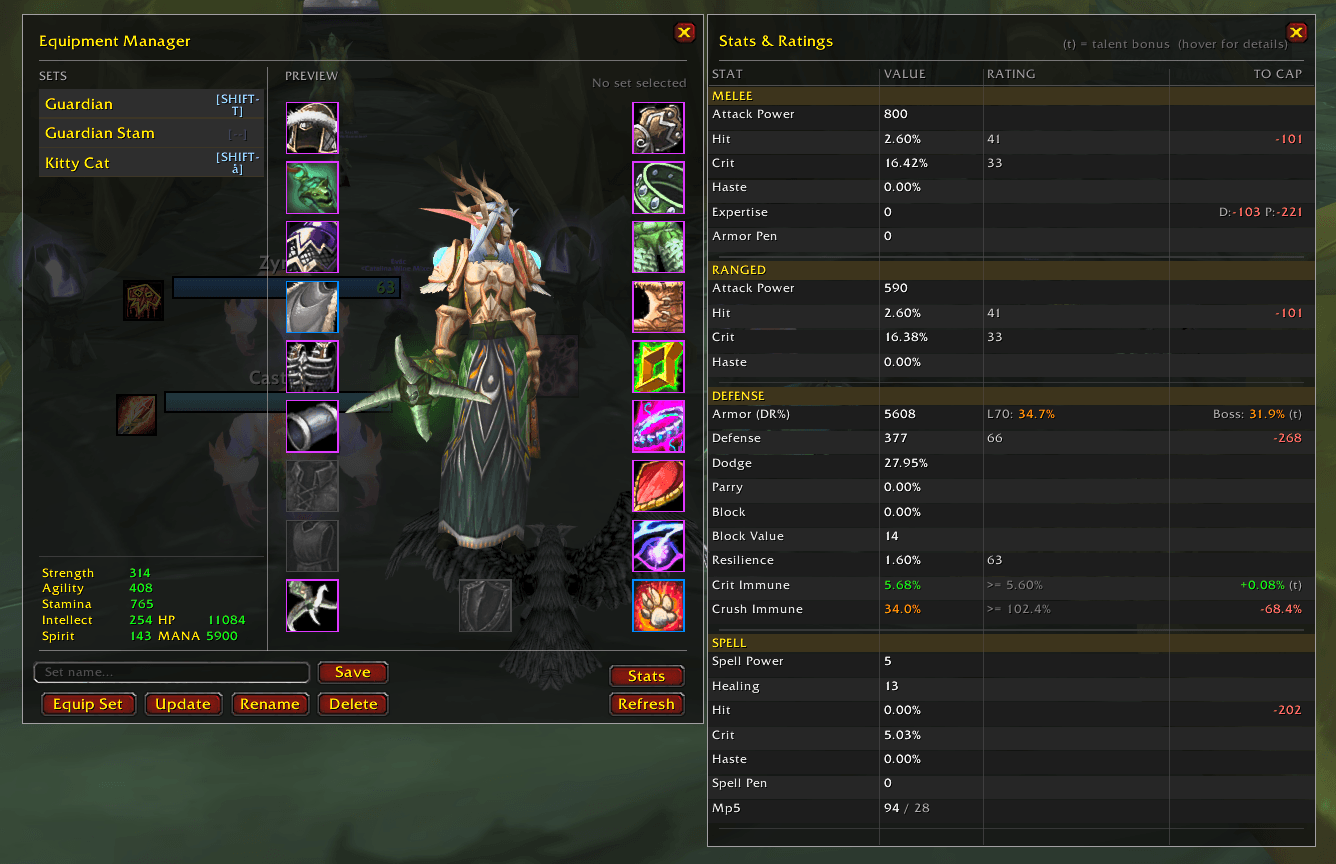
Stats and Ratings window
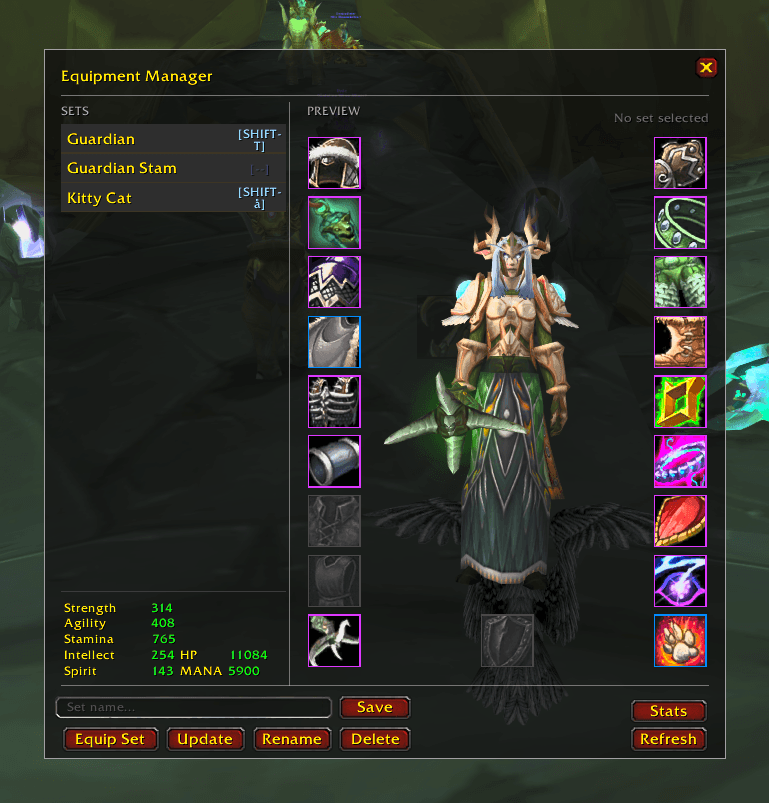
Main EQM Window
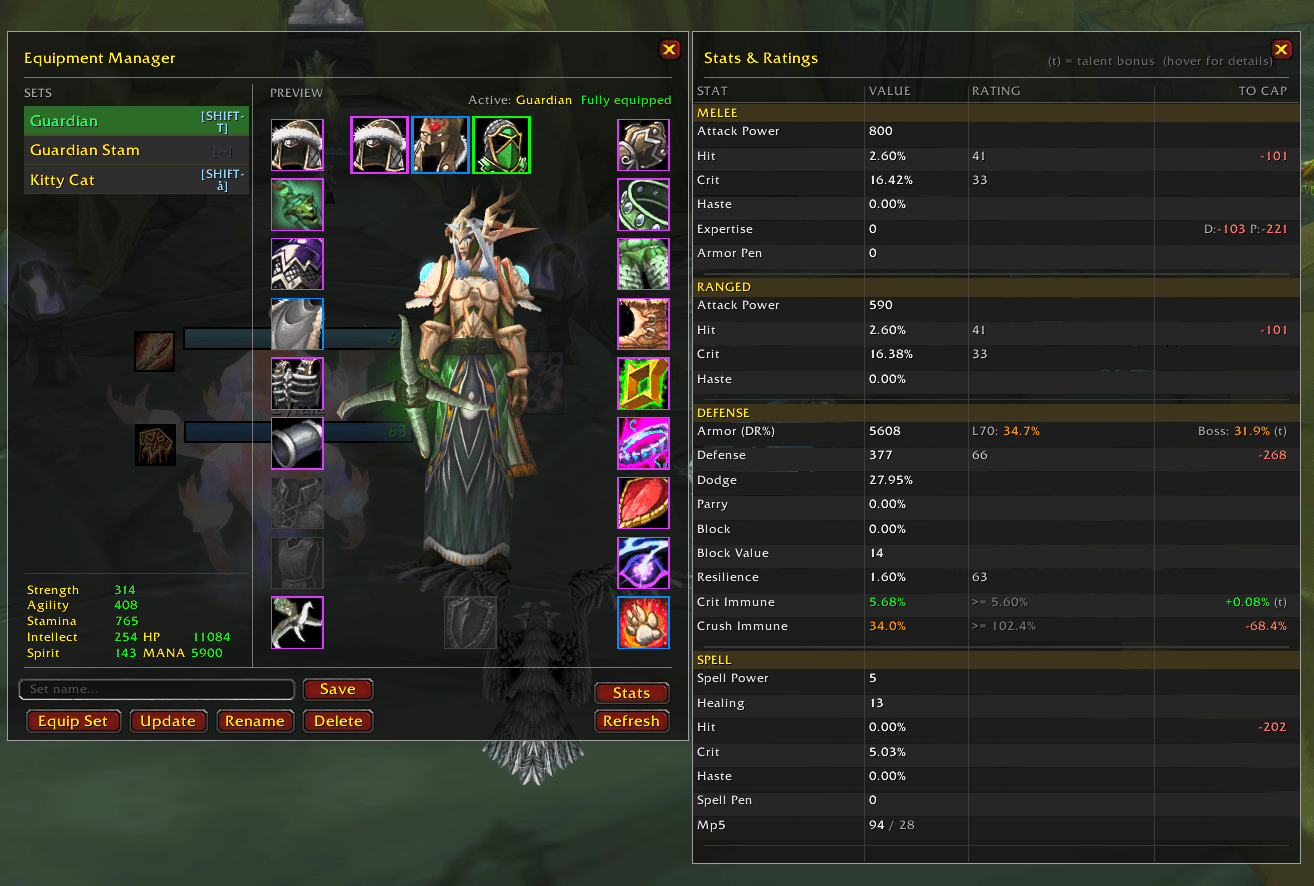
Ribbon selector
Description
A gear-set manager for World of Warcraft Burning Crusade Anniversary
Save named snapshots of your current equipped gear, swap between them with a single click or a keybind, and pick replacement pieces straight from your bags through a quality coloured icon ribbon, all from a compact paper-doll UI that docks beside your character frame.
- Named gear sets — save, rename, and delete unlimited sets per character.
- Paper-doll preview — slot icons reflect the saved set; quality-coloured borders indicate whether each piece is equipped, in bags, in the bank, or missing.
- Item picker ribbon — click any slot icon to open a horizontal strip of compatible bag items with quality borders. Pending selections are shown in cyan until you commit them.
- One-click equip — equip the full set at once; the addon finds pieces in bags automatically.
- Bank deposit / withdraw — move an entire set between your bags and the bank with one button (bank must be open). Items shared across multiple sets are never deposited.
- Per-set keybinds — bind any key combination to a set for instant equipping without opening the UI.
- Stats panel — a live table of Melee, Ranged, Defense, and Spell ratings with to-cap distance and talent-bonus indicators.
- Bag item highlights — items belonging to the active set glow gold in open bag windows. Compatible with default bags, Bagnon, and Baganator.
- Slash commands — full control from the chat box.
| Method | Action |
|---|---|
| Minimap button (click) | Toggle main window |
| Character frame EQM button | Toggle main window |
/eqm or /equipmentmanager |
Toggle main window |
Press Escape or click × to close.
Saving a set
- Type a name in the "Set name…" field (bottom-left of the window).
- Click Save (or press Enter). The current equipped gear is saved under that name
Equipping a set
- Select the set from the list on the left, then click Equip Set. The addon picks up each piece from your bags and equips it.
Pending changes (try-before-you-commit)
- Click a slot icon on the paper doll — the item picker ribbon opens below.
- Click a bag item in the ribbon. It appears with a cyan border on the doll (a draft, nothing is moved yet).
- Click Update to write all pending changes to the saved set, or click a different item to change your mind.
Renaming a set
- Select the set in the list.
- Type the new name in the input field.
- Click Rename.
Deleting a set
- Select the set in the list.
- Click Delete and confirm the prompt.
- Opens when you click any paper-doll slot icon.
- Shows up to 10 compatible bag items at a time with quality-coloured borders. Items that are in the bank (not in bags) show a small B badge.
- Scroll with the ◀ ▶ arrows or the mouse wheel.
- The currently equipped item is always inserted at the front as a "revert" option.
- Hover any cell to see the full item tooltip.
- Click a cell to set it as a pending change (cyan border on the doll). Click Update to save.
Both buttons require the bank frame to be open.
| Button | Effect |
|---|---|
| Deposit | Moves set items from your bags to the bank. Items used in more than one set are left in your bags. |
| Withdraw |
Moves set items from the bank into your bags. Stops early and prints a warning if your bags fill up. |
- Click the [--] badge on the right side of any set row.
- Press the desired key (with optional Shift / Ctrl / Alt modifiers). Press Escape to clear an existing binding.
- The badge updates to show the bound key (e.g. [F1] or [CTRL-5]).
Pressing the bound key equips that set instantly (blocked in combat).
Click Stats (bottom right of the main window) to open a live stat table docked to the right of the main frame.
| Section | Stats shown |
|---|---|
| Melee | Attack Power · Hit % · Crit % · Haste % · Expertise · Armor Pen |
| Ranged | Attack Power · Hit % · Crit % · Haste % |
| Defense | Armor (DR%) · Defense · Dodge · Parry · Block · Block Value · Resilience · Crit Immune · Crush Immune |
| Spell | Spell Power · Healing · Hit % · Crit % · Haste % · Spell Pen · MP5 |
Columns: VALUE — RATING (raw rating from gear) — TO CAP (rating still needed to reach the TBC boss cap).
Rows that include a talent bonus are marked (t); hover the row to see which talents contribute.
Items that belong to the currently selected set glow gold in any open bag window. The overlay updates automatically when you change the selected set, open the bank, or your bags change.
Works with the default WoW bag UI, Bagnon, and Baganator (via the official RegisterItemSetSource API).
/eqm Toggle the main window/eqm list Print all set names to chat/eqm save <name> Save current gear as <name>/eqm equip <name> Equip the set named <name>/eqm rename <old> <new> Rename a set/eqm delete <name> Delete a set/eqm deposit [name] Deposit set to bank (bank must be open)/eqm withdraw [name] Withdraw set from bank (bank must be open)| Border | Meaning |
|---|---|
| Quality colour (gray → orange) | Item is equipped and matches the saved set |
| Orange | Item is in your bags but not currently equipped |
| Blue | Item is in the bank (not in bags) |
| Red | Item is missing (not in bags or bank) |
| Cyan | Pending selection — not yet committed via Update |
The Equipment Manager (TBC) Team