Ephyra's That's My Mark
- By
Ephyra's That's My Mark is a lightweight utility addon and a dedicated port of the WeakAura, That's My Mark!. It is designed to streamline targeting and coordination by combining focus management, raid marking, and spell-alerting into one seamless tool.
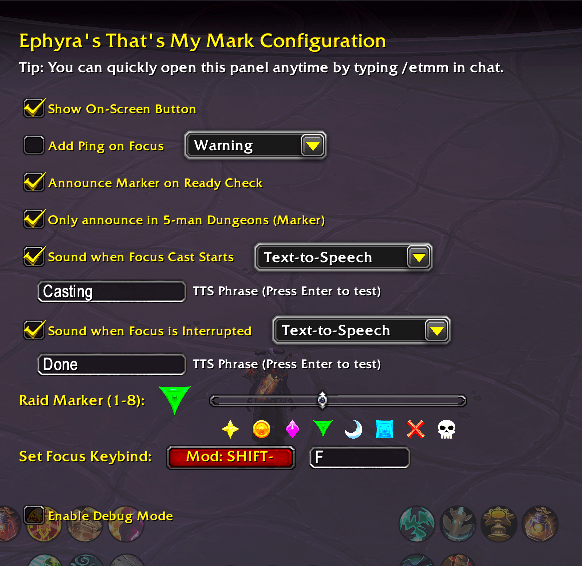
menu.png
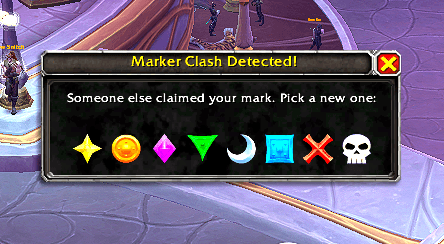
clash.png
Description
Ephyra's That's My Mark
Ephyra's That's My Mark is a lightweight utility addon and a dedicated port of the WeakAura, That's My Mark!. It is designed to streamline targeting and coordination by combining focus management, raid marking, and spell-alerting into one seamless tool.
Key Features
- Smart Focus & Mark: With a single action, the addon clears your old focus and sets a new one on your mouseover or target while instantly applying your chosen raid marker.
- Smart Marker Protection: The addon uses non-destructive marking. If you attempt to focus a target that already has a priority mark assigned to it (like a Tank's Skull), it will set your focus but safely refuse to overwrite the existing icon.
- Smart Clash Detection: The addon actively listens to group chat for 4 seconds following a Ready Check. If another party member calls out your assigned marker (e.g., typing
{skull}or{rt8}), a quick-resolve mini-frame pops up, allowing you to instantly pick a new mark and announce it to the group without ever opening your settings. - Integrated Pinging: Automatically drops a map ping on your focus target to alert your group. Choose from Warning, Alert, On My Way, or Assist styles.
- Smart Audio Alerts: Distinct sounds trigger when your focus target starts a cast or is interrupted. The addon intelligently tracks your class/spec interrupt cooldown natively—automatically accounting for dynamic talent reductions (like Cold Thirst) and Warlock pet states—so it only alerts you when your kick is actually ready!
- (Optional) Group Announcements: Automatically announces your assigned raid marker to the group during a Ready Check.
How to Use
- The Button/Keybind: Clicking the on-screen button or using your custom keybind will clear your current focus, set a new one on your mouseover (priority) or target, and apply your marker. Clicking with no target safely cleans up your mark.
- Moving the Button: Hold Shift and drag the button with your Left Mouse Button to reposition it anywhere on your UI.
- Configuration: Type
/etmmin chat or open the settings via Options > AddOns > Ephyra's That's My Mark to customize markers, keybinds, and audio alerts.
Audio Alerts & TTS
This addon serves as your "extra set of ears" for focus targets:
- Cast Start: Notifies you immediately when your focus begins a cast or channel, but only if your interrupt is off cooldown.
- Interrupt: Confirms the focus cast (or channeled spell) was successfully kicked by you, featuring a latency-friendly timing window to ensure you never miss a success prompt.
- Custom Sounds & TTS: Full support for custom
LibSharedMedia(LSM) sounds. Alternatively, select "Text-to-Speech" to have the game read your custom alert phrases out loud!
Slash Commands
/etmm- Opens the configuration panel.
Inspired by the original WeakAura That's My Mark! by Ephyra (Yours Truly).
Ephyra's That's My Mark Team