Gold Dragon
Silver Dragon

Epeen Ratings
Bronze Dragon
Admin Dragon
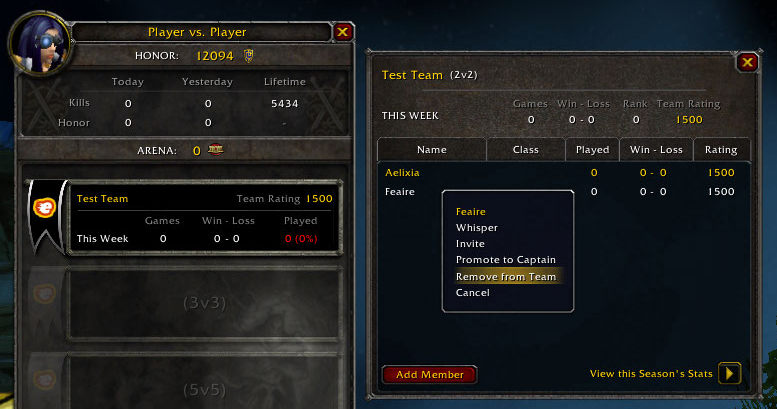
Epeen teams show up like normal arena teams if you're below level 80.
Platinum Dragon
Donator Dragon
Description
Notice: Epeen currently only works for players using an English (UK / USA), French or German WoW client.
Epeen – Because twinks deserve rated arenas too.
Description
Epeen is the WotLK update of the Skirm AddOn. Epeen allows twinks to gain virtual arena ratings and points by doing skirmish arenas.
Ratings
Each team will start off with a rating of 1500 once created, and their rating can never drop below this. There is an upper rating cap of 3000.
| Rating | Points Per Win | Points Per Loss |
|---|---|---|
| 1500 - 1799 | 12 | -8 |
| 1800 - 2099 | 10 | -8 |
| 2100 - 2399 | 8 | -8 |
| 2400 - 2699 | 6 | -8 |
| 2700 - 2999 | 4 | -8 |
Arena
In order for the arena match to be rated it must meet all of these criteria:
- All your team is present
- Everyone on your side is in your team
- Everyone's rater is turned on (type “/epeen rate” to toggle this on and off)
- There are enough opponents (2 for 2v2)
- The opponents' average team level plus 1, is greater than or equal to your average team level (if your team had 2 level 19s, and the opponents' team had 2 level 18s, the match would be rated)
At the start of the match, if the first 3 criteria are met then it is a rated arena match. In a rated match, if the captain leaves early it will be counted as a loss and your rating will decrease. However if at the end of the match there wasn't enough opponents or their level was too low then the match will cause no rating change.
Dragons
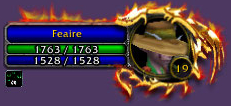
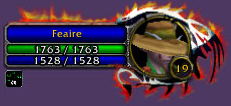
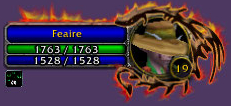
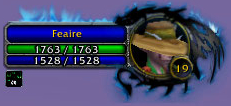
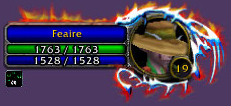
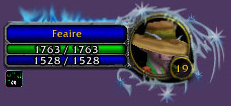
For users who use the default Blizzard UI (not X-Perl or other unitframe/user interface mods) they will see special rating dragons around some players' portraits (upon targetting them). You can gain these dragons by getting at least one team (2v2, 3v3 or 5v5) to each of these rating markers:
| Dragon | 2v2 Rating Needed | 3v3 Rating Needed | 5v5 Rating Needed |
|---|---|---|---|
| Bronze | 1800 | 1700 | 1600 |
| Silver | 2100 | 1950 | 1800 |
| Gold | 2400 | 2200 | 2000 |
| Platinum | 2700 | 2450 | 2200 |
There are 2 other dragons:
- The Donator dragon is for people who have donated towards website upkeep costs, or helped with testing.
- The Admin dragon is only worn by the creators of Epeen/EpeenRatings.
Points
Epeen also gives you arena points each week. These cannot be spent on anything yet (though there are plans on implementing this in the future). You will gain arena points for competing in 10 rated matches per week. At the end of the week, Epeen will calculate your points (based on your rating) and add them to any previous points you have accumulated. Once the points have been calculated for that week, your wins/losses will be reset to 0. These wins/losses are individual to each player (if a player is invited to an arena team, they will stay on 0 wins/losses until they compete in some rated arenas).
When calculating arena points, Epeen will only grant you the points for your highest gaining team (you won't gain points for every one of your teams each week). 2v2 teams gain less points than 3v3 teams, which gain less points than 5v5 teams.
Uploading
Epeen is released along with our website EpeenRatings.com. On this website, there is the ability to upload your ratings file to become part of the scoreboard.
To upload to our website you must be the team captain and follow these steps:
- Log out of WoW.
- Register on the website
- Click “Upload”
- Login to the website
- Upload the file located at: \World of Warcraft\WTF\Account\ACCOUNTNAME\SavedVariables\Epeen.lua
If there were no errors upon uploading to the website, then you will have been added to the ratings database.
You can also use our auto-uploader called EpeenAgent. When you have installed it, you will be prompted to input your Epeen account details (this is the username/password you signed up to the EpeenRatings website with), your WoW username (this is needed to find your save file) and the folder in which you installed WoW. Once you have inputted this data, hit the "Set" button and you can close the EpeenAgent window. EpeenAgent will now automatically upload your data everytime you close WoW.
If you wish to use the “Manually Upload” button, you must make sure you aren't logged into any characters (although you can stay logged into WoW) before clicking it.
Data
The data about your teams/ratings/points is stored in the Epeen SavedVariables file (as stated above). This data is stored securely, so any attempt to modify the data will either result in replacing the corrupted value with a lower one, or deletion of that team (depending on how serious the data was).
If you have corrupted data in your Epeen SavedVariables file, and you believe you haven't editted it in any way, please contact us via email or the forums and we'll take a look to see if there's a bug.
Commands
Here's a list of in-game commands and what they do:
- “/epeen help optionalCommand” Shows information about a command, or a list of commands if no command is specified.
- “/epeen version” Shows the Epeen AddOn version number you're currently using.
- “/epeen author” Shows information about who made the Epeen AddOn and website.
- “/epeen create teamSize teamName” Creates an arena team.
- “/epeen invite teamSize optionalPlayer” Invites the player to your arena team. If no player is typed, then it invites your current target.
- “/epeen accept” Accepts the last pending team invite you received.
- “/epeen rater” Toggles the rater on and off (must be done before start of the arena to take effect for that arena).
- “/epeen kick teamSize optionalPlayer” Kicks the player from your arena team. If no player is typed, then it kicks your current target.
- “/epeen leave teamSize” Makes you leave the arena team.
- “/epeen disband teamSize” Disbands the arena team.
- “/epeen data optionalTeamSize” Shows data about your teams and ratings. More detailed information is available if a team size is specified.
- “/epeen view optionalPlayer” Shows the player's team/rating data if they're online. If no player is typed, then it views your target's data.
- “/epeen points” Shows how many arena points you have.
- “/epeen website” Shows the Epeen website info.
- “/epeen dragon” Toggles the UI dragons on and off.
- “/epeen ding” Toggles the guild ding sender on and off.
- “/epeen donate” Toggles your donator dragon on and off if you have it activated on your account.
- "/epeen upload" Enables/Disables the current character from being included in uploads.
Other Info
If you find an error/bug, please report it to us on the forums (any potentially fatal bugs, please report to Feaire via private message). We may sometimes ask you to send us your Epeen SavedVariables file to debug a problem.
The Epeen - Twink Skirmish Arena Ratings Team


Owner