RGX | Enhanced Traveler's Log!
- By
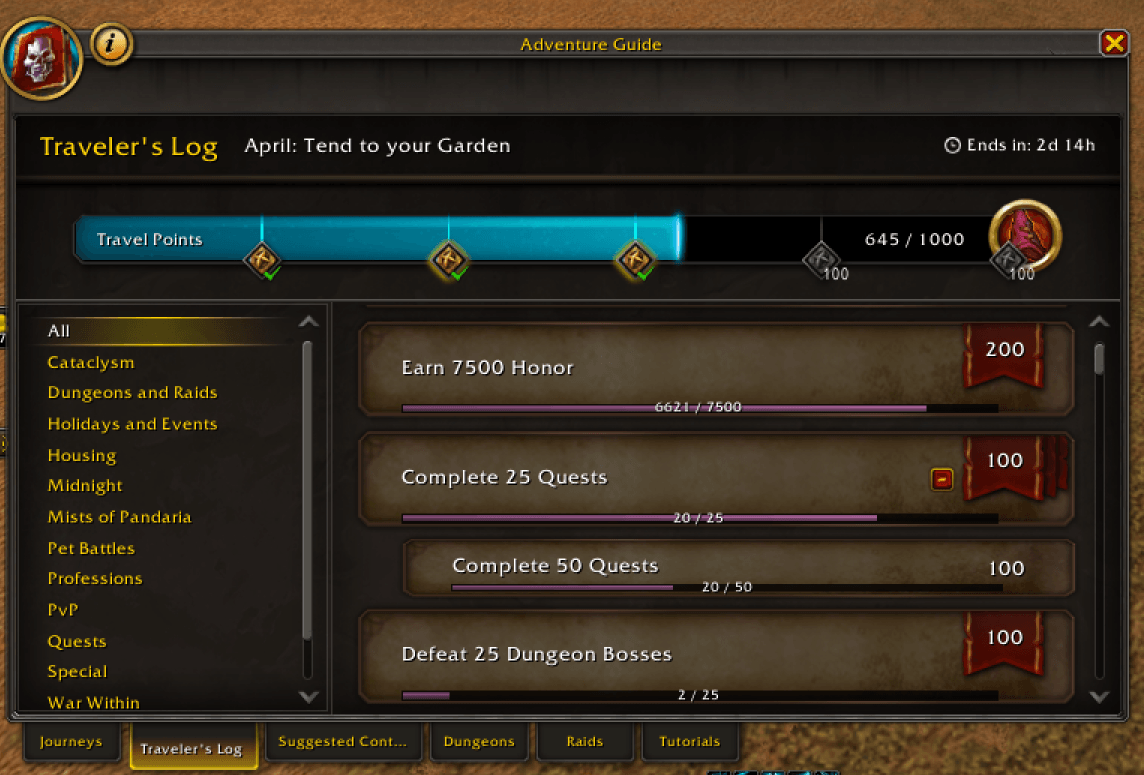
Adds progress bar to Trade Post Activities! Traveler's Log Progress Bars!
RGX | Enhanced Traveler's Log!

RGX | Enhanced Traveler's Log!

kiwi.gif
Description
 RGX | Enhanced Traveler's Log!
 RGX Mods - RealmGX Community Project
Overview
RGX | Enhanced Traveler's Log! overlays clean, themed progress bars on every Monthly Activity row in World of Warcraft's Encounter Journal and adds a minimap launcher that opens straight to the Traveler's Log tab. Watch your monthly progress fill in real time, hide completed rows, and skip the extra clicks.
The Kiwi Says: "Every bar tells a story! Bwwiiiee."
Features
Progress Bars - Themed bars overlay every Monthly Activity row with current/total progress!
Minimap Launcher - One click opens the Encounter Journal straight to Monthly Activities.
Hide Completed - Optional setting collapses finished activities so the list shows only what's left.
Live Updates - Bars refresh automatically as you make progress in-world.
RGX-Framework Native - Built directly on the shared RGX-Framework — no LibStub bloat, no fallbacks.
Combat Safe - Skips opening the journal during combat lockdown so it never breaks your fight.
Persistent Settings - Minimap angle, visibility, and bar preferences saved between sessions.
Brand Color Theme - Bars use the ETL palette by default — clean, distinctive, easy to read.
Required Dependency: RGX-Framework must be installed and enabled.
Slash Commands
The addon can be managed using the following slash commands:
/etl # Open Traveler's Log
/etl help # Show all available commands
/etl status # Show current addon state
/etl bars on/off # Enable or disable progress bars
/etl completed on # Hide completed activity rows
/etl refresh # Re-scan visible Traveler's Log rows
/etl icon on/off # Show or hide the minimap icon
/etl help # Show all available commands
/etl status # Show current addon state
/etl bars on/off # Enable or disable progress bars
/etl completed on # Hide completed activity rows
/etl refresh # Re-scan visible Traveler's Log rows
/etl icon on/off # Show or hide the minimap icon
Compatibility
Midnight (Retail) | ✅ Fully Supported (Interface 120005)
Installation
- Install RGX-Framework first — ETL requires it:
- Download RGX | ETL from your preferred platform:
- Extract to your WoW
Interface/AddOnsdirectory:- Retail WoW: World of Warcraft/retail/Interface/AddOns
- Restart WoW and enable the addon in the AddOns menu.
Support the Project
Love RGX | ETL? Here's how you can show your support:
- Buy Me a Coffee: Donate
- Donate via CashApp: Donate
- Star on GitHub: RGX | ETL
- Share: Share it with friends and guildmates!
Feedback and Contributions
Your feedback is valuable! If you encounter any issues or have suggestions:
- Report Issues: GitHub Issues
- Contribute: Submit a pull request on GitHub.
- Contact: Reach out via GitHub.
License
This project is licensed under the MIT License.
Disclaimer
Disclaimer: This RGX | ETL addon is provided "as is" without warranty. Use at your own risk. The author is not responsible for any issues arising from its use.
What's New
_See GitHub Releases for the full release history and latest updates._
Configuration Tips
|
### Recommended Setup:
|
### Quick Commands: `` |
Known Issues
### RGX-Framework dependency
- Issue: ETL will not load without RGX-Framework
- Workaround: Install RGX-Framework alongside ETL — it's required, not optional
_For updates, join our Discord._
Troubleshooting
Bars not showing?
- Confirm RGX-Framework is enabled in your AddOns list
- Run
/etl statusto check the active state
- Try
/etl refreshto re-scan visible rows
Minimap click opens to the wrong tab?
- Update to the latest release — older versions had a tab navigation regression
- Try
/reloadto refresh the UI
Still having trouble?
- Join our Discord for instant support
- Open a GitHub Issue
Upcoming Features
- In-game Options Panel — Tune bar layout and colors without slash commands
- Custom Bar Color — Pick your own theme via the RGX color picker
- Profile System — Save and share configurations
- Reward Preview — Glance at the reward for each activity from the row
Thank you for choosing RGX Mods! 🌟
Made with ❤️ by the RealmGX Community Lead Developer: DonnieDice
"Every traveler deserves a clean log."
The Kiwi Says: "Bars full, kiwi happy! Bwwiiiee."
Join our Discord Community | Star us on GitHub | Support Development
RGX Mods - Powered by RealmGX Community
RGX | Enhanced Traveler's Log! Team

Owner