EnhancedQuestTracker
- By
Enhanced Quest Tracker gives you the tracker side of Questie without its quest database, map pins or extra overhead. It's a single tracker frame that shows what's nearby and what to do next.
default.png
party-default.png
party mouse over.png
questielike.png
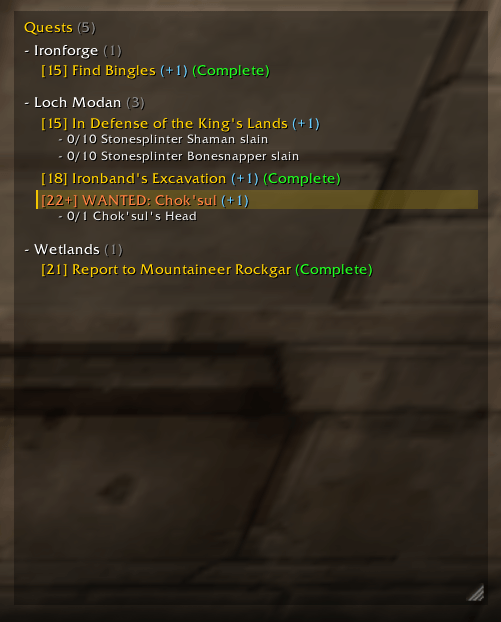
party-questielike.png
Description
Enhanced Quest Tracker
Questie-like tracker features in a lightweight package. A quest tracker for WoW Forever that groups your quests by zone and sorts them by level.
Enhanced Quest Tracker gives you the tracker side of Questie without its quest database, map pins or extra overhead. It's a single tracker frame that shows what's nearby and what to do next.
Features
- Grouped by zone. Each zone has its own section that you can collapse, and one button collapses or expands all of them.
- Sorted by level. Quests are listed from lowest to highest level within each zone.
- Quest item buttons. If a quest has a usable item, a button appears next to the quest name. Click it to use the item. The button goes away when the quest is complete.
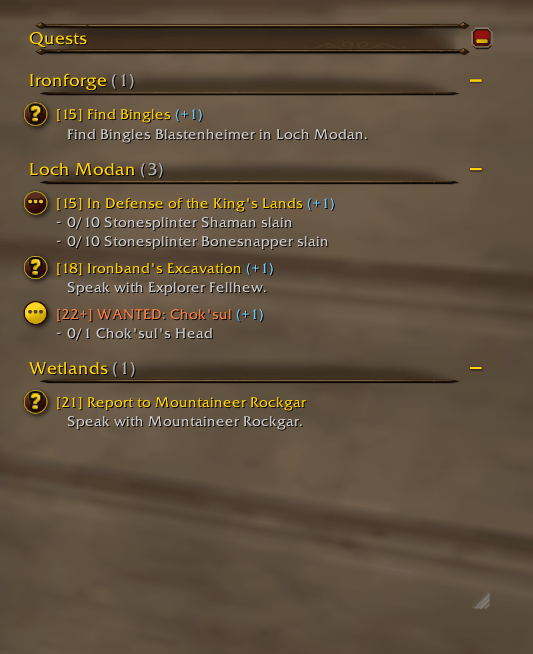
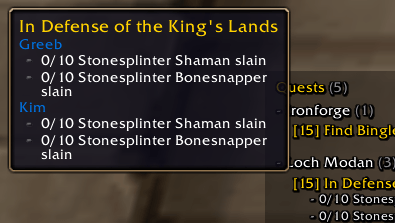
- Party progress. A blue
(+N)after a quest shows how many party members also have it. Hover the quest to see how far along they are. - TomTom waypoints. If you have TomTom installed, a map button next to each quest with a known location sets a TomTom waypoint to it. Setting a waypoint also focuses the quest. While the waypoint is set, the button turns into a red X that cancels it. The waypoint moves when you complete an objective, and it's removed when you hand the quest in or stop focusing it. You can turn the buttons off in the options.
- Party announcements. You can have the addon post a message in party chat when you accept or complete a quest.
- Auto share. You can have quests you pick up shared with your party automatically. Quests someone shared with you aren't shared back.
- Quick quest actions:
- Left-click opens the quest.
- Shift-click untracks it, or links it if you're typing in chat.
- Right-click opens a menu with Focus, Untrack, Share Quest, Share In Chat and Abandon.
- Move and resize. Drag the tracker anywhere, resize it from the bottom-right corner, and scroll with the mouse wheel when the list is long. You can lock it in place.
- Replaces Blizzard's tracker. You can hide the default quest tracker, or keep both.
Styles
Choose a style in Options > AddOns > Enhanced Quest Tracker:
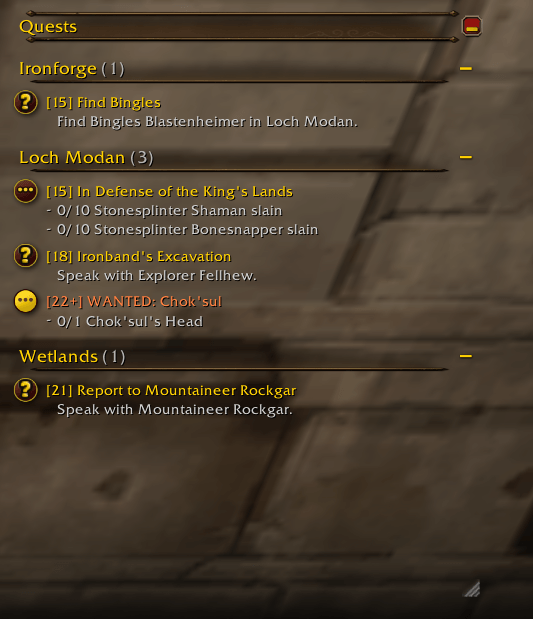
- Default: looks like Blizzard's quest tracker, with header bars, clickable quest map icons for focusing a quest, and check marks on finished objectives, but keeps the zone groups.
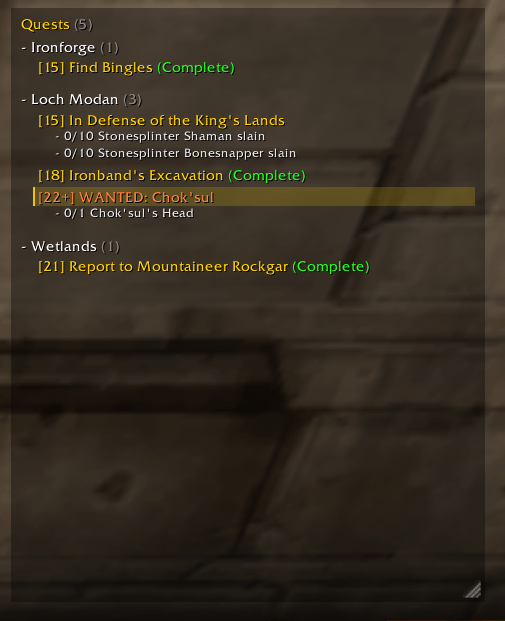
- QuestieLike: a compact, text-only layout in the style of Questie. Zones have
+/-headers with a quest count. Quests are shown as[level] titleand coloured by difficulty, with- objectivelines underneath. Quest item buttons sit to the left of the quest name. - QuestieLike - High Contrast: the same as QuestieLike, but all the tracker text is outlined so it's easier to read over the game world.
Options
Everything is in Options > AddOns > Enhanced Quest Tracker, split into two sections.
Display Options
- Lock Tracker: stop the tracker being moved or resized. Hold Shift to move or resize it anyway.
- Hide Blizzard Quest Tracker: hide the default objective tracker.
- Style: see Styles above.
- Font Size: 70–150%. Row spacing and item buttons scale along with the text.
- Background Opacity: 0–100%. The default is 0% (fully transparent).
- Tracker Width
- Show TomTom Waypoint Buttons: only shown if TomTom is installed. On by default.
Party Options. These only apply when you're in a party, not a raid.
- Announce Completed Quests: post in party chat when a quest's objectives are complete. On by default.
- Announce Accepted Quests: post in party chat when you accept a quest. Off by default.
- Auto Share Accepted Quests: share quests with your party as you pick them up. Quests shared with you aren't shared back, and quests that can't be shared are skipped. Off by default.
Slash Commands
| Command | Action |
|---|---|
/eqt |
Show or hide the tracker |
/eqt options |
Open the settings panel |
/eqt lock |
Lock or unlock the tracker's position |
/eqt blizz |
Hide or show Blizzard's quest tracker |
/eqt announce |
Turn party completion messages on or off |
/eqt announceaccept |
Turn party quest accepted messages on or off |
/eqt share |
Turn auto-sharing accepted quests with your party on or off |
/eqt expand |
Expand all zones |
/eqt reset |
Reset the tracker's position and size |
Notes
- Quest item buttons only update outside combat, because the game restricts secure frames during combat.
- TomTom is optional. Waypoint locations come from the game's own quest data, so the button only appears on quests the game knows a location for.
- Built for WoW Forever (Interface 16001).
Bug reports and suggestions are welcome in the comments or on the issue tracker.
The EnhancedQuestTracker Team