Enemy Colors
- By
Colors default health bars and nameplates by enemy type & provides an API to get your color preferences for other addons as well.
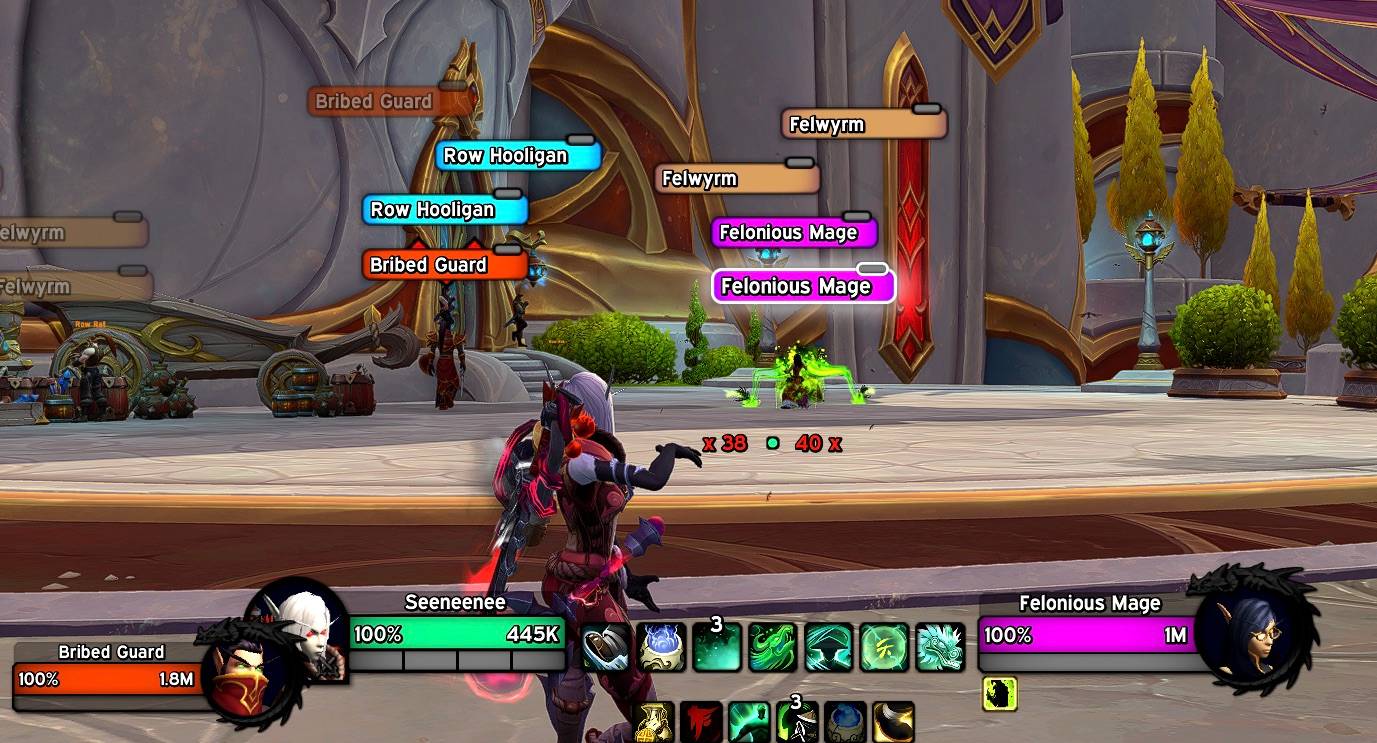
Screenshot 2026-06-24 at 20.44.34.jpeg
Description
EnemyColors
Colors the target, focus, target-of-target, and enemy health bars & nameplates by enemy classification — boss, miniboss, caster, melee, trivial, rare, and rare elite.
Open the options with /ec (or /enemycolors) to pick colors, enable/disable individual types, toggle nameplate coloring, and choose whether to color attackable-only or neutral units.
Inspired by Platynator and other nameplate addons that add color variation to enemies.
Public API
EnemyColors publishes a global EnemyColors table so other addons (nameplates, unit frames, …) can reuse the same color decisions and stay in sync with the user's settings. Colors are 0–1 RGB.
| Function | Returns | Notes |
|---|---|---|
EnemyColors.GetColorForUnit(unit) |
r, g, b, key or nil |
The color EnemyColors would paint for this unit, honoring all user settings (enabled, attackable/neutral filters, per-type toggles). nil means "leave the default color". |
EnemyColors.GetColorByKey(key) |
r, g, b or nil |
Raw palette lookup for a classification key, ignoring per-unit gating. |
EnemyColors.GetColorKeyForUnit(unit) |
key or nil |
The classification key for a unit without applying the color. |
EnemyColors.IsEnabled() |
boolean |
Whether coloring is currently enabled. |
EnemyColors.GetTypes() |
array of { key, label } |
Ordered list of the classification types, for building your own UI/legend. |
EnemyColors.RegisterCallback(token, fn) |
– | fn is called whenever colors/settings change so you can recolor. token identifies the registration (reusing it replaces the callback). |
EnemyColors.UnregisterCallback(token) |
– | Remove a previously registered callback. |
EnemyColors.version |
number |
API version (currently 1) for feature detection. |
Classification keys: boss, miniboss, caster, melee, trivial, rare, rareElite.
Example: color nameplates
EnemyColors now colors nameplates itself (see above), but the same API is still useful if you want a different consumer to drive coloring — for instance to integrate with your own nameplate addon. The snippet below tints each nameplate's health bar using EnemyColors, and re-colors live whenever the user edits the palette in /ec.
In your addon's .toc, declare EnemyColors as an optional dependency so it loads first when present:
## OptionalDeps: EnemyColors-- MyNameplates.lua
local frame = CreateFrame("Frame")
frame:RegisterEvent("NAME_PLATE_UNIT_ADDED")
frame:RegisterEvent("NAME_PLATE_UNIT_REMOVED")
-- Track the units that currently have a visible nameplate so we can recolor
-- them on demand when EnemyColors fires its change callback.
local active = {}
local function Colorize(unit)
local plate = C_NamePlate.GetNamePlateForUnit(unit)
local healthBar = plate and plate.UnitFrame and plate.UnitFrame.healthBar
if not healthBar then
return
end
local r, g, b = EnemyColors.GetColorForUnit(unit)
if r then
healthBar:SetStatusBarColor(r, g, b)
end
-- If r is nil, EnemyColors has nothing to say for this unit (disabled,
-- filtered out, or that type is turned off) — leave Blizzard's color,
-- or substitute your own fallback here.
end
frame:SetScript("OnEvent", function(_, event, unit)
if event == "NAME_PLATE_UNIT_ADDED" then
active[unit] = true
Colorize(unit)
elseif event == "NAME_PLATE_UNIT_REMOVED" then
active[unit] = nil
end
end)
-- EnemyColors is optional: only wire up if the user has it installed.
if EnemyColors then
EnemyColors.RegisterCallback("MyNameplates", function()
for unit in pairs(active) do
Colorize(unit)
end
end)
endNotes
- Blizzard re-colors nameplate health bars on its own updates (threat, faction, etc.). For fully robust behavior, re-apply your color after those updates — for example
hooksecurefunc(NamePlateBaseMixin, "OnAdded", ...)or by re-runningColorizeonUNIT_HEALTHfor the affected unit. The example above covers the common case (initial show + settings changes). GetColorForUnitworks with any valid unit token, not just nameplates —"nameplate7","target","mouseover","boss1", etc.
Enemy Colors Team