Enemy Ability Bar
- By
Enemy Ability Bar displays important ability icons with their cooldown durations used by enemies on a simple bar.
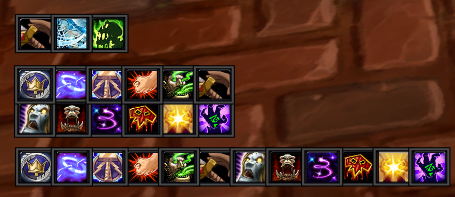
Enemy Ability Bar showing three different frames with abilities.
Description
What is Enemy Ability Bar?
Enemy Ability Bar displays important ability icons with their cooldown durations used by enemies on a simple bar.
The addon is fully customizable. You can create frames for different abilities and add abilities by your own.
How to create a bar
The first step is to open the configuration screen by typing
/eab config
In the options, you need to create a window first, by setting a window name, clicking OK and clicking Add.
The window now appears on the list and you can configure it as you want.
Third step is to add abilities to your window, which can be done in the Abilities tab. You can add either a single ability or a whole group of abilities.
To display the window now, you have to type
/eab test
Slash Commands
/eab ui,config,options - displays the configuration screen
/eab test - shows or hides the frames outside of arena (test mode)
The Enemy Ability Bar Team