Endless Map
- By
Screenshot 2026-10-04 114331.png
Screenshot 2026-10-04 114347.png
Screenshot 2026-10-04 114554.png
Description
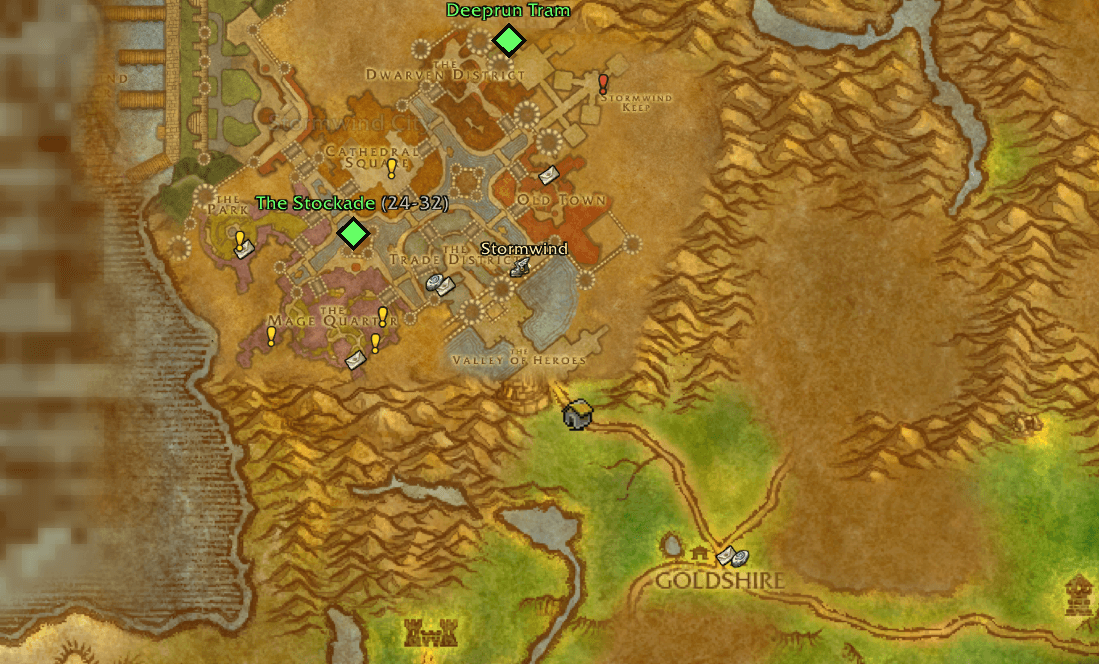
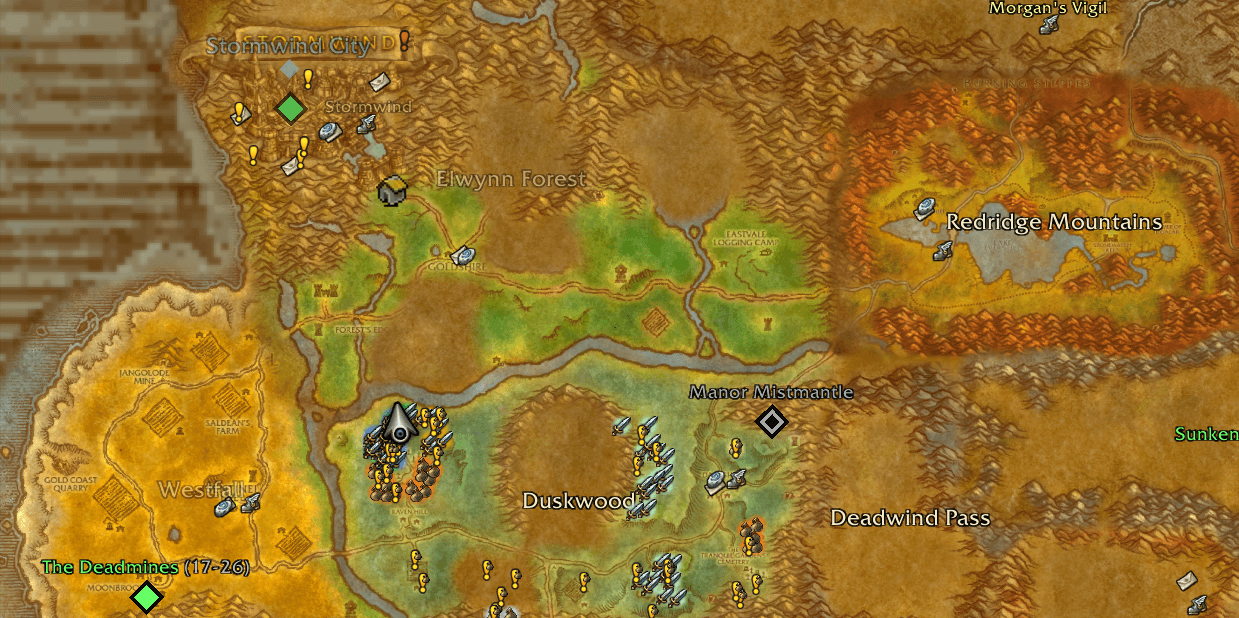
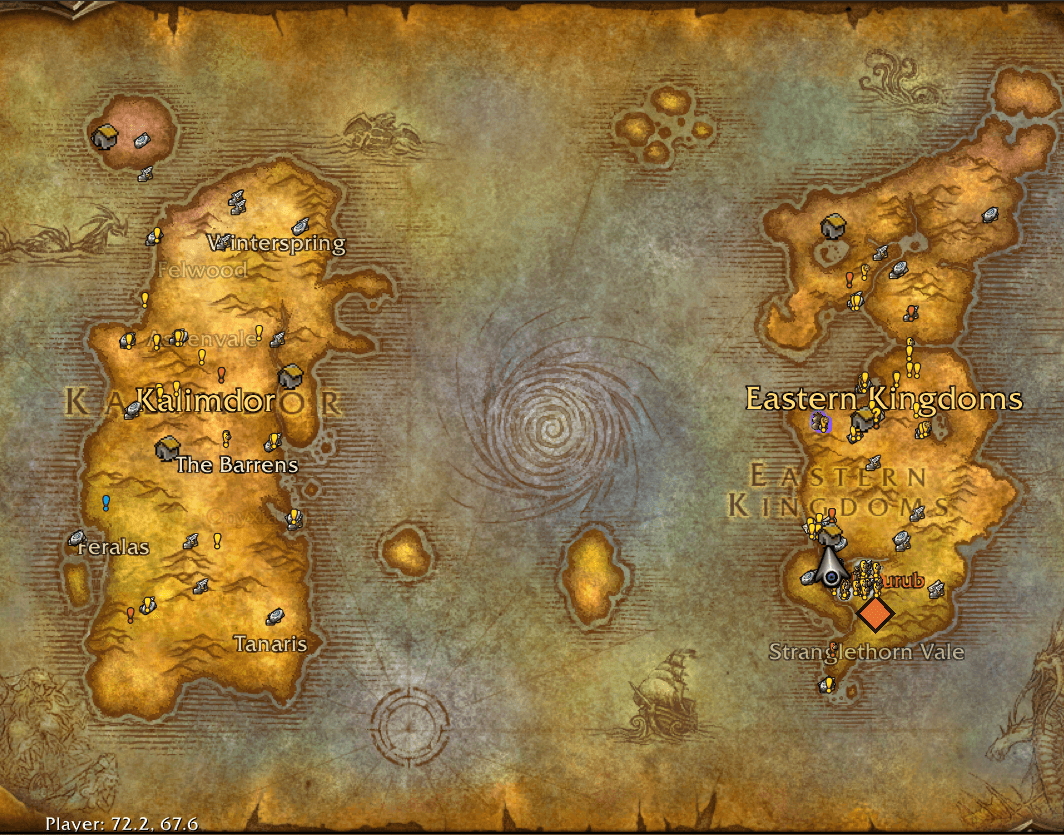
Endless Map Your whole world on one seamless map. Glide from all of Azeroth down to a single dungeon door in one smooth zoom. Drag straight across zone and continent borders without the map ever switching under you, watch each capital sharpen into its own detailed city map and the caves of the old world open up as you close in, and when you reach a dungeon, open its map with every boss marked. Click your arrow or a party member and the map follows them; on WoW Forever, one click turns the whole map into the real terrain of the game's minimap.
Formerly Azeroth Unrolled - the same add-on under a new name: update as usual, your settings carry over.
Made for WoW Forever (1.60.1). It also loads on Classic Era, where the parts marked WoW Forever stay off.
Highlights One continuous zoom with the mouse wheel, from the whole world down to a dungeon door. No borders in your way: drag and fling across zones and continents, or click a zone and the map flies there in one smooth arc. Follow anyone: click your arrow or a party member's dot and the map follows them. M opens the map on you and follows you. Party bubbles: you and your party as small round portraits on the map. Click one and the map flies to them. Caves and mines: about 290 caves of the old world show their tunnels as you zoom in. Minimap imagery (WoW Forever): the real terrain from the game's own minimap pictures, with a fog of war over the land you have not explored. Sharp city maps for all six capitals, Blackrock Mountain and Dalaran, drawn on top as soon as you zoom in close. Dungeon and raid maps (WoW Forever) with numbered boss markers, entrances, floors and the room you are in. Your icons come along: quest markers, flight masters and Questie's pins move with the map and stay clickable. Simple to set up: round buttons on the map for the settings, the caves and the imagery. Lightweight: no libraries, nothing sent anywhere, next to nothing running while the map is closed, and most of its pictures freed ten seconds after you close it. Lightweight Endless Map does its work while you look at the map, and stays out of the way the rest of the time.
Nothing else to install. No libraries and no other add-ons: one folder, AzerothUnrolled (the old name, kept so your settings carry over). Nothing sent anywhere. No add-on messages, and nothing posted in any chat channel: it only reads what your game already knows. Your settings and learned doors are saved on your own computer only. Map closed: next to nothing runs. Nothing is drawn or updated. It still listens for game events (about twenty kinds on WoW Forever) - a zone change, your group changing, a boss kill, a mouse click - and answers most of them with a quick check that the map is closed. On WoW Forever it also checks your position four times a second while you are out in the world (not in a dungeon, raid or battleground), which is how it learns where a dungeon's door is when you walk in. Combat adds nothing. Map open and still: it goes quiet. Once the world map stops moving, Endless Map stops redrawing it (while it follows someone, it keeps checking where they are and redraws only when they move). In our automated tests a still world map makes fewer than one update every four frames, even with a Questie-style add-on refreshing its pins, and the party bubbles and the minimap imagery make none at all. Pictures only when needed. A zone's art loads as you zoom in on it, a cave's tunnels only once you are close, a dungeon's map only when you open it, and the minimap imagery only if you switch it on (it is off by default; until then its button shows one small preview picture of it). Freed after you close the map. Ten seconds after you close it, Endless Map frees the zone, city, cave and dungeon pictures it loaded and the minimap imagery; only the world and continent maps and the imagery button's small preview stay ready for the next time. Download about 4.8 MB. Two thirds of it (3.2 MB) is the optional minimap imagery, and about 1.1 MB is the outlines of the zones and caves; the add-on's code and map data come to about 330 KB. What it does The world map One continuous zoom, from the whole world down to about four times closer than a zone's own map. The mouse wheel zooms, dragging pans across zone and continent borders, a flick keeps gliding, and clicking a zone flies there. Smooth flights. Whenever the map moves by itself - a click on a zone, a party bubble, someone you follow taking a portal or their hearthstone - it flies there in one smooth arc: out, across and back in. A turn of the wheel on the way changes how close it lands; a drag stops it where it is. Zones join up seamlessly while you move. From one fixed zoom (14.05x by default) the capitals, Blackrock Mountain and Dalaran switch to their own sharper maps, drawn over everything else on the map; below it you see each zone exactly as Blizzard draws it. Your map icons come along. Quest markers, flight masters and other add-ons' pins (Questie, for example) move with the map and stay clickable. Endless Map draws underneath them. Place names for continents, zones, cities, dungeons (with their level range), raids and flight masters, each shown at the zoom where it is useful. Following and party bubbles Click your arrow - or a party member's dot - and the map follows them: it keeps them in the middle, changes maps as they cross into another zone and flies after them through a portal or a hearthstone. "Following" and their name show at the top of the map, and the mouse wheel zooms about them. Dragging the map, clicking a zone or clicking them again stops it. M opens the map on you at world zoom 14 (1x is the whole world map) instead of showing your whole zone, and follows you. Opening the map any other way - the quest log, a quest link - works as before. Party bubbles: you and your party (in a raid, your own group) as small round portraits in the map's top left corner (on WoW Forever under the map-pin button). Hover one to see the zone they are in; click it and the map flies to them and follows them, click it again to stop. The bubble of the one followed glows; offline or dead members are greyed. Caves and mines About 290 caves and mines of the old world show their tunnels right on the map from world zoom 30 - where the map cannot zoom in that far, at its deepest zoom over the cave. Blizzard's own cave maps where WoW Forever's cave is the one they draw, and every other cave - wolf dens, mines, ogre mounds, hives, crypts, the Caverns of Time, WoW Forever's own caves - drawn from the game's own minimap of it. Each carries its name where the game names it; caves with two levels show the lower one under the upper. Dungeon entrance caves (the Deadmines, Wailing Caverns, Uldaman and more) carry their dungeon's icon at the portal; on WoW Forever a click on their tunnels opens the dungeon's map. With the city maps, from world zoom 14: the tunnels of Gnomeregan, the caves around Maraudon and the Scarlet Monastery, and the Timbermaw Hold tunnels between Felwood, Moonglade and Winterspring. The caves button - a mining pick, left of the settings button - hides and shows them with one click. The menu sets the zoom: 20x, 30x, 40x or off. Minimap imagery (WoW Forever) The real terrain. The imagery button, left of the caves button, switches the whole world map from Blizzard's drawn map to the game's own minimap pictures - from the whole world down to the deepest zoom, with the game's detailed minimap tiles once you are close - and back. Its picture shows the other look, and it glows while the imagery is on. Off by default. Fog of war: land you have not explored turns grey and dimmed as you zoom in on a continent, and turns to colour the moment you explore it. The sea and the capitals stay in colour. Everything else stays: zone and city names (and the names of the sub-zones you have explored), the caves, Blackrock Mountain, Dalaran, dungeon entrances, doors and every map icon. Ironforge's and Undercity's city maps still show, since they are underground. Dungeon and raid maps (WoW Forever) Click a dungeon or raid icon on the world map to open its map. Inside an instance the map opens on that instance by itself. Several dungeons behind one door (Blackrock Mountain, Scarlet Monastery, Maraudon) open an entrance map first. Bosses: a numbered skull for every boss with a known position, in the game's own encounter order. A boss you defeat turns grey with a check mark. The skull button lists every boss of the dungeon. Entrances: a swirl shows where you arrive. Floors and rooms: a floor dropdown, and the room the game names is lit and labelled. Maps for Forever's own instances - The Hall of Thanes, Ruins of Lordaeron, Excavation Site: Wetlands, City of Dalaran, Half-Pint Tavern - and for the Deeprun Tram. Doors on the world map (WoW Forever) Door icons for Forever's new instances, next to the classic ones. Grey placeholders for instances that Forever lists but that are not in the game yet (shown by default; one click in the settings menu hides them). They are approximate and say so. Learned doors: walk into an instance once and Endless Map remembers where its door is, for all your characters. "You are inside": while you are in an instance, its door on the world map carries your player icon. Settings Three round buttons sit in the lower right corner of the map:
the settings button (a treasure-map icon) opens a menu; the caves button (a mining pick), left of it, hides and shows the caves; the imagery button (WoW Forever), left of that, switches between the drawn map and the minimap imagery. The menu has:
switches for the smooth zoom, place names, dungeon and raid icons, the placeholders for unreleased dungeons, dungeon maps, boss and entrance markers, map icons moving with the map, follow on click, M follows me, party bubbles, the minimap imagery and the zoom readout; Zoom: short lists of presets for the wheel step, the zoom depth, the flight speed, the zoom at which the city maps appear (10x, 14.05x as the default, 20x, or by each city's own zone), the zoom at which the caves appear (20x, 30x as the default, 40x, or off) and the zoom M opens the map at (10x, 14x as the default, 20x, or off for the game's own view); the list of commands, reset to defaults, and "Hide these buttons" (/unroll button brings them back). The same settings are on the game's own options page, Esc > Options > AddOns > Endless Map, along with "Buttons on the map" to bring hidden buttons back.
Everything can also be set by command. /endlessmap always works; /unroll is the short form, and the old /azerothunrolled still works too. Every command below works with /endlessmap in place of /unroll.
Command What it does /endlessmap, /unroll show the current settings and the command list /unroll on, /unroll off the smooth zoom on or off (off: Blizzard's map as usual) /unroll depth <1-10> how far past a zone's own map you can zoom (default 4) /unroll step <1.05-2> zoom per wheel notch (default 1.3) /unroll speed <0.25-4> speed of the map's flights (default 1) /unroll labels place names and dungeon icons together, on or off /unroll names, /unroll icons place names on or off; dungeon and raid icons on or off /unroll rest, /unroll flight names and icons also while the map is still (off: only while it moves); flight-master names /unroll mosaic unexplored land drawn in map style, on or off /unroll cells seamless zone pieces, on or off /unroll livepins map icons move with the map (off: hidden while it moves) /unroll follow a click on your arrow or a party member's dot follows them, on or off (default on) /unroll openzoom <1-25>, default, off the world zoom M opens the map at, on your character (default 14; off: the game's own view) /unroll openfollow M also follows you, on or off (default on) /unroll bubbles the party bubbles on or off (default on) /unroll cavezoom <10-60>, default, off the world zoom from which the caves show their tunnels (default 30; off: never) /unroll imagery WoW Forever: the minimap imagery on or off (default off) /unroll dungeons WoW Forever: dungeon maps on or off /unroll bosses WoW Forever: boss and entrance markers on or off /unroll markers WoW Forever: your group on entrance maps, the game's own icons or simple dots /unroll doors WoW Forever: list the known doors; doors hints off hides the placeholders (on shows them); doors forget clears learned doors (doors forget <id>: one instance) /unroll zoom show the current zoom as a number on the map /unroll cityzoom <1-25>, default, off the world zoom from which city maps take over (default 14.05; off: by each city's own zone) /unroll button the buttons on the map (settings, caves, imagery) on or off /unroll taint check that the objective tracker's quest data is clean (for bug reports) /unroll debug information for bug reports /unroll reset all settings back to their defaults (learned doors are kept) Inside dungeons: what an add-on can and cannot show Your own position inside an instance cannot be shown. The game does not give add-ons the player's position inside dungeons and raids, and WoW Forever's instances have no built-in map that Blizzard's own map could place you on. No add-on can work around that, and guessing the position from other clues is exactly what the restriction is there to prevent, so Endless Map does not try.
What you get instead:
the instance's map, with its bosses and entrance: where things are, not where you are; the lit room: the room the game itself names. Some instances name few rooms; then nothing is lit; "You are inside" on the world map, which marks the instance's door; defeated bosses, from the game's own boss-kill events and from the lockout the game reports when you enter. Known limits Boss positions come from research, not from the game: 252 of 269 bosses have a marker. Five are marked "approximate", and 17 appear only in the boss list. Kills are remembered until the next loading screen. After a wipe and a run back, the skulls show alive again. Placeholders for unreleased instances are educated guesses and may be wrong. The City of Dalaran dungeon door is not confirmed yet. Boss names and some labels on the dungeon maps are in English on every client. In combat the game allows no change of map: following keeps the view inside the map shown, so at a zone's edge the one you follow can drift off the middle until combat ends. A turn of the wheel brings them back to the middle; Blizzard's own map and its pins then return when combat ends. The minimap imagery's pictures are two thirds of the 4.8 MB download, even if you never switch it on. Built on the English client and tested in game on build 1.60.1.70245. After a game patch, some map art or new instances may need an update of the add-on. On Classic Era the WoW Forever parts - the dungeon maps, the doors and the minimap imagery - stay off. Works with Questie and other add-ons that put icons on the world map. Endless Map needs no libraries and sends no data anywhere.
Feedback Found a door in the wrong place, a boss on the wrong floor, or a map or cave that looks odd? Please leave a comment. /unroll debug and a screenshot help a lot.
Credits Blizzard Entertainment - World of Warcraft, its maps and its data. Most of what Endless Map shows is art already in your game client, drawn by file ID. Apart from its own icon, the only images the add-on carries are derived from that art: the minimap imagery's overview pictures (scaled-down composites of the game's own minimap tiles) and outline masks computed from the client's map and minimap art. Classic boss positions were researched in community vanilla databases (MaNGOS Zero, CMaNGOS, VMaNGOS, AzerothCore) and checked against Blizzard's Encounter Journal data. Ten positions in The Hall of Thanes and Ruins of Lordaeron (nine bosses and one entrance) follow the guide maps of ForeverChanges (foreverchanges.pro), cross-checked with Icy Veins - thank you. Door positions were cross-checked with wowhandbook.com; level ranges with mobalytics. Questie, wago.tools, Gethe/wow-ui-source and warcraft.wiki.gg were invaluable during development. The full list is in NOTICE.md inside the add-on folder.
License Copyright (C) 2026 Hadlock. Endless Map is free software under the GNU General Public License, version 3 or later (GPL-3.0-or-later). World of Warcraft and Blizzard Entertainment are trademarks of Blizzard Entertainment, Inc. This add-on is not affiliated with or endorsed by Blizzard.
Endless Map Team