Enchant Clickables Forever
- By
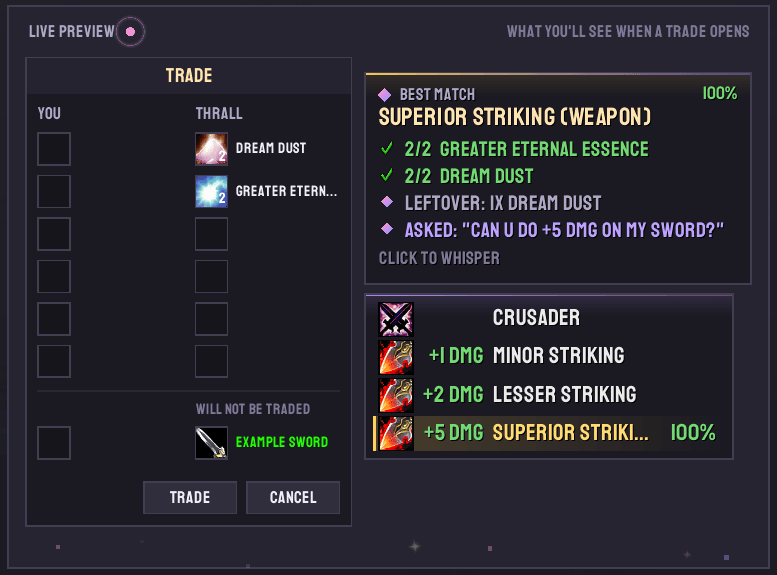
An addon that lets players view possible enchants a player might want based on items being traded in the screen. Also, an enchanter can click the enchant onto the person's gear assuming they have it learned.
ECPhoto1.PNG
Description
Enchant Clickables Forever
One-click enchanting for the trade window.

Enchant Clickables makes enchanting other players' gear faster, easier, and more convenient.
When someone places an item in the "Will Not Be Traded" slot, a list of compatible enchants appears alongside the trade window. Simply click the enchant you want, and it's cast directly onto their item.
No digging through the Enchanting window. No searching for recipes. No keeping someone waiting while you find the right enchant.
Built specifically for WoW Forever, Enchant Clickables supports Classic enchanting recipes alongside Forever's expanded enchanting system, including entirely new enchantable equipment slots.
Supported Equipment Slots
- Chest
- Bracers
- Boots
- Gloves
- Cloaks
- One-Handed Weapons
- Two-Handed Weapons
- Shields
- Necklaces / Amulets (New in Forever)
- Held-In-Off-Hand Items (New in Forever)
Forever-specific enchants, including Recovery and Revelation, are supported as well.
Additional Forever Enchanting Content
Forever also expands Enchanting with new craftable equipment and profession items, including:
- Class-specific Relics, including Druid Idols, Paladin Librams and Shaman Totems.
- New Wands and Staves.
- Craftable Held-In-Off-Hand Equipment.
- Enchanting Camp Objects, including the Enchanted Lute, Arcane Salvager and Arcane Forge.
⚠️ Important: Keep Your Enchanting Window Open!
Your Enchanting profession window MUST remain open for this addon to function properly.
WoW Forever changed how enchants are applied to equipment. Enchant Clickables uses the profession window to cast enchants.
If the window is closed, your first click will automatically open it and position it beside the enchant list, keeping the trade window unobstructed. Your next click will apply the enchant.
Once the trade is complete, the Enchanting window returns to its original position.
✨ Core Features
Smart Enchant List
- Only available enchants: Displays recipes you've learned and currently have the materials to craft, filtered to match the item being traded.
- Equipment-aware filtering: Bracers show bracer enchants, two-handed weapons show weapon and two-handed enchants, necklaces show necklace enchants, and off-hand items show compatible off-hand enchants.
- Stat bonuses at a glance: Each enchant displays its actual bonus using the game's spell descriptions (e.g., +7 Agility, +5 Stamina, +3 Damage, +15 Fire Resistance).
- Sorted by bonus: Enchants are organized from the smallest bonus to the largest.
- Automatic recipe tracking: Open your Enchanting window once and the addon records your learned recipes and their material requirements. Newly learned recipes are added the next time you open it.
- Works with your own materials: Enchants you can afford using your own inventory appear automatically, without additional prompts.
- Always shows available options: Even when the customer's materials don't match a recipe, the list still displays every enchant you can perform using your own materials.
Intelligent Material Matching
Enchant Clickables understands the materials customers provide and automatically matches them against your available recipes.
- Automatic recipe matching: As materials enter the trade window, the list narrows to compatible enchants. The closest match appears first, with a percentage indicating how much of the recipe's requirements have been covered.
- Previous trade memory: Remembers materials from the customer's previous trade when the same player returns with their item.
- Chat request recognition: Understands enchant requests sent through Whisper, Say, Party, Raid, and Guild chat. Examples include "ms boots", "15 agi", and "crusader".
- Incorrect material detection: Recognizes incorrect materials, such as a Large Shard instead of a Small Shard, the wrong Essence, or equipment accidentally placed in the materials slot. One click whispers the customer an explanation.
- Essence conversion: Lesser and Greater Essences are interchangeable at a 3:1 ratio. For example, six Lesser Essences can satisfy a recipe requiring two Greater Essences. The addon automatically combines them before applying the enchant.
- Automatic material supplementation: If a customer is short on materials but you have the missing reagents, the match card shows what you're contributing and its estimated Auction House value.
Match Summary Card
A convenient summary card appears above the enchant list, giving you a complete breakdown of the best recipe match:
- Customer materials: What the customer provided.
- Incorrect materials: Any incompatible or incorrect reagents.
- Your contribution: Materials supplied from your own inventory.
- Estimated value: Auction House value of the materials you're contributing.
- Remaining materials: Anything still needed to complete the recipe.
- Excess materials: Any additional materials provided by the customer.
Click the summary card to whisper the customer a complete breakdown, including item links.
Automated Customer Whispers
Make communicating with customers easier with automatically generated messages.
Missing materials:
"For Enchant Boots - Lesser Stamina I still need: 2x [Soul Dust]"Incorrect materials:
"Oops, wrong one! That's [Large Glimmering Shard], but Minor Striking needs [Small Glimmering Shard]."Unlearned recipes:
Customize the message sent when a customer requests an enchant you haven't learned. The default message is: "Oops sorry! I haven't learned that recipe yet."
Item links are saved as they're encountered, allowing whispers to include properly formatted item links without waiting for the game to load them.
⚙️ Settings & Customization
Type /ec or click the minimap button to open the settings window.
Appearance
- Resizable window: Drag the corner to scale the entire settings window.
- Font and size: Choose the enchant list's font and font size.
- Forever Ledger integration: If Forever Ledger is installed, access its full font library, including favorites.
- Background opacity: Adjust the enchant list's background transparency.
- Column visibility: Show or hide the icon, bonus, and name columns.
- Material indicators: Enable or disable dimmed rows for enchants where you only have some of the required materials.
Matching & Automation
- Adjust how closely materials must match a recipe.
- Choose how many matching enchants appear in the list.
- Enable or disable chat request recognition.
- Enable or disable previous trade memory.
- Enable or disable Auction House material pricing.
Live Preview
A built-in mock trade window lets you preview your appearance and layout changes as you make them.
Slash Commands
| Command | Function |
|---|---|
/ec |
Opens the settings window. |
/ec all |
Displays every enchant available for the traded item's equipment slot, temporarily bypassing learned-recipe and material checks for the current session. |
/ec minimap |
Toggles the minimap button. |
ℹ️ Additional Information
- Auction House Pricing: Material prices are provided by Auctionator or TradeSkillMaster, if either addon is installed. All other features work independently.
- Combat Compatibility: If you're in combat, the enchant list waits and automatically updates once combat ends.
- Character-Specific Recipes: Learned recipes are saved separately for each character.
- Account-Wide Settings: Your addon settings are shared across your account.
❤️ Credits & Acknowledgments
The original idea for this addon came from me and my close friend CaffeineAddiction (Nagee on Herod) during the original WoW Classic era.
I've taken it upon myself to bring this addon back to life for WoW Forever, rebuilding and adapting its functionality with the assistance of Claude AI.
A special thanks to everyone who supported the original concept and helped inspire its return.
Enjoy enchanting!
Enchant Clickables Forever Team