EmoteBarEN/PT-BR
- By
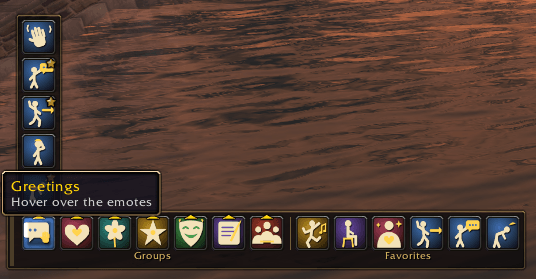
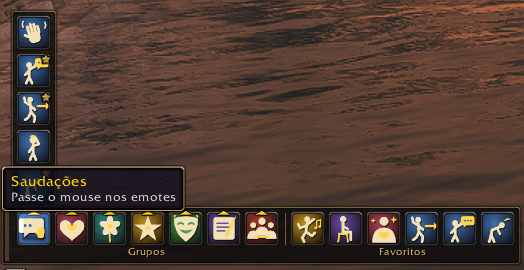
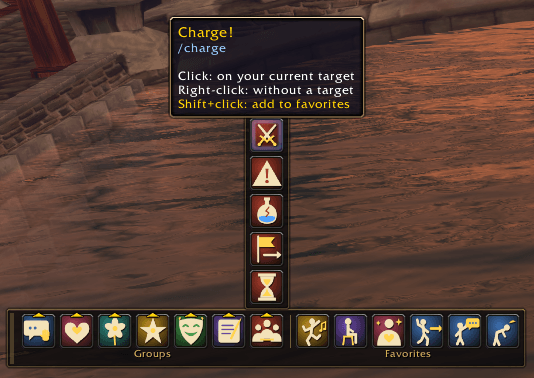
Emote bar with 35 emotes in 7 categories and favorites. EN/PT-BR
1-en.PNG
1-pt.PNG
2-en.PNG
2-pt.PNG
Description
EmoteBarEN/PT-BR
Author / Autor: Drakko Forjadepedra
English
An action bar with your character's emotes, organized by category, for WoW Forever (also works on Classic Era). Available in English and Brazilian Portuguese, following your game language automatically.
Installation
Copy the EmoteBar folder to:
World of Warcraft/_classic_beta_/Interface/AddOns/
The EmoteBar.toc file must sit directly in AddOns/EmoteBar/.
How to use
The bar has two parts:
- Categories (first 5 buttons): hover to open a menu with that category's emotes
- Favorites (after the gap): emotes always at hand
On any emote button:
| Action | Result |
|---|---|
| Click | Performs the emote on your current target (or with no target, if none is selected) |
| Right-click | Performs the emote without a target, even if someone is selected |
| Shift+click | Adds to or removes from favorites |
Favorites show a gold mark in the category menu. Drag the bar by the gold handle on its left edge (or top edge when vertical).
Emotes
| Category | Emotes |
|---|---|
| Greetings | Wave, Hello, Bye, Salute, Bow |
| Celebration | Cheer, Dance, Applaud, Roar, Flex |
| Fun | Laugh, Chicken, ROFL, Joke, Poke |
| Roleplay | Sit, Kneel, Sleep, Pray, Cry |
| Group | Charge!, Help me!, Out of mana, Follow me, Wait |
The Group emotes include character voice lines, handy in dungeons.
Commands
/emotebar, /eb or /gestos show the list. Every command also accepts its Portuguese name.
| Command | What it does |
|---|---|
/emotebar bar |
Shows or hides the bar |
/emotebar lock |
Locks or unlocks the position |
/emotebar rotate |
Switches between horizontal and vertical |
/emotebar size 36 |
Button size (20 to 56) |
/emotebar scale 1.2 |
Overall scale (0.5 to 3) |
/emotebar list |
Lists every emote and its command |
/emotebar default |
Restores the original favorites |
/emotebar reset |
Moves the bar back to the default position |
/emotebar language en |
Forces English (pt for Portuguese, auto to follow the game) |
Customizing
Every emote lives in Dados.lua. To add one, include a line in a category:
{ token = "THANK", nome = { ptBR = "Agradecer", enUS = "Thank" }, icone = I .. "INV_Misc_Gift_01", comando = "obrigado" },
Use /reload after editing. Interface texts live in Idiomas.lua.
Português
Uma barra de ação com os emotes do personagem, organizados por categoria, para o WoW Forever (também funciona no Classic Era). Disponível em português do Brasil e inglês, seguindo o idioma do jogo automaticamente.
Instalação
Copie a pasta EmoteBar para:
World of Warcraft/_classic_beta_/Interface/AddOns/
O arquivo EmoteBar.toc precisa ficar direto em AddOns/EmoteBar/.
Como usar
A barra tem duas partes:
- Categorias (os 5 primeiros botões): passe o mouse para abrir o menu com os emotes daquela categoria
- Favoritos (depois do espaço): emotes sempre à mão
Em qualquer botão de emote:
| Ação | Resultado |
|---|---|
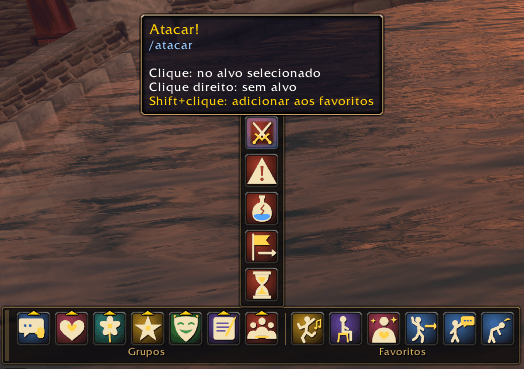
| Clique | Faz o emote no alvo selecionado (ou sem alvo, se não houver) |
| Clique direito | Faz o emote sem alvo, mesmo com alguém selecionado |
| Shift+clique | Adiciona ou remove dos favoritos |
No menu de categoria, os favoritos têm um marcador dourado no canto. Para mover a barra, arraste pela alça dourada na ponta esquerda (ou de cima, na vertical).
Emotes e atalhos
Os atalhos em português funcionam em qualquer idioma do jogo, e aceitam um nome: /oi Fulano acena para o jogador Fulano.
| Categoria | Atalhos |
|---|---|
| Saudações | /oi (acenar), /ola, /adeus, /continencia, /reverencia |
| Celebração | /comemorar, /dancar, /aplaudir, /rugir, /musculo |
| Humor | /rir, /galinha, /rolar, /piada, /cutucar |
| Roleplay | /sentar, /ajoelhar, /dormir, /rezar, /chorar |
| Grupo | /atacar, /socorro, /semmana, /sigam, /esperem |
Os emotes de Grupo têm fala do personagem, úteis em masmorras.
Comandos
/emotebar, /eb ou /gestos mostram a lista. Todos os comandos também aceitam o nome em inglês.
| Comando | O que faz |
|---|---|
/emotebar barra |
Mostra ou esconde a barra |
/emotebar travar |
Trava ou destrava a posição |
/emotebar girar |
Alterna entre horizontal e vertical |
/emotebar tamanho 36 |
Tamanho dos botões (20 a 56) |
/emotebar escala 1.2 |
Escala geral (0.5 a 3) |
/emotebar lista |
Lista todos os emotes e atalhos |
/emotebar padrao |
Volta os favoritos para a lista original |
/emotebar reset |
Volta a barra para a posição padrão |
/emotebar idioma pt |
Força português (en para inglês, auto para seguir o jogo) |
Personalizando
Todos os emotes ficam em Dados.lua. Para adicionar um, inclua uma linha na categoria (exemplo acima, na seção em inglês). Depois de editar, use /reload. Os textos da interface ficam em Idiomas.lua.
EmoteBarEN/PT-BR Team