
elvui_anchor
Description
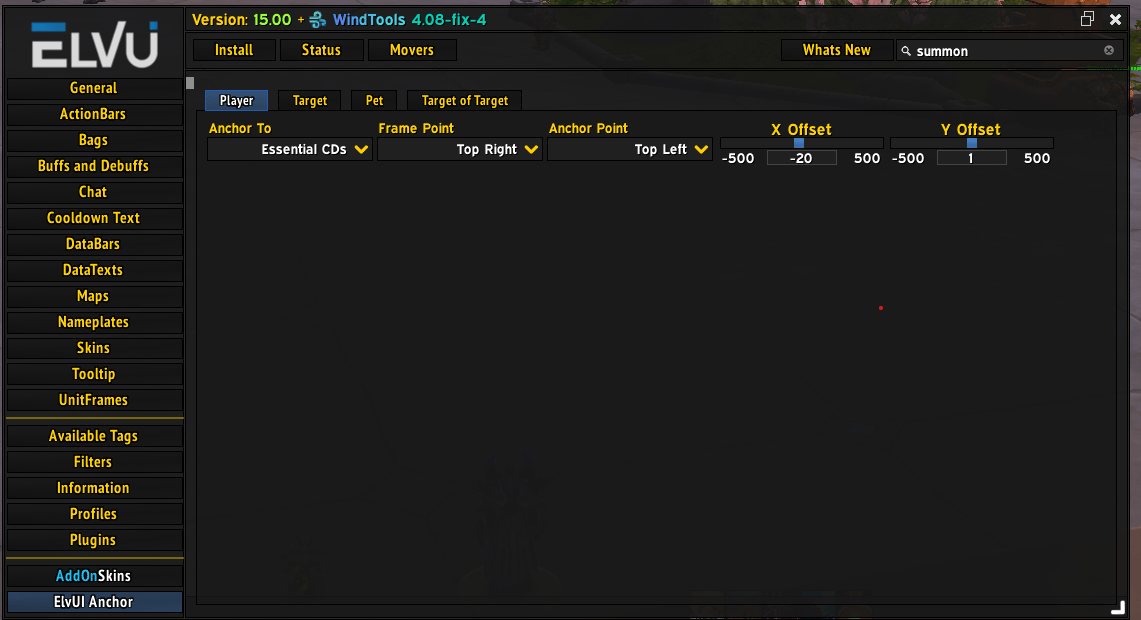
ElvUI Anchor is a specialized utility designed for players who want a more dynamic, responsive user interface. While ElvUI provides powerful positioning tools, it often lacks a native way to "parent" unit frames to other addon frames or specific sub-elements. This addon bridges that gap, allowing you to anchor your Unit Frames directly to other UI components, such as the Essential Cooldowns bar.
Core Features
- Dynamic Parent Anchoring: Move beyond standard screen-positioning. Anchor your Player, Target, Pet, and Target-of-Target frames to other objects like
EssentialCooldownVieweror even other ElvUI frames. - Target Castbar Decoupling: Independently control the Target Castbar’s anchor, allowing it to sit perfectly below your target frame or centered on an entirely different UI element.
- Clean Tabbed Interface: Fully integrated into the ElvUI configuration menu with a dedicated "tabbed" layout for easy navigation between Player, Target, Pet, and ToT settings.
- Precise Offset Control: Fine-tune your layout with X and Y offset sliders, ensuring pixel-perfect alignment within your custom UI suite.
How This Enhances Your Experience
In high-end raiding or PvP, information density is key. Usually, if you move your "Essential Cooldowns" bar, you have to manually reposition your unit frames to match.
With ElvUI Anchor, your frames become "intelligent." If you move your central cooldown bar, your Player and Target frames follow it automatically. This creates a cohesive "UI Block" that moves together, reducing the time spent on UI maintenance and ensuring your most vital information (Health, Power, and Cooldowns) stays in your line of sight as a single unit.
Examples of Use
-
The "Center-Focused" Layout: Anchor your Player frame to the top of your Cooldown bar and your Target frame to the bottom. Now, your entire combat hub is controlled by moving just one frame.
-
Side-Car ToT: Anchor your Target-of-Target frame to the right side of your Target frame so it always stays tucked neatly away regardless of where you move your primary target.
-
Custom Castbars: Position your Target Castbar specifically relative to your target's health bar, rather than having it float as a static element on the screen.
ElvUI_Anchor Team
