EllesmereUI_AFK
- By
A customisable AFK screen for EllesmereUI with Class Hall playlists, custom music, character animations, camera orbit, draggable model placement, chat notifications, a Return Home button, and AceDB profiles.
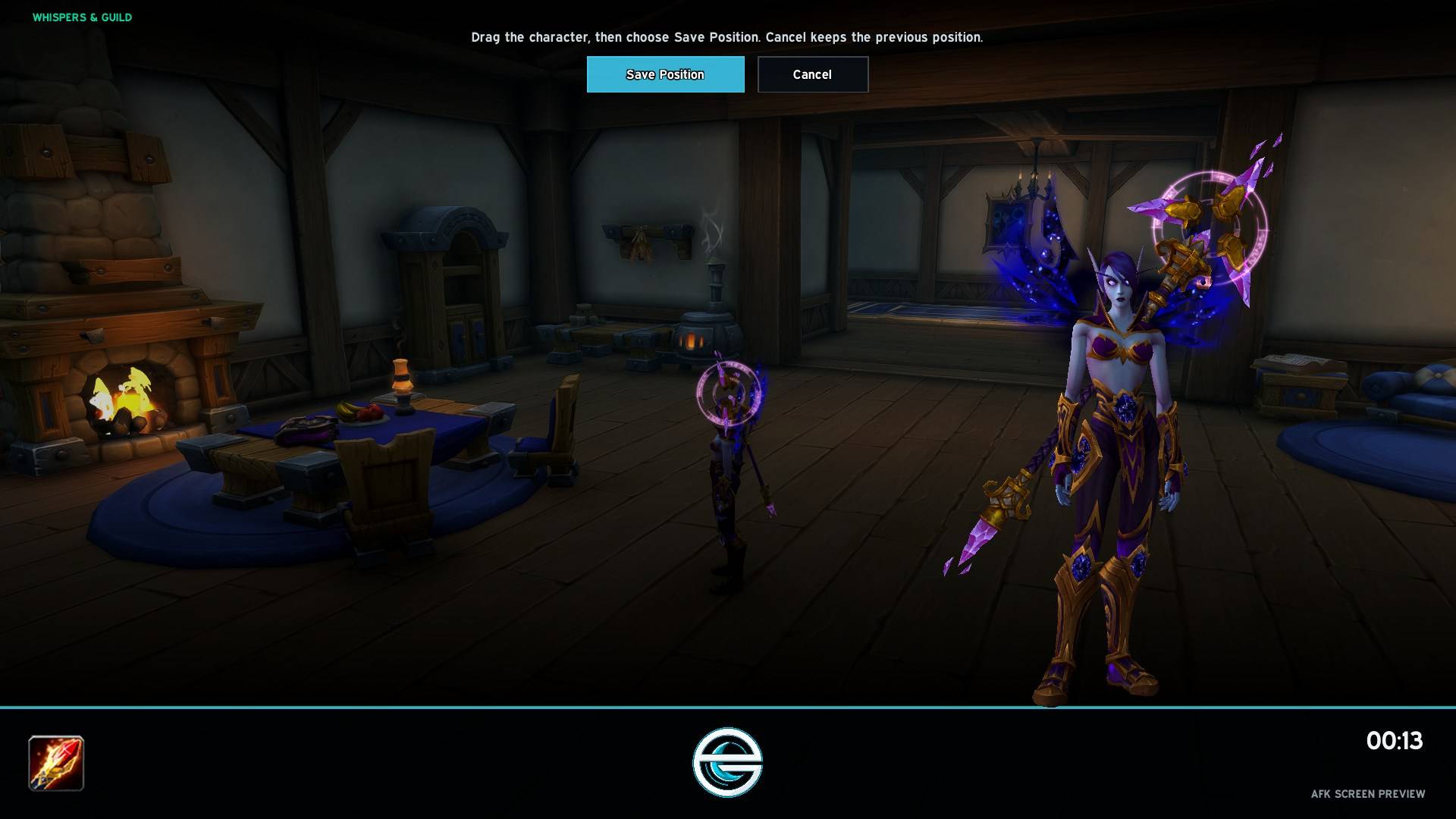
AFK Screen Preview & Model Positioning
Description
EllesmereUI AFK
EllesmereUI AFK gives World of Warcraft a custom AFK screen designed to match EllesmereUI. It combines character presentation, Class Hall music, housing access, chat notifications, and profile support in one configurable plugin.
EllesmereUI is required.
AFK screen
WoW opens the screen when your character becomes AFK through inactivity or /afk. Your character sits in the game world while the AFK model waves, then begins your selected animation after 20 seconds.
Customisation includes:
- Nine character animations
- Model scale and position
- Drag-to-position preview mode
- Orbiting game camera
- World dimming
- Character and guild information
- AFK timer and custom status text
- EllesmereUI AFK logo
- Optional hiding of the normal interface
Preview mode hides the base UI so you can position the model without obstruction. Save Position and Cancel return you to the addon options.
Class Hall music
Choose the music associated with your class, select another Class Hall, or pick a random hall. Evokers receive a themed Forbidden Reach playlist.
Each playlist supports three playback modes:
- Single track: repeats your chosen file
- Sequential: starts from your chosen file and follows the playlist order
- Shuffle: chooses a different file at each track boundary
The addon uses each music file’s encoded duration, allowing tracks to finish before the next one begins.
You can preview your selection from the Music options. EllesmereUI AFK preserves your previous WoW music setting and restores it when AFK playback or the preview ends.
Custom music supports MP3 or OGG paths and WoW FileDataIDs.
Housing button
An optional secure button lets you return to your first owned house. While visiting your house, it changes to Return to Previous Location, matching the behaviour of the Housing Dashboard.
The button includes cooldown text and a clock animation. EllesmereUI Unlock Mode controls its position.
Messages and interruptions
The AFK screen can display new whispers, Battle.net whispers, and guild messages without changing your normal chat frames.
Combat, queue proposals, loading screens, cinematics, and pet battles close the AFK screen when gameplay needs your attention.
EllesmereUI integration
The settings panel follows EllesmereUI’s sidebar layout, styling, colours, and animated controls. Its pages cover general behaviour, appearance, music, and profiles.
AceDB-3.0 provides a standard Default profile, per-character settings, named shared profiles, and an option to save your current configuration across the entire WoW licence.
Commands
/euiafkopens the settings/euiafk previewopens or closes the AFK preview/euiafk hidecloses the AFK screen/euiafk onenables the addon/euiafk offdisables the addon/euiafk resetrestores the current profile defaults
EllesmereUI_AFK Team