Edit Mode Visibility
- By
Adds Hidden and Mouseover options to Blizzard’s Edit Mode. Hide any HUD frame or fade it in on hover, set right from Edit Mode.
Screenshot 2026-11-17 031835.png
Screenshot 2026-11-17 031910.png
Description
EditMode Visibility
Blizzard's Edit Mode lets you move and resize your HUD, but not hide parts of it. EditMode Visibility adds that option. Set any Edit Mode frame to Always Show, Hidden, or Mouseover, right inside Edit Mode.
Features
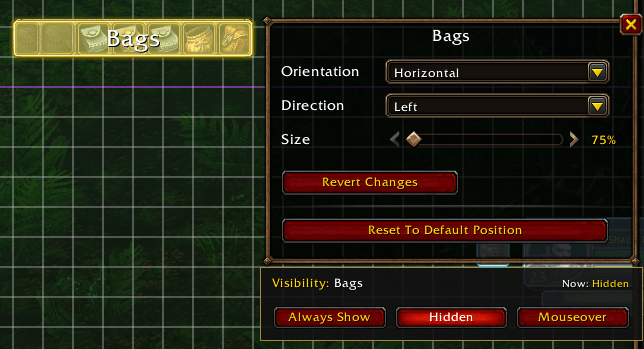
- Set it in Edit Mode. Click a frame in Edit Mode and a Visibility panel appears under its settings, with three buttons: Always Show, Hidden, Mouseover.
- Edits stay easy. Every frame shows at full opacity while Edit Mode is open, so you can always find and move it.
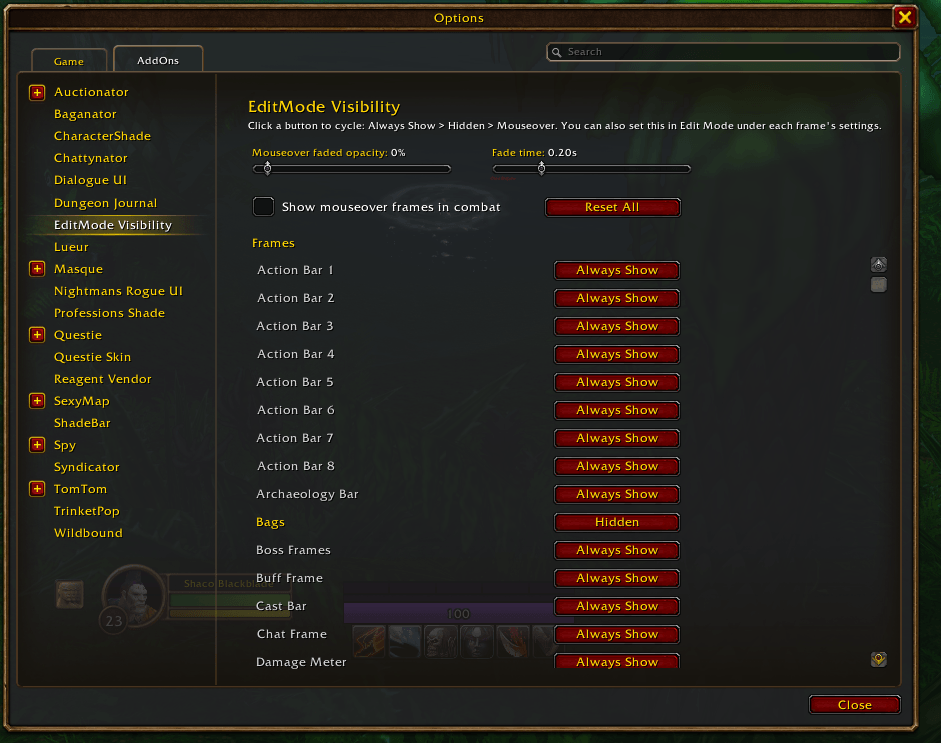
- Settings page (Esc > Options > AddOns > EditMode Visibility):
- A list of every Edit Mode frame with its current setting
- Faded opacity for Mouseover frames (0–90%)
- Fade speed
- Option to show Mouseover frames during combat
- Reset All button
Slash commands
| Command | What it does |
|---|---|
/emv |
Open the settings page |
/emv reset |
Set every frame back to Always Show |
/emv debug |
Print diagnostic info (useful for bug reports) |
Notes
- Action bars and unit frames can only stop reacting to the mouse outside combat. If you hide one during a fight, its mouse input turns off as soon as combat ends.
- Some action bars already have Blizzard's own "Bar Visible" setting in Edit Mode. Use either that or this addon on a bar, not both.
- Settings are saved per account.
Bug reports
Please include the output of /emv debug and which frame was affected.
Edit Mode Visibility Team