promotional bannermobile promotional banner

Edit Mode Coords

Adds coordinates to properly align elements in Edit Mode
jdzKb71.png

jdzKb71.png

Description

EditModeCoords enhances World of Warcraft’s built-in Edit Mode by adding precise X/Y coordinate controls for every movable frame.

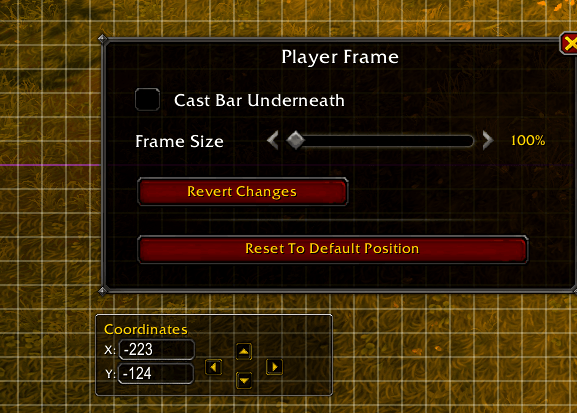
When you select a frame (such as the Player Frame, Action Bars, Minimap, or Target Frame), a new “Coordinates” box appears under the Edit Mode settings panel.
You can:

  • View exact X and Y offsets (center-based, not screen-edge-based).
  • Nudge frames pixel-by-pixel (↑ ↓ ← → buttons).
  • Hold Shift for 10px steps.
  • Hold Ctrl for 50px steps.
  • Manually enter coordinates to position frames with mathematical precision.
  • Coordinates update live while dragging!

This addon doesn’t replace Edit Mode — it extends it with tools for perfectionists who want precise alignment and symmetry in their layouts.

Updated for Midnight!

The Edit Mode Coords Team

profile avatar
  • 3
    Projects
  • 1.8K
    Downloads

More from Analfabestia

  • DynamicUI project image

    DynamicUI

    • 194
    • Addons

    Switches profiles in Blizzard's Edit Mode when mounted, entering combat or being idle

    • 194
    • April 22, 2026
    • Addons
  • AutoSwitchUI project image

    AutoSwitchUI

    • 375
    • Addons

    Switches the minimap from position based on the condition to be mounted or dismounted.

    • 375
    • April 22, 2026
    • Addons
    • +1
  • DynamicUI project image

    DynamicUI

    • 194
    • Addons

    Switches profiles in Blizzard's Edit Mode when mounted, entering combat or being idle

    • 194
    • April 22, 2026
    • Addons
  • AutoSwitchUI project image

    AutoSwitchUI

    • 375
    • Addons

    Switches the minimap from position based on the condition to be mounted or dismounted.

    • 375
    • April 22, 2026
    • Addons
    • +1