EasyPreyProgress
- By
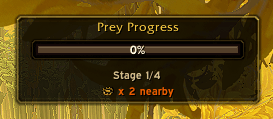
EasyPreyProgress is a compact World of Warcraft addon that shows a clean progress bar for your active Prey Hunt.
Prey.png
Description
EasyPreyProgress
EasyPreyProgress is a compact World of Warcraft addon that shows a clean progress bar for your active Prey Hunt.
It is designed to stay readable during normal gameplay, avoid unnecessary clutter, and surface the most useful hunt information at a glance.
Features
- Compact Blizzard-inspired Prey Hunt progress bar
- Live percentage tracking when Blizzard provides it
- Stage fallback display when no live percentage is available
- Simple
Stage X/4readout - Nearby trap text when detected
- Nightmare hunt warning text for
Echo of PredationandBloody Command - Stage-based bar coloring
- Appearance options for scale, width, theme, title, percentage text, trap text, and warning text
- Theme presets:
Blizzard Gold,Dark Minimal, andPredator Red - Reset buttons for position and appearance
- Optional zone-only visibility
- Optional display without an active Prey Hunt for setup and positioning
- Optional hiding of the default Blizzard Prey widget
- Shift-drag repositioning without lock/unlock commands
- Native in-game options panel
- Saved position and settings
Slash Commands
/epp optionsopens the options panel/epp showforces the addon to stay visible/epp hidehides the addon/epp resetrestores the default position and settings/epp zonetoggles zone-only visibility/epp blizztoggles hiding the Blizzard Prey widget
Options Panel
Open the in-game options panel with /epp options.
Available options include:
- Show or hide the bar
- Show the bar without an active Prey Hunt for setup and positioning
- Only show in the active Prey zone
- Hide the default Blizzard Prey widget
- Adjust scale and width
- Select a visual theme
- Show or hide the title, percentage text, trap text, and warning text
- Reset position or appearance
Installation
- Place the
EasyPreyProgressaddon folder inside yourWorld of Warcraft/Interface/AddOns/directory. - Start the game or run
/reload. - Enable
EasyPreyProgressfrom the AddOns list if needed.
Notes
- The addon prefers live Blizzard data when available.
- When Blizzard does not expose a true live percentage, the bar falls back to stage-based progress.
- Stage 1 starts at
0%, followed by33%,66%, and100%for later fallback stages.
Version
Current release: 1.1.2
The EasyPreyProgress Team