Easy Space Maker
- By
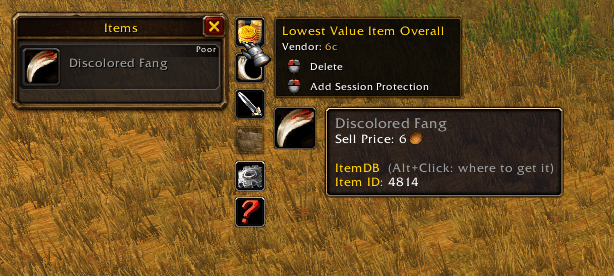
The general UI the player interacts with for the purpose of deleting or protecting items in their bags.
Description
AI Assistance Disclosure:
Easy Space Maker was designed and developed by The Mustached King with assistance from OpenAI's ChatGPT throughout the development process, including code implementation, troubleshooting, and feature refinement.
No generative AI was used to create any images, artwork, or audio assets for this addon. All custom visual assets were created by hand, and audio functionality uses World of Warcraft's built-in sounds or user-provided custom audio.
Easy Space Maker
Less inventory management. More time playing World of Warcraft!
Ever find yourself out questing, farming, or running dungeons when suddenly your bags are full? Now you have to stop what you're doing, open your inventory, and figure out which items are worth keeping and which ones belong in the trash.
Easy Space Maker was created to solve exactly that problem!
Designed for World of Warcraft: Forever, Easy Space Maker provides a quick, convenient, and highly customizable way to identify and delete your lowest-value inventory items directly from the loot window.
Instead of manually searching through your bags, Easy Space Maker does the searching for you!
Features
Six Item Deletion Categories
Easy Space Maker adds six customizable category icons alongside your loot window, each identifying the lowest-value eligible item in your inventory.
- Lowest Value Item Overall — Your lowest-value eligible item, regardless of category.
- Lowest Value Junk — The least valuable poor-quality (gray) item.
- Lowest Value Equipable — The least valuable piece of equipment.
- Lowest Value Food — The least valuable food or drink item.
- Lowest Value Crafting — The least valuable crafting material.
- Lowest Value Other — The least valuable item outside the other specialized categories.
Items are ranked by the total vendor value of their current stack, not just their individual value.
Quick and Convenient Item Management
Left-click: Delete the suggested item, subject to your configured confirmation and safety settings.
Right-click: Add the item to Session Protection, preventing it from being suggested again during your current session.
Hover over a category icon to view detailed item information, including vendor value, stack information, and optional auction pricing.
The interface automatically adjusts its position depending on which side of the screen your loot window occupies.
Protected Items and Deletion Safeguards
Don't want to accidentally delete something important? Neither did I!
Easy Space Maker includes several layers of protection:
- Permanently protect specific items from deletion suggestions.
- Temporarily protect items using Session Protection.
- Ignore all quest items.
- Ignore items with zero vendor value.
- Enable or disable deletion confirmation.
- Configure additional warnings based on item quality.
- Maintain separate quest-item deletion warnings.
- Search, filter, and sort your Protected Items list.
The addon also rechecks the intended item before deletion to help prevent deleting the wrong item if your inventory changes.
Deletion confirmation is enabled by default.
Extensive Visual Customization
Make Easy Space Maker look and behave the way you want!
- Customize all six category icons individually.
- Browse thousands of WoW icons through the build in icon browser.
- Search icons by filename, keyword, or texture ID.
- Filter icons by equipment type, consumables, spells, and more.
- Optionally display the actual item-to-be-deleted as the category icon.
- Customize icon sizes, spacing, borders, and colors.
- Adjust information-panel scaling and appearance.
- Use a live preview to experiment with your settings.
Each category can use its own selected icon, with optional dynamic item icons and automatic fallback.
Inventory and Loot Window Options
- Optionally show category icons only when your bags are completely full.
- Display individual item values and optional maximum stack values.
- Automatically position category buttons beside your loot window.
- Customize minimap-button positioning.
- Access settings directly through the minimap button.
Auction Pricing Integration
Easy Space Maker supports optional pricing information from:
Auctionator
Display auction pricing alongside vendor values, including database-update information when available.
TradeSkillMaster (TSM)
Optional integration for additional pricing information where a compatible version is available.
Auction pricing is informational. Item deletion recommendations are ranked using vendor values.
Audible Feedback
Add a little personality to your inventory cleanup!
- Choose different sounds for item deletion and Session Protection.
- Select from built-in World of Warcraft sound effects.
- Add your own custom MP3 or OGG sounds.
- Configure whether feedback uses Master Audio or the normal Sound Effects channel.
- Disable audible feedback entirely if you prefer.
Custom sound files can be placed in the addon's Sounds folder. See the included README for supported filenames and instructions.
Getting Started
After installing Easy Space Maker, simply open a loot window!
The six category icons will appear beside it, showing the lowest-value eligible items currently in your inventory.
Left-click an icon to initiate deletion, or right-click to temporarily protect the suggested item.
Hover over an icon for additional information before making your decision.
Accessing Settings
Open the World of Warcraft Options menu and navigate to:
Options → AddOns → Easy Space Maker
You can also use:
- /esm options
- /esm config
- The Easy Space Maker minimap button
Settings are divided into three main sections:
General — Core behavior, minimap, auction pricing, visibility, and audio settings.
Visual Customization — Icons, borders, colors, sizing, and live preview.
Protected Items — Permanent protections, Session Protection management, item filtering, and deletion safeguards.
Recommended Optional Addons
Easy Space Maker works independently, but the following addons can enhance its functionality.
ItemDB Forever + Ace3
Recommended for expanded item searching.
ItemDB Forever provides a broader item database for finding and protecting items that may not already be cached by the WoW client.
The ItemDB Forever build tested during development requires the Ace3 library. Install both if you want expanded item searching.
Without ItemDB, Easy Space Maker still supports direct item IDs, item links, and searches among items known to the client.
Auctionator
Optional integration providing auction pricing and database-update information.
TradeSkillMaster (TSM)
Optional pricing integration, subject to compatibility with World of Warcraft: Forever.
None of these addons are required for Easy Space Maker's core item-deletion functionality.
Important Notes
- Designed for World of Warcraft: Forever. Compatibility with other client versions is not guaranteed.
- Easy Space Maker uses total vendor stack value when choosing deletion candidates.
- Session Protection is temporary and resets between sessions.
- Permanent Protected Items persist between sessions.
- Deletion confirmation is enabled by default.
- Deleted items cannot be restored by Easy Space Maker.
- Always review your deletion settings before disabling confirmations.
A Message from the Creator
Hello, and thank you for using Easy Space Maker!
I originally developed this addon for personal use, with assistance from ChatGPT. I never intended to release it publicly, but after some encouragement from friends, I decided to share it with the community.
The idea was simple: I wanted to spend less time digging through my bags and more time actually playing World of Warcraft: Forever.
What started as a simple inventory-cleanup tool gradually grew into something much more comprehensive. I've always been a firm believer in giving people options, and that philosophy became a driving force behind Easy Space Maker.
I'm not a professional addon developer, nor do I have any ambition to become a full-time one. I built this because I wanted a better experience for myself, and I'm sharing it in the hope that others might find it useful too!
If you enjoy the addon, consider recommending it to your friends!
If you have a genuine suggestion, feel free to leave it here on CurseForge. I can't promise I'll agree with or implement every idea, but I'm always curious about what other players would like to see.
And if you have ethical concerns about how this addon was developed, by all means, make something better! Save me the time and effort of developing and maintaining it! LOL!
Addons are one of the wonderful things about World of Warcraft. They allow players to improve the experience for themselves and others, and sometimes a fresh perspective can lead to improvements someone else hadn't considered.
Thank you again for trying Easy Space Maker. I hope it helps you spend less time managing your inventory and more time enjoying Azeroth!
Regards,
The Mustached King
Easy Space Maker was developed by The Mustached King with assistance from ChatGPT.
Easy Space Maker Team