


Easy Loadouts
- By
KépernyÅkép 2026-10-10 223220.png
Description
Easy Loadouts
Save your click-cast bindings, action bars and gear set as loadouts and swap between them – like heal and DPS – with one click.
Healing in a group but questing solo? Tired of rebuilding your click-casting, your bars and your gear every time you switch roles? Easy Loadouts saves your whole setup and puts it back with a single click.
Made for WoW: Forever. Other game versions are not supported.
Features
- One-click switching. Every loadout is a button on a small bar. Click it to load the loadout.
- Click-cast bindings. Saves Blizzard's built-in Click Casting setup: spells, macros, target and menu clicks, with all modifiers.
- Action bars (optional). Tick "Save action bars too" and the loadout also remembers everything on your action bars: spells, macros, items and equipment sets.
- Exact spell ranks. A spell comes back in the rank you saved, so downranking stays intact.
- Your macros, not look-alikes. Macros are found by name and content, so the right one comes back even after you add or delete macros.
- Empty slots in the loadout are cleared. Anything that can't be put back (for example a deleted macro) is reported in chat, and its slot is left alone.
- Gear (optional). Pick one of your Equipment Manager sets for the loadout, and it is equipped when the loadout loads. Leave it on "- None -" and your gear stays as it is.
- Combat safe. WoW doesn't allow these changes during combat, so a click in combat queues the loadout: it glows yellow and loads the moment combat ends. Click it again to cancel.
- Always know what's active. The current loadout has a green border; the others are dimmed.
- Stays out of the way. Only the buttons stay visible; the frame and the names fade in when you mouse over the bar.
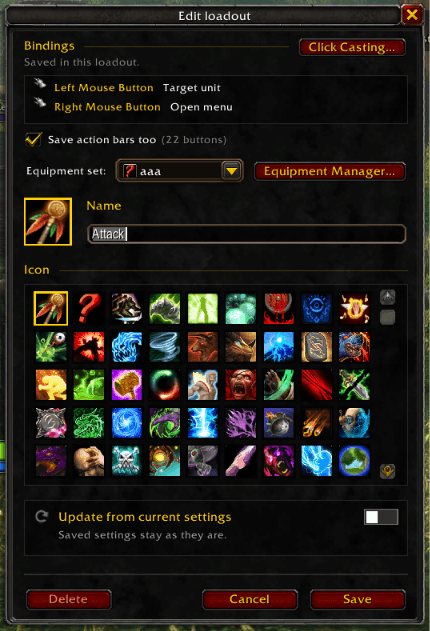
- Easy editor.
- Pick an icon. The first ones offered are your bound spells, and macros with
#showtooltipshow the spell they cast. - Rename or delete a loadout.
- Update from current settings: flip the switch to overwrite a loadout with your current click-casting (and action bars). It tells you what will be replaced before you save.
- Open Blizzard's Click Casting window or the Equipment Manager with one button.
- Pick an icon. The first ones offered are your bound spells, and macros with
- Per character. Each character has its own loadouts.
Gear protection
Items in your equipment sets are easy to lose by accident. Easy Loadouts watches out for them:
- Sold one to a vendor? A popup tells you which set it belongs to and offers to buy it back with one click.
- Disenchanting one? A big red warning and a sound appear as the cast starts, so you can move or press Esc to cancel it.
The game doesn't let addons block selling or disenchanting, so Easy Loadouts warns you and helps you undo instead.
How to use
- Set up your click-casting in Blizzard's Click Casting window, arrange your action bars, and if you want gear switching, create an equipment set in the Equipment Manager.
- Click the + on the Easy Loadouts bar, name your loadout and choose an icon. Decide whether to save the action bars too and which equipment set to use, then click Save.
- Set up your other role and save it as a second loadout.
- To switch, click a loadout's button.
Mouse actions on a loadout button:
- Left click: load
- Right click: edit or delete
- Drag the bar: move it
Commands
| Command | |
|---|---|
/lo |
Show or hide the bar |
/lo new |
New loadout |
/lo reset |
Move the bar back to the center |
Notes
- Loadouts can only be applied out of combat (a WoW restriction). Clicks during combat are queued.
- Equipment sets are remembered by name. If you rename or delete a set, the editor shows it as "(not found)". Pick the set again.
- Pet bar, flyouts and mounts on the action bars are not saved. Slots holding them are left untouched.
- Hold nothing on your cursor while switching. If you do, the action bars are not changed and you are told why.
Feedback and bug reports are welcome. Please include what you clicked and any chat message the addon printed.
Easy Loadouts Team
