




Description
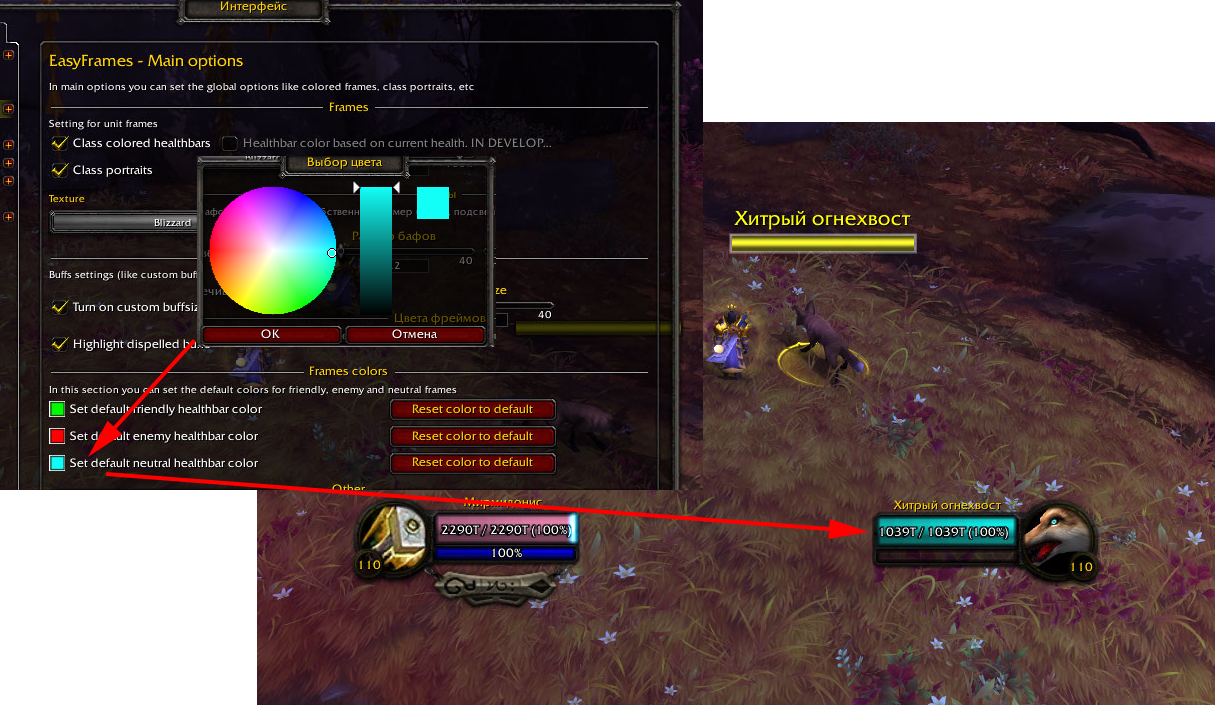
Make your unit frames colored and glorious.
Easy Frames is a fork of GhettoFrames, but only a visual one: all the code is written from scratch.
Works with World of Warcraft: Midnight and World of Warcraft: Forever. The list below is for the current version of the game. The Forever version (the 1.x files) has almost all the same options (Forever has no specializations, so there is no specialization icon portrait), with the frames fitted to Forever's art. Easy Frames is also available for the Classic versions of the game: see the Files tab.
To open the options window, type /ef or /easyframes.
Features
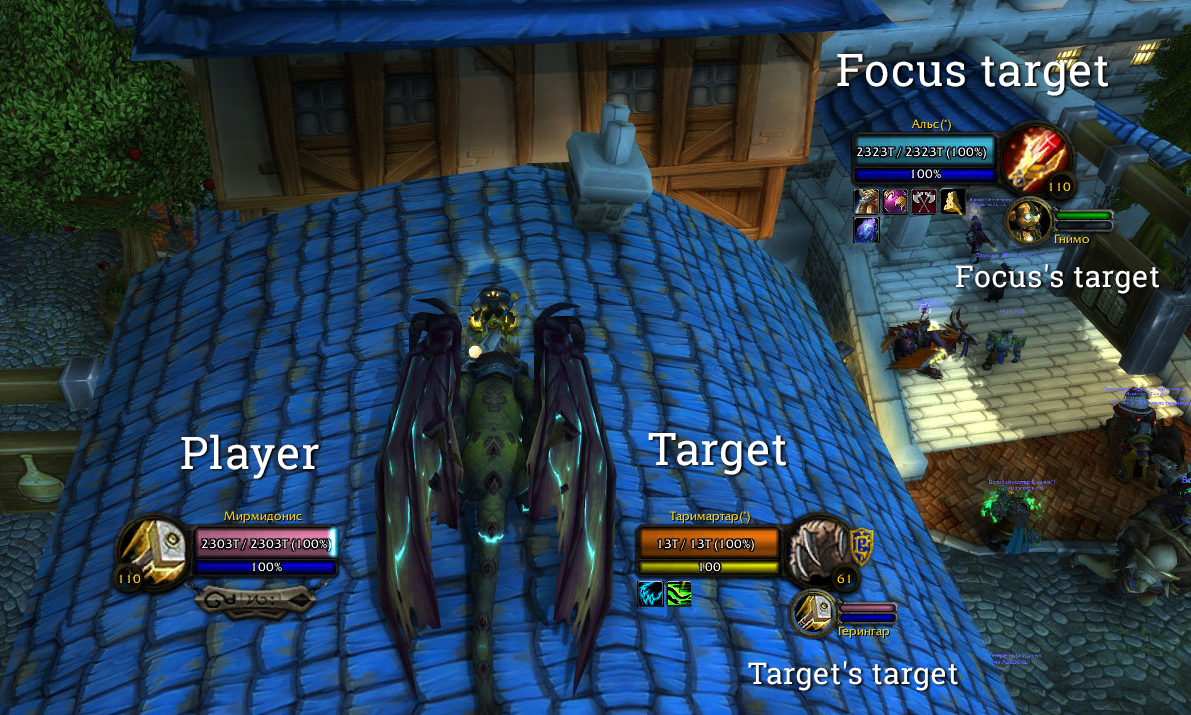
- Player, target, focus, pet, party and boss frames
- Class-colored health bars, or health bars colored by the current health
- Class portraits (old or new style) or the specialization icon instead of portraits
- A dragon around the portrait of your character (elite, rare elite or boss), like the one the target frame has
- The icon of an important aura in the portrait of the target and the focus: a big defensive effect, a crowd control effect (a stun, for example) or an external defensive effect, with the countdown
- Changeable bar texture, brightness of the frame border, and the opacity of the dark layer behind the empty part of the bars (as in Blizzard's own frames)
- Text format and fonts of the health, mana and alternate power bars, including your own custom format
- Hide the frames out of combat, with the opacity you choose
- Custom buff size, a limit of the displayed buffs and debuffs, show only your own debuffs
- Show or hide the elements of the frames: the name, the class resource bar, the rest, PvP and role icons, the group number, hit indicators, the threat indicator, the combat texture and more
- Show or hide Blizzard's target and focus cast bars
- Show the name of the player, target and focus inside the frame, over the health bar
- The options are translated into all the languages of the game, and you can switch to English
The size and the position of the frames are set in Blizzard's Edit Mode.
Format of the health and resource text
- Current + Max
- Current + Max (abbreviated)
- Custom: your own text
You can also change the font, its style and its size for the health, mana and alternate power bars.
Important! For this feature you need to turn on (in the game settings) Options → Interface → Display → Status Text → Numeric Value.
Custom format
Choose Custom in the text format list of the health, mana or alternate power bar, and write your text in the Text field. These words are replaced by values:
%CURRENT%: the current value%MAX%: the maximum value%PERCENT%: the percent%PERCENT_DECIMAL%: the percent with one decimal
Everything else is shown as you write it. Examples for 393 800 of 1 230 000 health, with the default thresholds of Custom number shortening:
| Text | Shown |
|---|---|
%CURRENT% / %MAX% (%PERCENT%%) |
393k / 1.2M (32%) |
%CURRENT% (%PERCENT_DECIMAL%%) |
393k (32.0%) |
%PERCENT%% |
32% |
How the numbers are shortened:
- By default, the way the game does it in the language of your client: K and M in English, 万 and 亿 in Chinese, 만 and 억 in Korean.
- Show full numbers: the numbers are not shortened.
- Custom number shortening: your own suffix and number of decimal places (0, 1 or 2) for each threshold: from 1 000, 100 000, 1 000 000, 10 000 000, 100 000 000 and 1 000 000 000. The defaults are k, k, M with one decimal place, M, M and B. The extra digits are cut off, not rounded, and a zero at the end is not shown: 495 060 with one decimal place is shown as 495k.
The custom format of an older version of Easy Frames is converted automatically: your text and your formulas (such as %.1fM) are kept.
Localization
Easy Frames is translated into all the languages of the game: English, Russian, German, Spanish (Spain and Latin America), French, Italian, Korean, Brazilian Portuguese, Simplified Chinese and Traditional Chinese.
The translations were made with AI and use the terms of the official game client. If something sounds wrong in your language, please write me a message or a comment on this page: corrections are welcome.
If you prefer English, open the options (/ef), General tab, and choose English in the Language list.
Bug reports
If you found a bug, please check this first: disable all the addons except Easy Frames. Does the bug still exist? If yes, create an issue at https://www.curseforge.com/wow/addons/easy-frames/issues, and don't forget to attach:
- the file
World of Warcraft\_retail_\WTF\Account\ACCOUNT_NAME\SavedVariables\EasyFrames.lua(ACCOUNT_NAME is the name of your account folder; for Forever the folder is_forever_instead of_retail_) - the text of the error, if the game shows one (for example from BugSack)
- screenshots
Thank you
If you liked this addon, you can donate, or write a comment with the words "Thank you" on the project page (it is really appreciated).
Easy Frames Team

