DynamicMarker (formerly FocusMarker)
- By
One-button focus target marking, F4/F5 ground flare keybinds, floating HUD bars, and an auto-swapping multi-spec interrupt macro for WoW Retail (12.1.5+).

Screenshot 2026-11-14 175456.png
Screenshot 2026-11-14 175326.png
Screenshot 2026-11-14 175348.png
Screenshot 2026-11-14 175359.png
Description
DynamicMarker -- Raid Target Icons, World Flares & Smart Interrupt Macros
Target Client: World of Warcraft Retail Midnight 12.1.5 (Interface 120105) | Author: Dentee-Frostmourne
DynamicMarker (/dm, /fm) is a fast Mythic+ and Raid utility addon for instant target marking, cursor-placed world flares, floating icon and flare bars, and smart focus/interrupt macros across all 13 classes. Use it standalone or as part of the full 8-module DynamicSuite bundle.
Upgrading from FocusMarker?
DynamicMarker is the official Midnight 12.1.5 successor to FocusMarker.
- Automatic Settings Import: On first login, DynamicMarker safely imports your saved FocusMarker bar positions, scale, opacity, visibility rules (Always, Group, or Off), orientation, and custom icon/flare orders without touching your original backup.
- Automatic Macro Upgrade: Any existing [FocusMarker] or [FocusMark] macro on your action bars is upgraded in-place to [DynamicMark].
- One-Click Cleanup & Re-Import: If FocusMarker is still enabled, Guided Setup lets you import and disable it in one click. You can also run
/dm importor/dm import statusout of combat anytime.
30-Second Quick Start ([DynamicMark] & [DynamicKick])
Open /dm and go to the Macro Setup tab (or click Guided Setup in the sidebar):
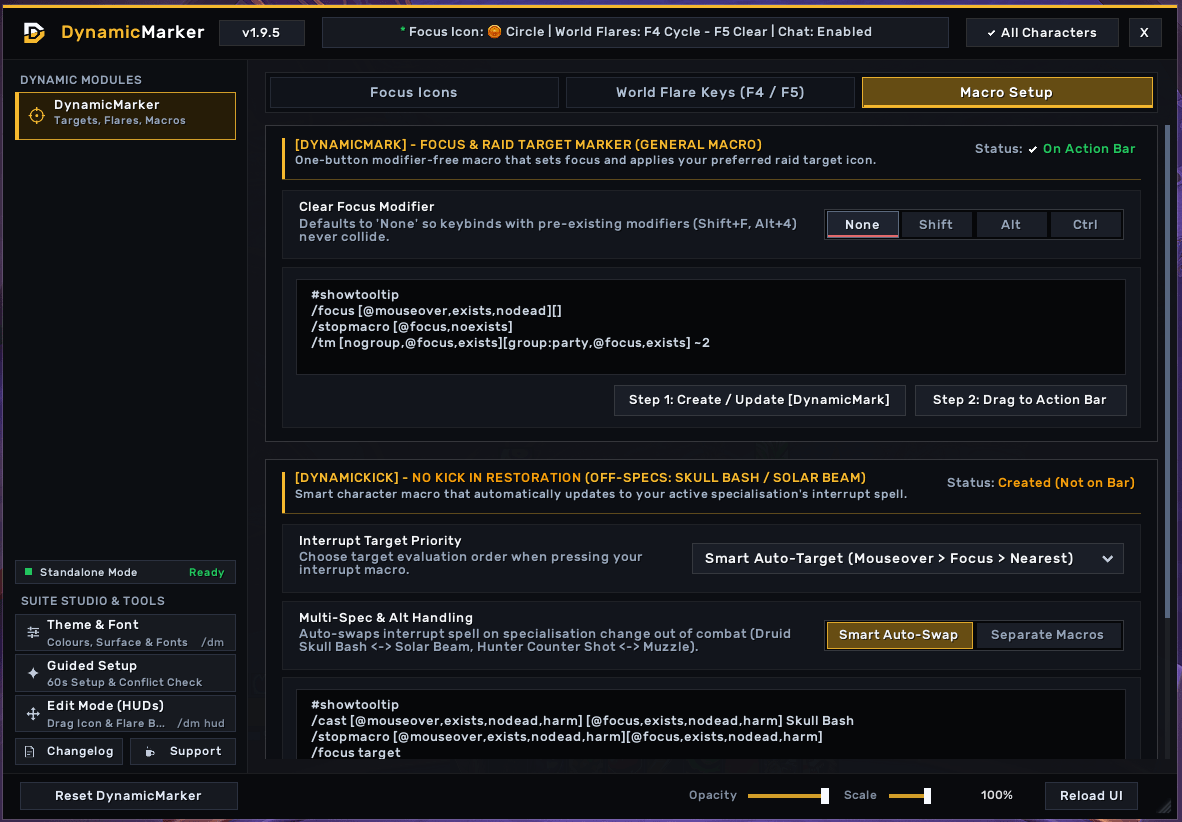
- [DynamicMark] (Account-Wide Target & Focus Macro):
- One-Key Focus & Mark: Click Create / Update and drag the macro onto any action bar slot.
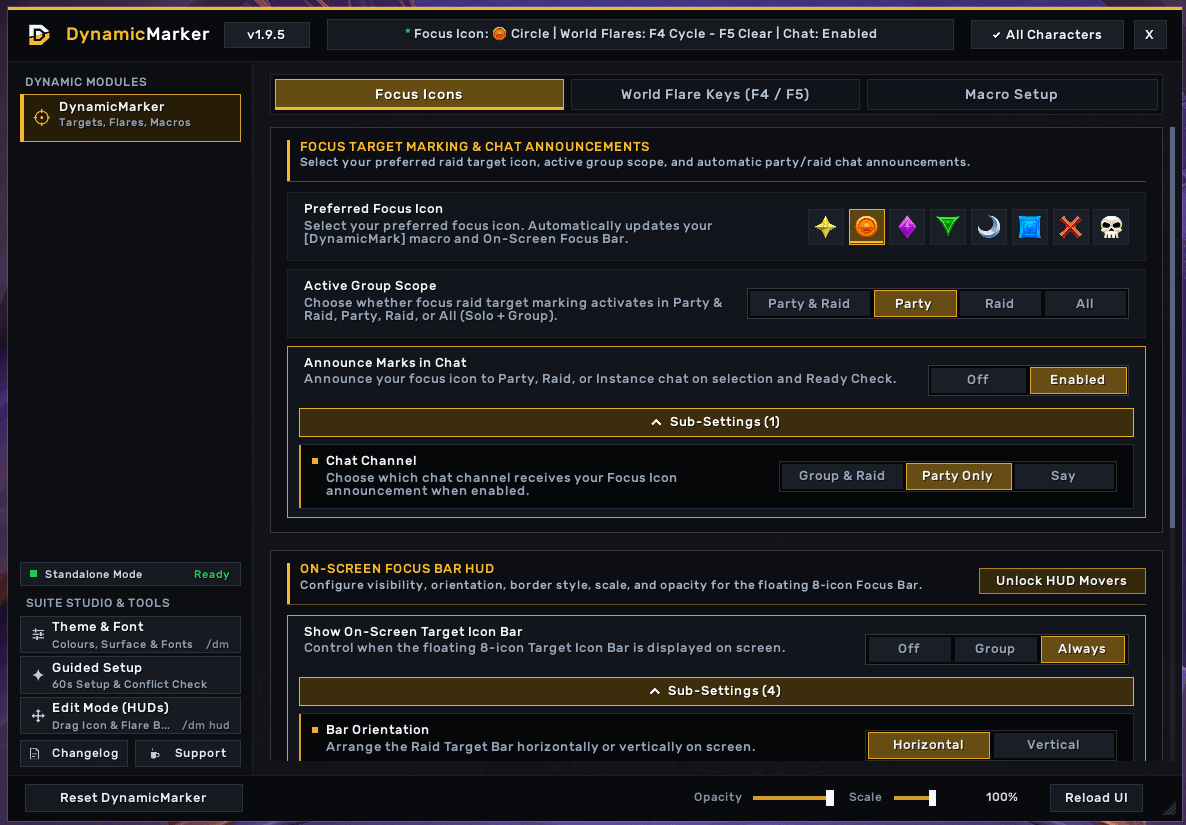
- Modifier-Free Marking: Sets your focus on mouseover or current target and applies your chosen Raid Target Icon (Skull by default) with no modifier keys required.
- Chat & Ready Check Alerts: Optionally announce marks to Party, Raid, or Say (
/dm mutetoggles Silent Mode instantly) and get Ready Check mark reminders.
- [DynamicKick] (Per-Character Auto-Swapping Interrupt Macro):
- Auto-Swaps Across All 13 Classes: Automatically updates your interrupt spell whenever you switch specialisations or talents out of combat.
- 4 Interrupt Priority Modes: Choose between Smart Auto-Target (Mouseover > Focus > Nearest), Mouseover > Focus > Target, Focus > Mouseover > Target, or Strict Focus Only.
World Flares & On-Screen HUD Bars
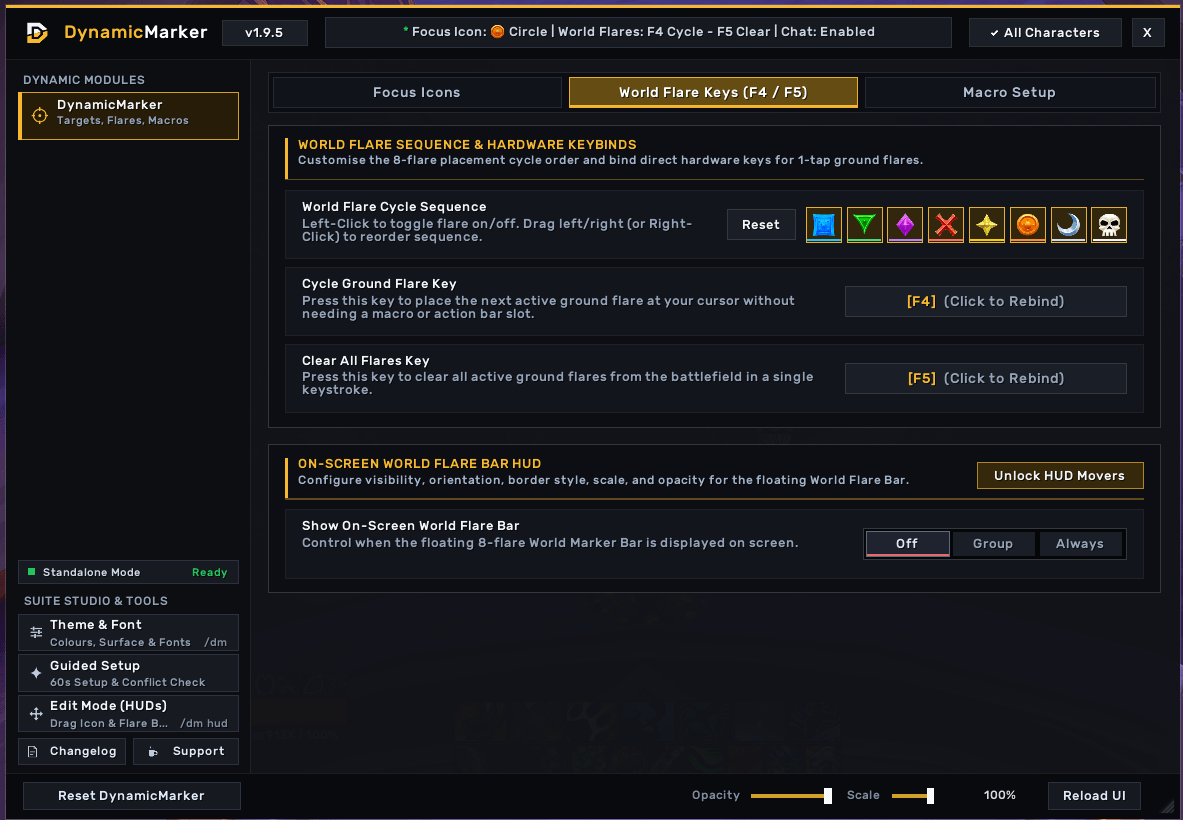
- One-Key Ground Flares (F4 / F5): Press F4 (customisable) to place world markers at your cursor in your chosen order, and press F5 (customisable) to clear all active flares.
- Customisable Flare Cycle: Drag and reorder any of the 8 world markers in the World Flare Keys tab and toggle individual markers on or off.
- Floating Focus & Flare Bars: Show each bar Always, in Group only, or Off; switch between Horizontal and Vertical layouts; and customise border styles, Scale, and Opacity.
HUD Edit Mode (/dm hud)
Type /dm hud (or click Edit Mode (HUDs) in the sidebar) to position your floating bars anywhere on screen:
- Smooth Scale-Aware Dragging: Drag the Icon Bar and Flare Bar cleanly at any bar scale (60%-150%) with live X, Y, and Scale readouts.
- Magnetic Edge & Bar Snapping: Bars snap cleanly to screen edges, screen centres, and neighbouring bars with alignment guides (hold Shift to fine-tune freely), and stay clamped inside your screen bounds.
- Mousewheel Scaling & Precision Controls: Scroll over a bar in Edit Mode to scale it (60%-150% in 5% steps), nudge by 1px or 10px, type exact X/Y coordinates, or reset anytime with
/dm resethud.
Obsidian Theme & Font Studio
- Custom Colours & Surfaces: Pick from 5 built-in accent themes (including Player Class Colour), 4 dark surface palettes, and adjustable font scaling.
- Quick Window Controls: Adjust standalone window Opacity (50%-100%) and Scale (80%-120%) or trigger Reload UI from the bottom-right dock.
Part of DynamicSuite
Want 7 more lightweight QoL and performance modules in one unified window? Check out DynamicSuite on CurseForge (https://www.curseforge.com/wow/addons/dynamicsuite), which includes DynamicLoad, DynamicPrep, DynamicMarker, DynamicZoom, DynamicFPS, DynamicGroup, DynamicBags, and DynamicChat.
- Automatic Coexistence: If you install DynamicSuite later, DynamicSuite automatically disables standalone DynamicMarker and prompts a clean UI reload so you never lose settings or see duplicate bars.
Slash Commands
| Command | Action |
|---|---|
/dm or /dynamicmarker |
Open or close the DynamicMarker window (also /fm or /focusmarker) |
/dm hud, /dm edit, /dm move |
Toggle HUD Edit Mode |
/dm unlock |
Unlock HUD Edit Mode movers |
/dm lock |
Lock HUD Edit Mode movers and save positions |
/dm flares |
Open directly to the World Flare Keys (F4 / F5) tab |
/dm macros |
Open directly to the Macro Setup tab |
/dm mute or /dm silent |
Toggle Focus Mark chat announcements On or Muted |
/dm show |
Set the On-Screen Focus Bar HUD to Always Shown |
/dm hide |
Hide the On-Screen Focus Bar HUD |
/dm import |
Re-import settings from FocusMarker out of combat |
/dm import status |
Print FocusMarker import status in chat |
/dm reset |
Reset DynamicMarker settings to defaults |
/dm resethud |
Reset Icon Bar and Flare Bar positions to safe screen defaults |
/dm help |
Print slash command help in chat |
Support & Contact
- Standalone CurseForge: https://www.curseforge.com/wow/addons/dynamicmarker
- Full Suite CurseForge: https://www.curseforge.com/wow/addons/dynamicsuite
- Direct Contact & Feedback: denteedev@gmail.com
- Optional Tip Jar (Ko-fi -- all features are 100% free): https://ko-fi.com/dentee

DynamicMarker (formerly FocusMarker) Team