


Dynamic Ambiance
- By
Dynamically changes values smoothly for visual ambiance between zones and areas, with a map editor and shareable presets.
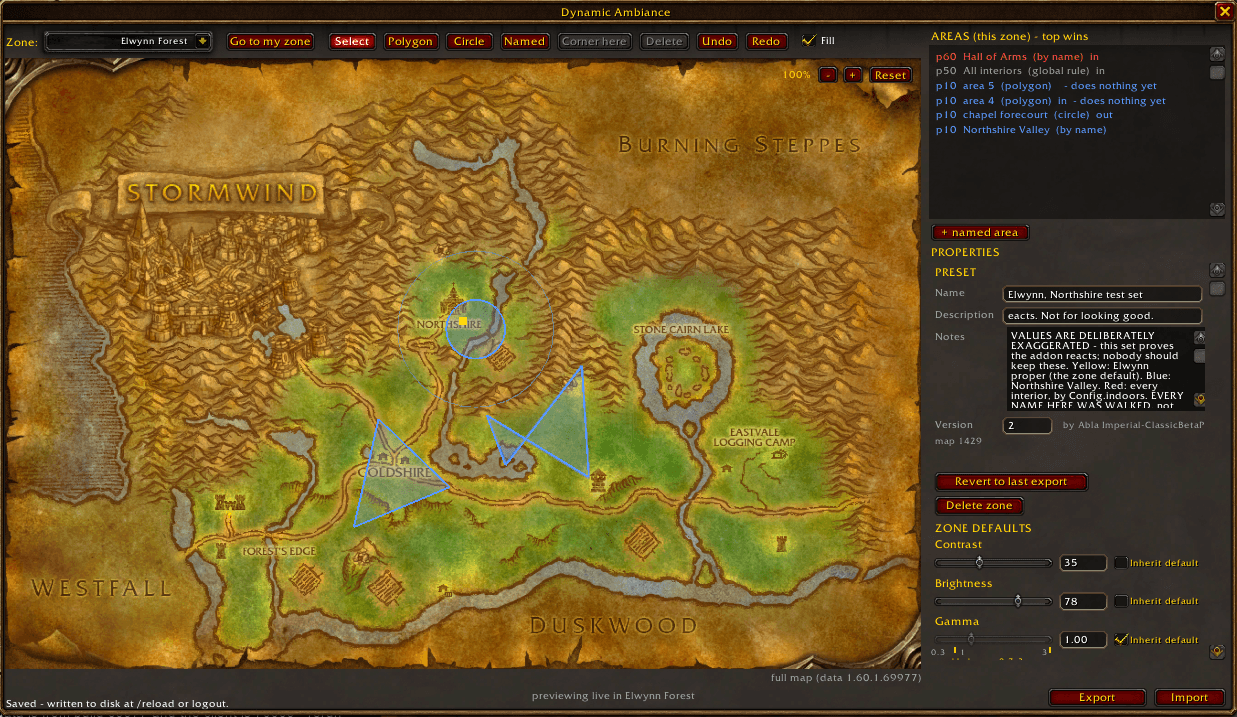
dynamicambianceforeverui.png
Description
Dynamic Ambiance
Sets your display brightness, contrast and gamma from where you are standing. You choose the values once per zone, and per area within a zone, and the addon eases between them as you move. Walking from Duskwood's canopy into Westfall at noon no longer means opening the graphics panel.
| Where | Contrast | Brightness |
|---|---|---|
| Duskwood (zone default) | 60 | 40 |
| Raven Hill | 65 | 32 |
| Darkshire | 55 | 48 |
| Westfall | 50 | 55 |
Features
- Smooth transitions. Crossing a boundary takes about a second and never snaps or flickers.
- Map editor (
/amb ui). Draw polygon and circle areas on the zone map, or add a subzone by name. Set contrast, brightness and gamma for each, order them by priority, and preview live. Every edit is saved as you make it. Undo and redo included. - Indoor / outdoor rules. An area can apply indoors only or outdoors only.
- Instance auto-toggles. Steps back in dungeons, raids and battlegrounds, each switchable.
- Sharing presets. Export a zone as a plain-text string and import one from another player. An import previews on your screen first and applies nothing until you accept.
- Safe. Your normal display settings come back when you log out.
Requirements
- WoW: Forever beta, build 1.60.1.70009 or later. Earlier beta builds do not keep addon settings between sessions.
- No other addons or libraries.
Quick start
- Log in.
/ambshows what the addon is doing. - Stand somewhere that looks wrong and type
/amb try 60 40(contrast, brightness, optional gamma) until it looks right./amb autoreleases it. /amb uiopens the editor. Pick the zone, draw an area or add a subzone, and give it the values you settled on.- Walk around.
/amb debugprints one line per change, so you learn what the subzones on your route are called.
The addon ships with one example zone, Elwynn Forest, with deliberately exaggerated values to show that it works. Change it or delete it in the editor.
Main commands
| Command | What it does |
|---|---|
/amb |
Current mode, zone, subzone and target |
/amb ui |
Open the editor |
/amb try 60 40 [gamma] |
Hold values so you can look at them |
/amb auto |
Follow the map again |
/amb on / /amb off |
Turn the addon on or off |
/amb export / /amb import |
Share a zone preset |
/amb settings |
Toggles, including instance auto-toggles |
/amb help |
Full command list in game |
Credit
The idea is Fabqt's: changing contrast and brightness per zone and per area within a zone.
Links
- Source and issues: https://github.com/imperial64/dynamic-ambiance-forever
- Support the addon: https://buymeacoffee.com/imperial64
MIT License.
The Dynamic Ambiance Team
