


screenshot.png
Description
Duolingwow
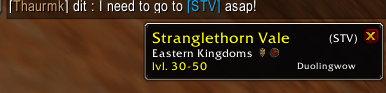
World of Warcraft addon that detects common chat abbreviations (zones, dungeons, raids, battlegrounds, cities) and shows a tooltip when you click the link.


Features
- Chat tooltips : click a recognized term (e.g.
BRD,AQ40,STV,Shat) to see the full name, zone, level, extension and type. - Multi-language : choose which languages to show (English, Français, Deutsch). Each entry can display in the enabled languages.
- Extension filter : enable or disable Vanilla and The Burning Crusade; only matching abbreviations are shown and become clickable.
- Zone type filter : enable or disable Raid, Dungeon, Zone, Battleground, City, Arena.
- Custom link color : set the color of clickable abbreviation links in chat (options).
- Commands :
/dl help,/dl status,/dl lang,/dl extension,/dl typeto manage languages, extensions and zone types.
Configuration
Interface → Chat → Duolingwow
- Languages : multi-select to enable or disable English, French and German in tooltips.
- Extensions : multi-select to enable Vanilla and/or The Burning Crusade (only enabled extensions are shown).
- Zone types : multi-select to enable Raid, Dungeon, Zone, Battleground, City, Arena (only enabled types are shown).
- Chat link color : button to choose the color of abbreviation links in chat (with preview).
Commands
All commands use the prefix /dl. Unknown commands print the help.
| Command | Description |
|---|---|
/dl help |
Print all available commands in chat. |
/dl status |
Print currently enabled languages, extensions and zone types. |
Languages — control which languages appear in tooltips:
| Command | Description |
|---|---|
/dl lang enable <lang> |
Enable a language in tooltips. |
/dl lang disable <lang> |
Disable a language in tooltips. |
Accepted values for <lang>: EN, FR, DE (case-insensitive).
Extensions — control which expansions are shown (Vanilla, The Burning Crusade):
| Command | Description |
|---|---|
/dl extension enable <extension> |
Enable an extension; its abbreviations are shown and clickable. |
/dl extension disable <extension> |
Disable an extension; its abbreviations are hidden and not clickable. |
Accepted values for <extension>:
- Vanilla (alias: Classic)
- TBC / The Burning Crusade / Burning Crusade (any string containing "Burning" or "Crusade" is accepted)
Zone types — control which kinds of zones are shown (Raid, Dungeon, Zone, Battleground, City, Arena):
| Command | Description |
|---|---|
/dl type enable <type> |
Enable a zone type. |
/dl type disable <type> |
Disable a zone type. |
Accepted values for <type>: Raid, Dungeon, Zone, Battleground, City, Arena. You can use the English name or the name in your game language (e.g. Donjon, Schlachtfeld).
Included abbreviations
Dungeons, raids, battlegrounds, arenas, cities and zones for Vanilla and The Burning Crusade (Eastern Kingdoms, Kalimdor, Outland). Examples: BRD, UBRS, LBRS, MC, AQ20, AQ40, STV, COT, HFR, BF, SH, SP, SV, DM, ZF, ONY, Shat, WSG, AV, AB. Only entries matching your enabled extensions and zone types are shown and turned into clickable links.
Project structure
DuoLingWoW/
├── DuoLingWoW.toc    # Addon metadata + IconTexture
├── core.lua          # Chat detection, tooltips, commands, filters
├── options.lua       # Options panel (Interface)
├── localization.lua # UI strings EN / FR / DE
├── dictionary_en.lua # Abbreviation dictionary → English
├── dictionary_fr.lua # Abbreviation dictionary → Français
├── dictionary_de.lua # Abbreviation dictionary → Deutsch
├── logo.tga          # Logo (options + addon list)
└── README.md
Future ideas
- Map labels : show abbreviations on the world map by appending them to existing zone names.
- WotLK and later : add expansion filter options and dictionaries for WotLK, Retail, etc.
- Server language : abbreviations could follow the server’s language (e.g. on EN servers SW = Stormwind; on FR servers HV = Hurlevent). Right now all abbreviations are English-only.
Author
Poro
GitHub: github.com/poro/duolingwow
The Duolingwow Team
