DungeonSweeper
- By
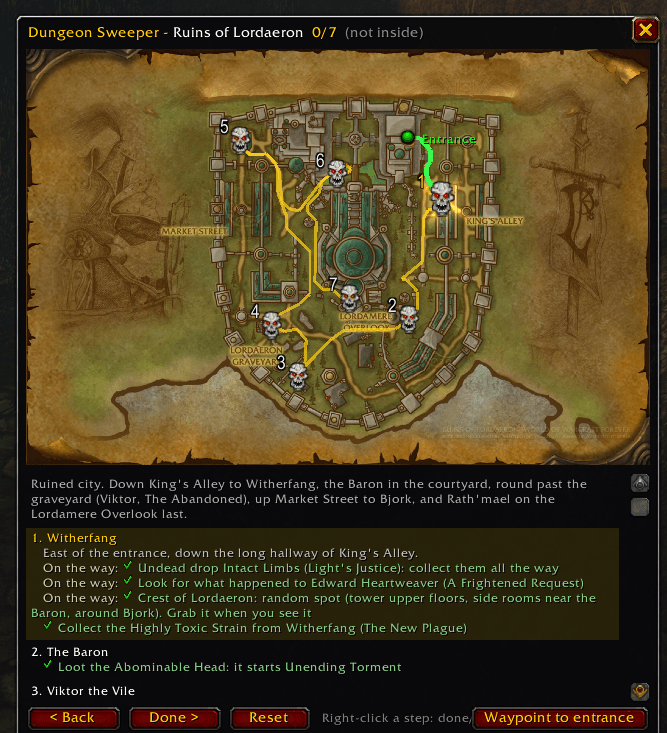
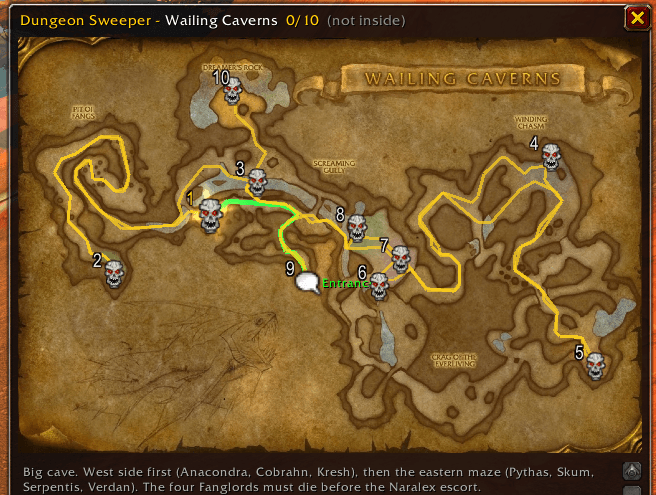
Never miss a boss, quest or quest item again. Dungeon Sweeper guides you through every WoW Forever dungeon in an efficient order, with a path on the dungeon map, auto-zoom per step and a group mode. Requires ForeverDungeonJournal.
2026-11-15 09_07_41-World of Warcraft.png
2026-11-15 08_29_30-World of Warcraft.png
Description
Dungeon Sweeper
Never miss a boss, quest or quest item again. Dungeon Sweeper guides you through every WoW Forever dungeon in an efficient order, with a path on the dungeon map, a little like RestedXP or TomTom but for inside the instance.
Requires ForeverDungeonJournal. Works with TomTom and Questie (optional).
When it opens and closes
- Entering a dungeon: the dungeon is detected automatically, a new run starts and the window opens in compact mode (just the map and a small "next step" bar).
- Leaving the dungeon: the window expands again and shows the quests you still need to turn in.
- Outside: preview any route with
/dsw <name>(e.g./dsw wc) or via the minimap button. - Runs are remembered until you've been away for 30 minutes or press Reset.
What's on the map
- The route: numbered points (bosses, quest NPCs, search spots) connected by lines that follow the dungeon's corridors, not straight lines.
- The leg you're on is shown in green, from your last completed point to the next one.
- Auto-zoom: after every step the map zooms onto that one leg. Fit zooms back in, and you can zoom and pan yourself.
- Search spots (e.g. the 5 possible Crest locations in Ruins of Lordaeron) show the item's icon and are part of the path.
- Floors: multi-level dungeons get floor buttons.
- Window: drag the bottom-right corner to resize, or use
/dsw scale.
What decides the path
Dungeon Sweeper looks at your quest log, completed quests, faction and class:
- Me: only what you still need. Quests you've done or can't do are left out.
- Group: everything anyone of your faction may need. Things that aren't for you are shown in blue as "(group)". Great when tanking or helping others.
- Auto (default): Me when solo, Group when you're in a group.
- Optional stops (rares, extras) are listed but never hold you up.
- "Before you go in": things outside the instance, such as Mad Magglish and Serpentbloom at Wailing Caverns.
How the path moves on
- Automatically when a boss dies. Dungeon Sweeper detects this from the encounter ending or from a dead boss you target, mouse over or see. It does not use the combat log, which WoW Forever blocks for addons.
- Done: step finished, or at a search spot "it wasn't here".
- Found: someone has the item, so the other spots for it leave the path for this run.
- Back: go one step back.
Dungeons
- All 35 dungeons in ForeverDungeonJournal, the new Forever dungeons and all the classic ones.
- Hand-crafted: Ragefire Chasm, Wailing Caverns and Ruins of Lordaeron.
- The other 32 are generated from ForeverDungeonJournal data. They're mostly right, but the order or lines may be off here and there. Improvements are coming.
- Dungeons without map data: Scholomance uses straight lines. Alcaz Prison, Blackmaw Hold and Shaper's Terrace have no boss pins. LBRS and UBRS show the step list only.
Limitations
- No player arrow: WoW Forever doesn't give addons your position inside dungeons. The arrow appears automatically if that ever changes.
- Search spots are estimates based on guides. If one is off, hold Alt and drag its icon on the map to the right place, then post the output of
/dsw exportin the comments. Spots you no longer need are hidden; switch to Group to see them all. - Group mode can't see your group members' quest logs. It assumes someone may need it.
Commands
| Command | What it does |
|---|---|
/dsw |
Open or close the window |
/dsw group |
Switch between Auto, Me and Group |
/dsw compact |
Map-only mode when entering a dungeon on or off |
/dsw fit |
Auto-zoom on or off |
/dsw next, /dsw prev |
Step forward or back |
/dsw reset |
Start a new run |
/dsw <dungeon> |
Show a dungeon's route (e.g. /dsw rfc, /dsw wc, /dsw lor) |
/dsw dump |
Debug report, include it when reporting a bug |
Feedback
Found a wrong spot, a better route or a bug? Leave a comment with a /dsw dump (bugs) or /dsw export (moved markers).
DungeonSweeper Team