DungeonBuddyHelper
This is an addon to help create a group for the DungeonBuddy bot on the "No Pressure" discord server.
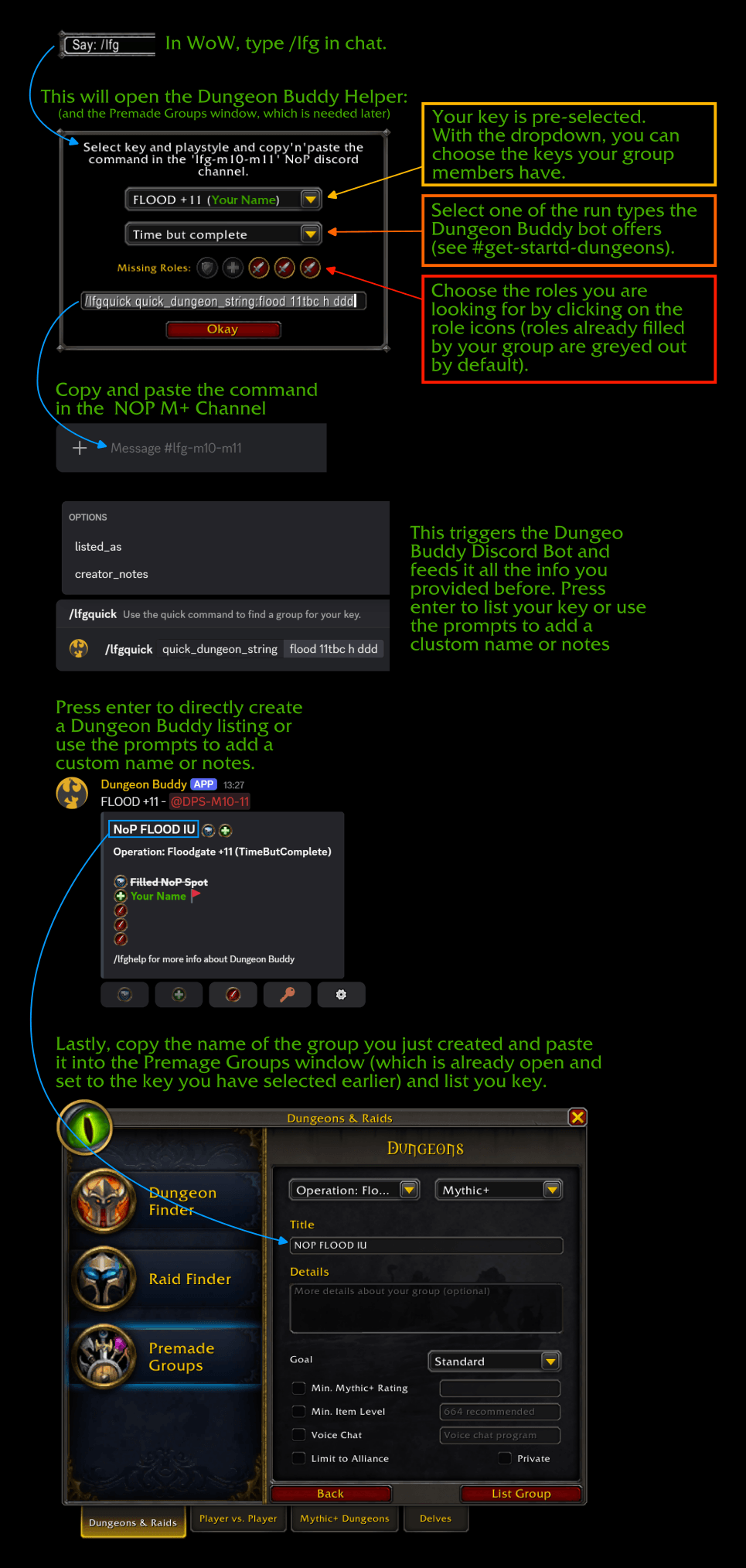
Shows the flow of using this addon and the DungeonBuddy to create a listing in the NOP Discord channel.
Description
This is a simple addon which aims to help create groups with the DungeonBuddy discord bot on the No Pressure discord server.
By typing /lfg or /dbh in the ingame chat it opens a window where you can copy the command for the discord bot for your current group an key.
By default it uses the key in your bags. You can use a different key by pasting a link (Shift + Left-Click) to a keystone after the /lfg command or by selecting a different key from the dropdown in the dialog window. It provides a list of keys available in your group.
You can also choose the playstyle of the run (Time or Completion) and the discord bot command will reflect that.
It also opens the group finder and selects the correct dungeon and playstyle for you. All you have to do is to take the command, paste it in the the correct discord channel. After the discord bot has created the listing you copy the generated name of your group and paste it in the ingame group finder tool.
The DungeonBuddyHelper Team