Dungeon QuickApply
- By
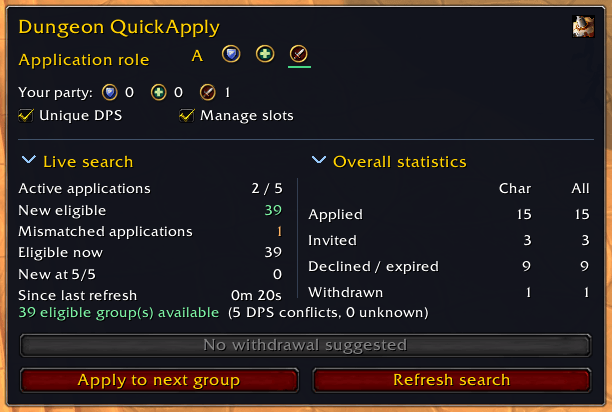
preview1.png
Description
Dungeon QuickApply
Dungeon QuickApply is a lightweight World of Warcraft addon designed to make finding and applying to Mythic+ dungeon groups faster, easier, and more efficient.
It works alongside Blizzard's built-in Group Finder, using your existing dungeon, role, and key-level search filters.
Spend less time browsing groups and more time running keys!
✨ Features
- Quick Applications – Apply to the next eligible dungeon group with a single click.
- Blizzard Filter Integration – Uses your current Group Finder search results and filters.
- Smart Role Selection – Choose Tank, Healer, DPS, or Auto using compact role icons.
- Unique DPS Filter – Optionally skip groups containing a DPS of the same class as a DPS in your party.
- Application Management – Identify applications worth withdrawing when all five application slots are occupied.
- Stale Application Detection – Prioritize old unanswered applications using a configurable timeout.
- Live Search Statistics – Keep track of matching groups, active applications, and new listings.
- Account-Wide Statistics – Track your application history across all characters.
- Compact Interface – A lightweight, collapsible UI that automatically appears alongside the dungeon search.
- No External Dependencies – Works without additional addon libraries.
🚀 How to Use
- Open Group Finder → Premade Groups → Dungeons → Find a Group.
- Configure your preferred dungeon, role, and key-level filters using Blizzard's standard search options.
- Dungeon QuickApply automatically appears alongside the search window.
- Select your preferred application role using the role icons.
- Click Apply to Next Group to apply to the next eligible listing.
- Click Refresh Search to update your search results.
- If all five application slots are occupied, use Free Up Slot to withdraw a suggested application when slot management is enabled.
The addon automatically skips previously attempted groups during the current session.
⚙️ Options
Unique DPS
Prevents applications to groups containing a DPS of the same class as a DPS in your current party.
Example:
Your party already contains a Retribution Paladin.
- ✅ Holy Paladin in the target group → Allowed
- ✅ Protection Paladin in the target group → Allowed
- ❌ Retribution Paladin in the target group → Skipped
This allows more precise filtering than Blizzard's standard class exclusions.
Manage Slots
Helps manage your five available group application slots.
When five applications are active and a new eligible group appears, Dungeon QuickApply suggests an application to withdraw.
Withdrawal priority:
- No Longer Matching – Applications to groups that no longer match the current search filters, have insufficient role slots, or are no longer available.
- Stale Applications – Old unanswered applications exceeding your configured timeout.
Invited applications are not suggested for withdrawal.
The default timeout is 90 seconds, configurable between 30 and 300 seconds using the settings menu.
Note: Applications are never withdrawn automatically. You must click the withdrawal button.
💬 Slash Commands
| Command | Description |
|---|---|
/dqa |
Show available commands |
/dqa help |
Display help |
/dqa reset |
Clear attempted-group history for the current session |
/dqa role auto |
Automatically select an available application role |
/dqa role tank |
Select Tank |
/dqa role heal |
Select Healer |
/dqa role dps |
Select DPS |
/dqa classes on |
Enable Unique DPS filtering |
/dqa classes off |
Disable Unique DPS filtering |
/dqa manage on |
Enable application slot management |
/dqa manage off |
Disable application slot management |
/dqa timeout 90 |
Set the stale application timeout to 90 seconds |
Most settings can also be configured directly through the addon interface.
📦 Installation
Download Dungeon QuickApply.
Extract the
DungeonQuickApplyfolder into:World of Warcraft/_retail_/Interface/AddOns/Restart World of Warcraft or type
/reload.Open Group Finder → Premade Groups → Dungeons.
The addon will appear automatically when the dungeon search is open.
⚠️ Important Information
Dungeon QuickApply respects Blizzard's addon API restrictions.
Applying to groups, withdrawing applications, and refreshing search results require a real mouse click or key press.
The addon does not automate protected actions in the background or bypass Blizzard's restrictions.
Some filtering functionality depends on the group information available through Blizzard's API.
Dungeon QuickApply Team