Druid Power
- By
druidpowerbuffs.png
druidpowerassigns.png
druidpowersolo.png
Description
Druid Power
A buff manager and raid-coordination panel for Druids on TBC Anniversary.
PallyPower blessed us with a better world where no Paladin has to be begged for a Blessing. Druid Power does the same for Elune's blessings: keep Mark across the raid and split the work between Druids so no one gets nagged and no group gets forgotten.
What it does
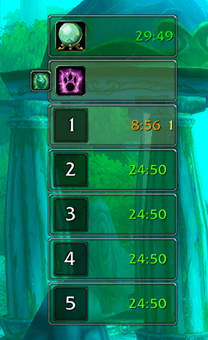
Druid Power gives you a compact vertical panel that tracks Mark of the Wild / Gift of the Wild across your party or raid. Each tile colors itself by coverage, green when everyone's set, yellow when some are missing, red when no one is buffed. A click casts the right spell on whoever needs it most.
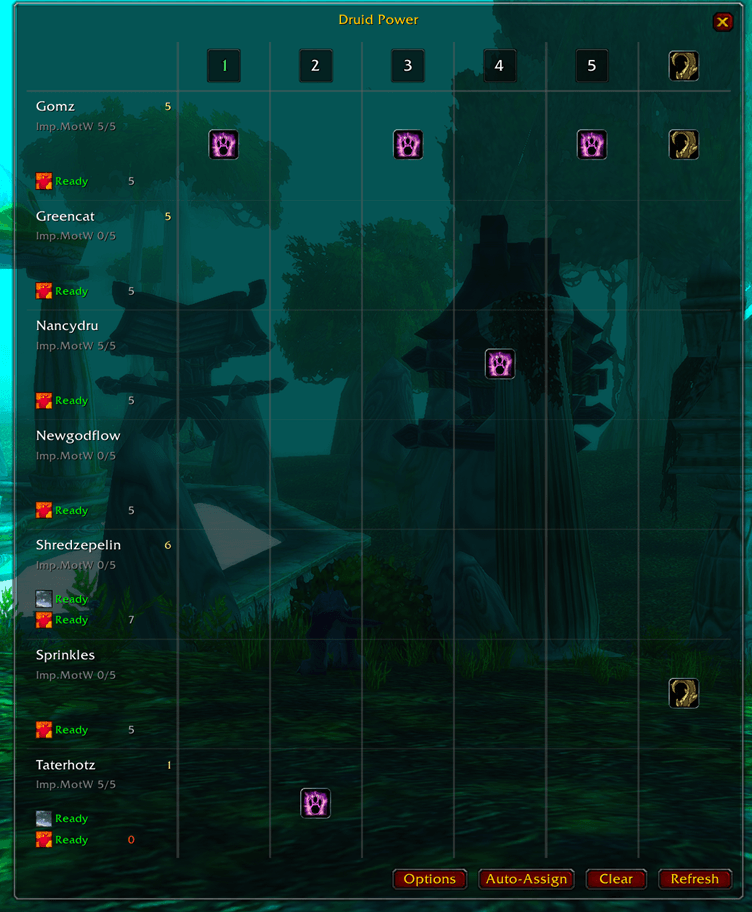
When several Druids are grouped and all run Druid Power, the addon syncs between you and hands out per-group assignments automatically: Mark/Gift ownership splits by Improved Mark of the Wild talent and spell rank. You can override any of it from the assignment grid, and assignments sync both ways, any Druid can reassign, leader or not.
The panel
The main window is a stack of tiles. Drag it by the small crystal handle on its left edge.
Mark of the Wild header
The full-width tile at the top of the group stack. It prioritizes the groups you're assigned to, then falls through to the rest of the raid so nothing is ever hidden.
- Left-click — cast Gift of the Wild on a group still missing it (one cast covers the whole group).
- Right-click — cast Mark of the Wild on the single neediest member, the one with the least time remaining. Keep right-clicking to rotate to the next-neediest rather than re-hitting the same target.
Group tiles
One tile per raid subgroup, showing buffed-versus-eligible counts and the soonest-expiring timer.
- Left-click — Gift of the Wild for that group.
- Right-click — Mark of the Wild on that group's neediest member.
Hover to see the group
Hover any group tile and a flyout opens listing every member of that group, with each person's range and dead status shown inline. From the flyout you can act on one specific player instead of the whole group:
- Left-click a member row — cast Gift of the Wild (still covers the group, cast through that person).
- Right-click a member row — cast Mark of the Wild on that member only.
Omen of Clarity indicator (top)
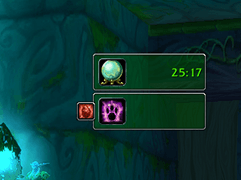
Shown only if you've specced Omen of Clarity (hide it under Options → Show Omen of Clarity indicator). Tracks the Omen of Clarity buff on yourself only. The backdrop is red when the buff is down, green when it's up, with the remaining time on the right.
Thorns bar (bottom)
Appears only when you're the Druid on Thorns duty. Shows how many of your assigned targets still need it and the soonest-expiring timer. Hover for the per-target list.
- Left/Right-click — cast Thorns on the neediest target.
Crystal drag handle
A small crystal overhanging the left edge, on the seam between the header and the first group row.
- Left-click — lock (red) / unlock (green) the panel.
- Drag — move the panel when unlocked.
Coordinating several Druids
Every Druid running Druid Power announces themselves to the rest. Within a few seconds each client knows the full roster, talents and ranks included, and the group agrees on per-group Mark/Gift ownership, split so the Druid with the best Improved Mark of the Wild and highest rank covers each group with no overlap.
Open the assignment grid with /dp assign (or left-click the minimap icon): click a cell to assign a Druid to a group, Auto-Assign to re-deal everyone, or Fill Empty to claim only the groups nobody owns. The grid also surfaces each Druid's Rebirth / Tranquility cooldowns and reagent counts, Wild Berries / Wild Quillvine for Gift, Maple / Stranglethorn Seed for Rebirth, so you can see who's out of supplies before a pull.
In combat, assignments lock (Blizzard's restriction on secure actions), but you can still re-buff from the panel the whole time.
Options
Open with /dp options, or right-click the minimap icon. (Left-click opens the assignment grid.)
- Main — enable/disable, use in party / when solo, minimap icon, tooltips.
- What to track — show the Omen of Clarity indicator; show the Thorns bar only when assigned.
- Appearance — scale, drag handle, lock anchor, reset position.
- Status Colors — recolor the Fully / Partially / None buffed states.
- Raid — hide bench players outside the dungeon's normal subgroups.
Slash commands
| Command | Action |
|---|---|
/dp |
Toggle the main panel |
/dp show / /dp hide |
Show / hide the panel |
/dp lock |
Lock / unlock the panel anchor |
/dp scale <0.5–2.0> |
Set the panel scale |
/dp assign |
Open the assignment grid (also: minimap left-click) |
/dp options |
Open the options panel (also: minimap right-click) |
/dp autoassign |
Re-deal all group assignments |
/dp fillempty |
Assign only the groups nobody owns |
/dp thorns [druid] |
Toggle a Druid's Thorns duty (omit the name for yourself) |
/dp owner |
Print per-group Mark/Gift ownership and the Thorns caster |
/dp druids |
List known Druids with talents and ranks |
/dp sync |
Force re-announce yourself and request others |
/dp report |
Per-group buffed/eligible counts |
Installation
Drop the DruidPower folder into your AddOns directory:
World of Warcraft\_anniversary_\Interface\AddOns\DruidPower
Then /reload (or restart) and log in on a Druid. Druid Power only activates for Druids, on any other class it stays out of the way.
Druid Power Team