DropScope Drop Rates
- By
Hover any mob to see everything it can drop and its drop rate, from a built-in loot database plus your own loot.
Know what every mob drops before you pull it.
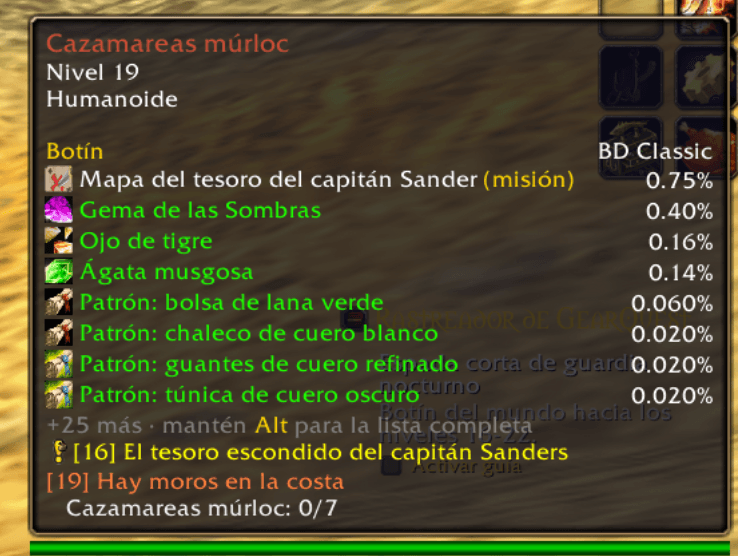
DropScope adds the full loot table to the unit tooltip. Hover any mob and you'll see every item it can drop, sorted by chance, with its drop rate. Prefer a separate panel? One click in the options.
Features
- Drop table on hover: item icons, quality-colored names and drop rates right in the tooltip. The full-list panel adds quality borders and chance bars so you can read it at a glance.
- Your own data: DropScope records what you actually loot in Forever and shows it in blue next to the database rate ("3/7", then a % once you have 20 corpses looted). Items you loot that aren't in the database are added automatically.
- Compact by default, full list on demand: the tooltip shows the top drops; hold Alt (or any key you bind) and a small panel opens beside it with the complete list, including boss loot pools (items with no fixed %).
- Quest items are marked with a yellow !.
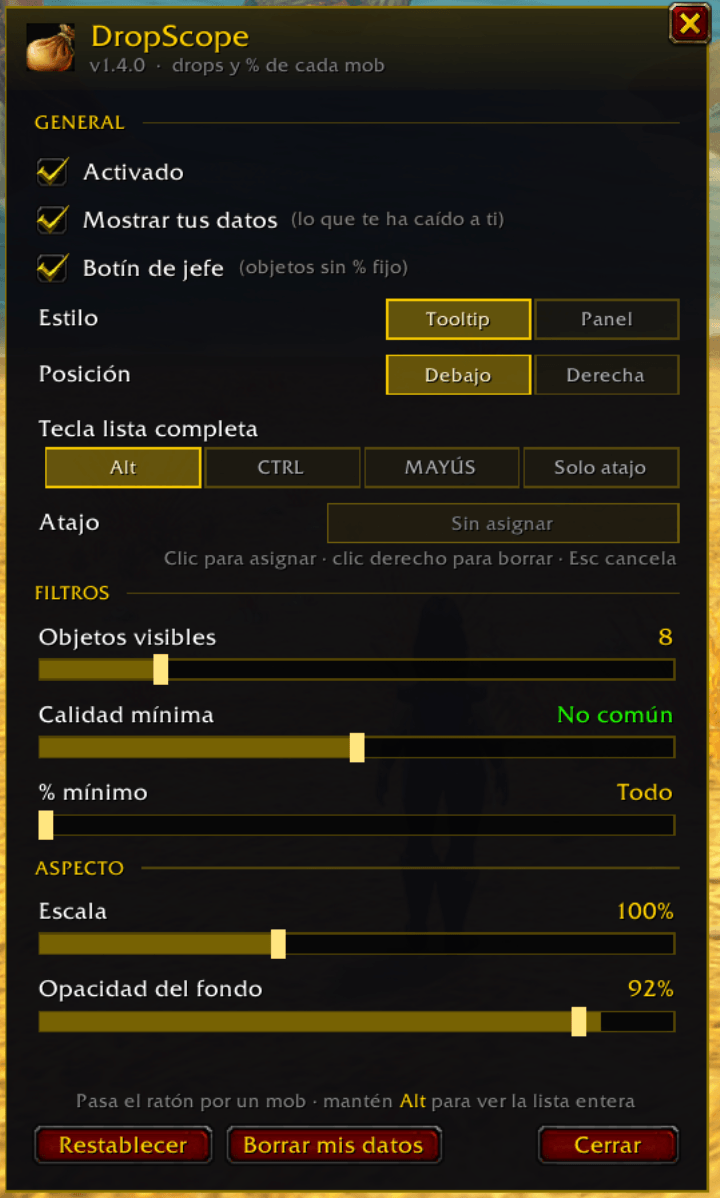
- Bind it anywhere: pick Alt, Ctrl or Shift, or bind any key or mouse button in Options → Keybindings → AddOns → DropScope (or right from the options window).
- Lightweight: loot data is parsed only for the mob you're looking at.
- English and Spanish. Item, mob and quality names come from your game client, so they're always in your language.
Options
Type /dropscope to open the options window: tooltip or panel style, position, full-list key and keybind, visible items, minimum quality, minimum %, scale and opacity, with a live preview.
Commands
| Command | What it does |
|---|---|
/dropscope or /ds |
Open the options window |
/dropscope max <n> |
Items shown before "+N more" |
/dropscope quality <0-4> |
Minimum item quality |
/dropscope min <%> |
Hide drops below this % |
/dropscope scale <0.5-2> |
Panel scale |
/dropscope key <alt|ctrl|shift|none> |
Modifier that opens the full list |
/dropscope style |
Switch between panel and tooltip lines |
/dropscope pools / mine |
Toggle boss pools / your own data |
/dropscope info |
Database and personal stats for your target |
/dropscope reset [all] |
Clear your data (target or everything) |
Good to know
- Drop rates come from Classic loot tables. If Forever has changed a drop, your personal data (in blue) will show the real rate over time.
- Forever doesn't let addons read the combat log, so personal data counts looted corpses. Mobs that drop nothing can't be looted, so personal rates read slightly high.
Credits
Loot data from the pfQuest database (MIT, © Eric Mauser "Shagu"), originally from VMaNGOS. Thank you!
Translations
Want DropScope in your language? Copy the esES block in Locale.lua, translate it and share it in the comments.
DropScope Drop Rates Team