DoubleClickForTheWin
- By
Context-sensitive actions for certain frames on double-clicks.
Double-click certain frames(see below) for context-sensitive actions. Generally double left-click to advance and double right-click to go back.
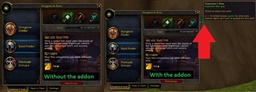
As an example, take or hand in completed quests just by continuously double-clicking the questgiver frame.
Nothing more, nothing less. No extra libraries, in-game options or other fluff nor bloat, just couple hundred lines of double-clicking goodness.
Frames handled:
Quest and gossip frames
- Double left-click anywhere to select first available quest(!), (completed) active quest(?), or gossip option.
- (Disabled for quest reward item buttons, so you won't accidentally select and accept the wrong item)
- (Disabled for quest reward item buttons, so you won't accidentally select and accept the wrong item)
- Double-click quest reward to select and accept.
- Double right-click anywhere to go back or close the frame.
Quest-log and quest-detail frames
- Double left-click anywhere to share quest.
- Double right-click anywhere to abandon quest. Double-click again to accept popup.
Loot frame and Need/Greed/Disenchant -buttons
- Double-click the buttons to select and accept popup.
Tradeskill frame
- Double-click any of the list items to quickly craft one selected item.
Auctionhouse frame, Browse and Bid tabs
- Double left-click any of the list items to bid. Double-click again to accept popup.
- Double right-click any of the list items to buyout. Double-click again to accept popup.
Auctionhouse frame, Auctions tab
- Double right-click any of the list items to cancel auction. Double-click again to accept popup.
Vehicle-interface, seat indicators
- Double click the yellow dots on the vehicle-interface that appears under the minimap to kick the player/NPC out.
The DoubleClickForTheWin Team