


DoT Verdict
- By
Screenshot 2026-10-28 164206.png
Screenshot 2026-10-28 164215.png
Screenshot 2026-10-28 164237.png
Description
DoT Verdict
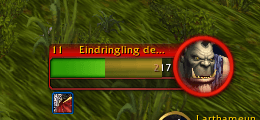
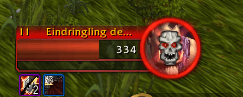
Will your DoTs finish it off? DoT Verdict shows the estimated remaining damage of your Affliction Warlock DoTs directly on the target's health bar and puts a skull on the portrait as soon as they are lethal. Move on to the next target instead of wasting casts.
Built from the ground up for Retail (Midnight 12.1+) and its new addon restrictions.
Features
- Damage marker attached to the end of the target's health. If it reaches the left edge, your DoTs finish the target.
- Lethal indicator: the marker changes color and a pulsing skull appears on the target portrait.
- Tracks Agony (including its damage ramp), Corruption / Wither (Hellcaller) and Unstable Affliction (several at once).
- Damage values come from your own spell tooltips, so they reflect your current gear and talents.
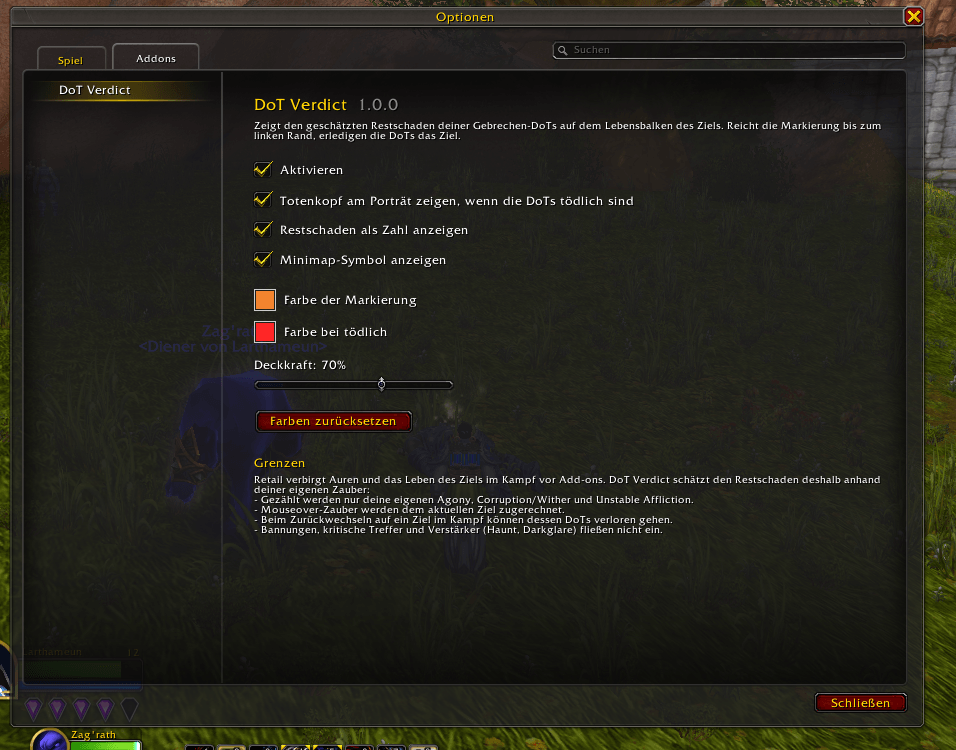
- Adjustable colors, opacity, skull and damage number.
- Settings via Options → AddOns → DoT Verdict, a draggable minimap button, the addon compartment or slash commands.
- Works in every client language. Fully translated: English, German.
How it works
Since patch 12.1, auras and target health are hidden from addons during combat. DoT Verdict does not try to read them:
- Your own casts are still readable, so DoT Verdict rebuilds your DoT timers from them.
- Tooltip damage is read out of combat and cached.
- The lethal check runs entirely inside the game client: a hidden status bar compares the hidden target health with the computed remaining damage, accurate to 1 HP. The addon never sees the health value.
Limitations
These follow directly from Blizzard's restrictions and cannot be worked around:
- Only your own DoTs are counted.
- Mouseover casts are credited to your current target.
- Switching back to a target during combat can lose its DoTs.
- Dispels, crits and damage amplifiers (Haunt, Darkglare) are not included. In practice, targets tend to die slightly earlier than shown.
Commands
| Command | Function |
|---|---|
/dv |
Toggle on/off |
/dv options |
Open the settings |
/dv color <name/hex> |
Marker color |
/dv lethalcolor <name/hex> |
Color when lethal |
/dv opacity <10-100> |
Opacity |
/dv skull |
Skull on/off |
/dv number |
Damage number on/off |
/dv minimap |
Minimap button on/off |
/dv reset |
Reset colors |
/dv debug |
Diagnostics for bug reports |
Color names: purple, red, green, blue, cyan, yellow, orange, pink, white, black, or any hex value such as ff8800.
Bug reports
Please leave a comment with the output of /dv debug status and, if an error was reported, /dv debug errors.
Translations
Translations are welcome. Leave a comment if you would like to translate DoT Verdict into your language.
DoT Verdict Team
