
DoctorLoot
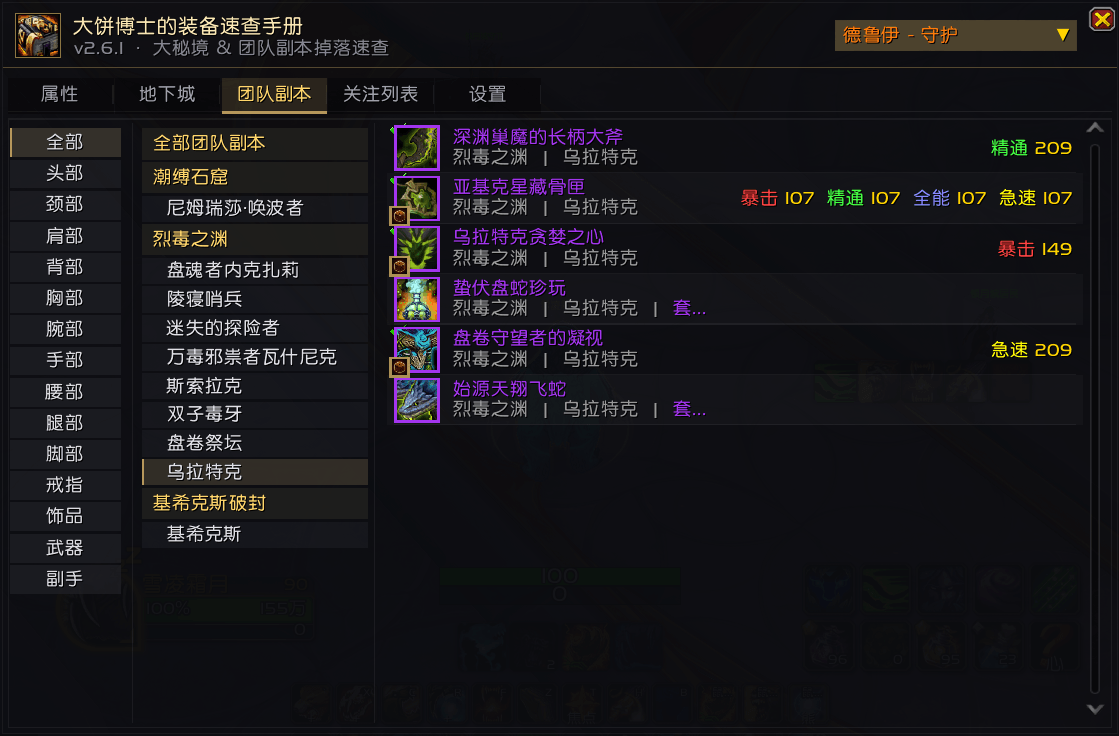
example.PNG
Description
A plugin for the official WoW server, used to quickly view Mythic Dungeon and Raid Gear
DoctorLoot — Loot Browser for Mythic+ and Raids
DoctorLoot turns the in-game Encounter Journal into a searchable, one-window loot table for the current season. It reads loot lists straight from your game client, caches them locally, and lets you filter the whole season's gear by specialization, slot and stat in a single click — without alt-tabbing to a database website or expanding eight dungeons and three raids by hand.
It adds no new game mechanics. What it removes is a chore the base game never really solved: looking things up while everyone else is already standing at the keystone. Everything comes from the client itself — no network requests, no external data packs, no stale database. When your game knows an item exists, DoctorLoot knows it too.
Features
Three browsing tabs
| Tab | Contents |
|---|---|
| Stats | Filter by Crit / Haste / Mastery / Versatility across all instances — "I want to stack haste, which items can I farm?" |
| Dungeon | Grouped by dungeon → boss, with a slot sidebar to narrow further |
| Raid | Grouped by raid → boss, in the same order as the Encounter Journal |
All three tabs share the class / specialization dropdowns in the top-right corner; changing them re-filters immediately.
Spec filtering (mirrors the Encounter Journal)
Spec eligibility is not guessed from armor type plus primary stat. That heuristic can never separate
specs that share a primary stat (Guardian and Feral are both Agility; all three Mage specs are Intellect).
Instead, the addon records the journal's loot list for every spec, packs the result into a bitmask
stored locally (db.specLoot.bits), and only does a table lookup at runtime — the journal is never
touched while you play.
As a consequence the list matches what the in-game journal shows for the selected spec. The flip side: specs that share a primary stat genuinely have identical loot lists, so seeing no change after switching is expected.
Watchlist
- Right-click any item row to add or remove it from the watchlist;
- When a party member loots a watched item, DoctorLoot whispers them automatically asking for a trade (once per player per item per 60 seconds; can be switched off on the Watchlist tab);
- Looting a watched item yourself removes it from the list automatically;
- The watchlist is grouped and collapsible by dungeon, so you can see at a glance what is still missing.
Bonus roll tracking
Bonus rolls are drawn from a pool: each Mythic+ dungeon and each raid boss has its own pool, every item in a pool can be rolled once, and the game resets the pool when it is exhausted. DoctorLoot therefore records which items in the pool have already been obtained:
- Recorded automatically the moment a roll resolves (only from the game's own
BONUS_ROLL_RESULTevent — nothing is guessed); - Items obtained via a bonus roll get a dice badge in the bottom-left of the icon;
- Ctrl + Right-click to add or remove a record manually (for anything missed);
- With SimulationCraft installed,
/dl roll importrestores history from its saved variables.
Extras
- Minimap button and AddonCompartment button (both can be hidden);
- Configurable open/close hotkey (single key or key combination);
- Checkmark on items you already own (on by default, toggleable in settings).
Installation
- Close the game;
- Copy the whole
DoctorLootfolder into:
World of Warcraft\_retail_\Interface\AddOns\DoctorLoot\Make sure DoctorLoot.toc sits directly in that folder — do not nest another folder with the same name;
- Start the game and confirm the addon is enabled in the AddOns list on the character screen.
No library dependencies.
Usage
Type /dl in game to open the main window, or click the minimap button.
Mouse
| Action | Effect |
|---|---|
| Hover | Full item tooltip (source, bonus-roll state, usable specs) |
| Shift + Left-click | Insert the item link into chat |
| Ctrl + Left-click | Dress up (preview) |
| Right-click | Add to / remove from the watchlist |
| Ctrl + Right-click | Toggle the "obtained via bonus roll" mark |
Commands
| Command | Description |
|---|---|
/dl |
Open or close the main window |
/dl raid |
Jump straight to the Raid tab |
/dl watch |
Open the watchlist |
/dl settings |
Open the settings tab |
/dl reload |
Re-scan this season's loot data (dungeons + raids) |
/dl spec |
Rebuild the per-spec loot marks from the Encounter Journal |
/dl roll |
Print the bonus roll history |
/dl roll import |
Import bonus roll history from SimulationCraft |
/dl icon |
Show / hide the minimap button |
/dl test |
Test mode: prints detailed info for any loot event |
/dl debug |
Print instance lists, scan results and boss order (troubleshooting) |
/dl help |
Command help |
About the data
- Scope: the current season's 8 Mythic+ dungeons plus the current tier's 3 raids. The scope lives in two
whitelists at the top of
Data.lua—SEASON_DUNGEONSandCURRENT_RAIDS— which is what you edit when the season rotates. - When it scans: whenever the addon version or the pool format changes, the data is rebuilt once after login (a few seconds). The pool is cached by version stamp, so subsequent logins read straight from saved variables. You can also force a resync with "Refresh loot data" in settings.
- Tier sets: in 12.x, tier sets drop as tokens (currency-like "Venomwoven Idol" style items, plus the final boss's material-type curio), not as armor pieces. They are not equipment, so DoctorLoot collects them separately on the Raid tab and labels them "tier token", inferring armor type from the name prefix and slot from the suffix. Having no stats, they never appear on the Stats tab.
- Boss order: taken from the journal's enumeration index (the order the Encounter Journal displays),
not from
journalEncounterID. - Stats / item level: a snapshot taken at scan time; anything not yet cached by the client is filled in after login.
FAQ
The list is empty, or only partially filled
Run /dl reload to rebuild. If it is still wrong, run /dl debug — it prints how many bosses and items were
read per instance, plus the raid boss order. Include that output in an issue.
Switching specs does not change the list
If the specs share a primary stat (e.g. all three Mage specs), the journal itself has no difference — this is
expected. If they differ in primary stat and nothing changes, run /dl spec to rebuild the spec marks. When
the addon's own sanity checks decide the data is unreliable, it falls back to primary-stat inference and says
so in chat.
Tier pieces show as "tier token" with no stats on the Raid tab Correct — tokens have no stats. They are there to show which boss drops which set slot.
Data is wrong after a game patch
Major patches change instance, boss and item IDs. Update the whitelists at the top of Data.lua, then run
/dl reload. There is a fallback: if the whitelist matches nothing, the addon reverts to enumerating the
current expansion instead of showing nothing at all.
File layout
DoctorLoot/
├── DoctorLoot.toc        Addon manifest (load order)
├── Core.lua              Bootstrap, saved-variable defaults, slash commands, helpers
├── ItemDB.lua            Item stats, class/spec rules, pool compaction and caching
├── Data.lua              Journal scanning, scope whitelists, filtering, auto-fill
├── SpecLoot.lua          Per-spec loot marks copied from the Encounter Journal
├── UI.lua                Main frame, tabs, class/spec dropdowns, item rows
├── BrowseByStats.lua     Stats tab
├── BrowseByDungeon.lua   Dungeon tab
├── BrowseByRaid.lua      Raid tab (lazy loading + boss order)
├── Watchlist.lua         Watchlist
├── RollHistory.lua       Bonus roll pool tracking
├── LootMonitor.lua       Loot events and auto-whisper
├── MinimapButton.lua     Minimap button
├── Settings.lua          Settings tab
├── Locale/zhCN.lua       Simplified Chinese strings
└── CHANGELOG.md          Changelog (ignored by .gitignore, not tracked)
Credits
Inspired by the discontinued LifaMpLoop addon; the data layer and UI were rewritten on top of it.
Author: 大饼博士 · https://github.com/dbboshi
一款针对wow正式服的插件,用于快速查看大米和团本装备
DoctorLoot Team
