
DisenchantOrVendor
- By
Screenshot 2026-07-31 085654.jpg
Entzauber-Liste.jpg
DOV Green.jpg
DOV Blue.jpg
Description
DisenchantOrVendor by Tolleranz
Available in English and German — the addon follows your client language.
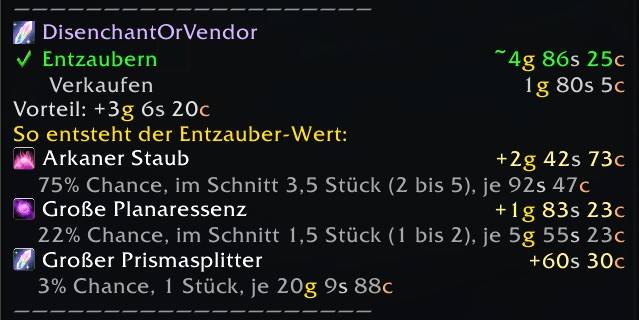
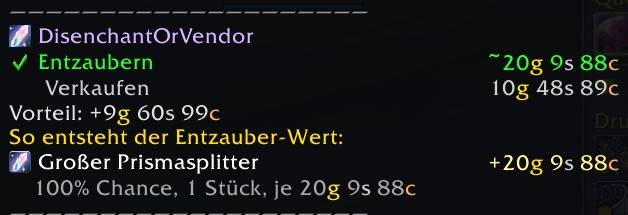
Shows directly in the item tooltip whether it is more profitable to disenchant an item, sell it to a vendor, or put it in the auction house — based on current auction house prices.
The three-way comparison
Disenchanting and vendoring are certainties. Selling in the auction house is a bet, so the addon treats it as one: it is only recommended when it clearly wins and the item is actually likely to sell.
The usual trap is a single overpriced listing that nobody will ever buy. Most tools take the current lowest price at face value and would tell you to sell. This addon instead reads Auctionator's 21-day price history, including how many of the item were on offer each day, and uses the more conservative of "cheapest right now" and "typical price over the period". A lone fantasy price cannot move that average, so it drops out by itself.
Auction house fees are part of the calculation: the 5% cut, plus the deposits you forfeit on auctions that expire. Every deduction is shown in the tooltip instead of silently shrinking the number.
Features
Tooltip
- Compares Disenchant / Vendor / Auction House with a clear recommendation
- Material breakdown — which mats drop, with what chance and amount, and their share of the total value. Written for beginners, not for spreadsheet users.
- Sale probability with its source named: TSM region data, your own BeanCounter history, or an estimate from market activity
- Says so explicitly when the auction house would pay more but the sale looks unreliable
- Warning when your Enchanting skill is too low for the item
- "Roughly equal" indicator for close cases
Bulk disenchanting
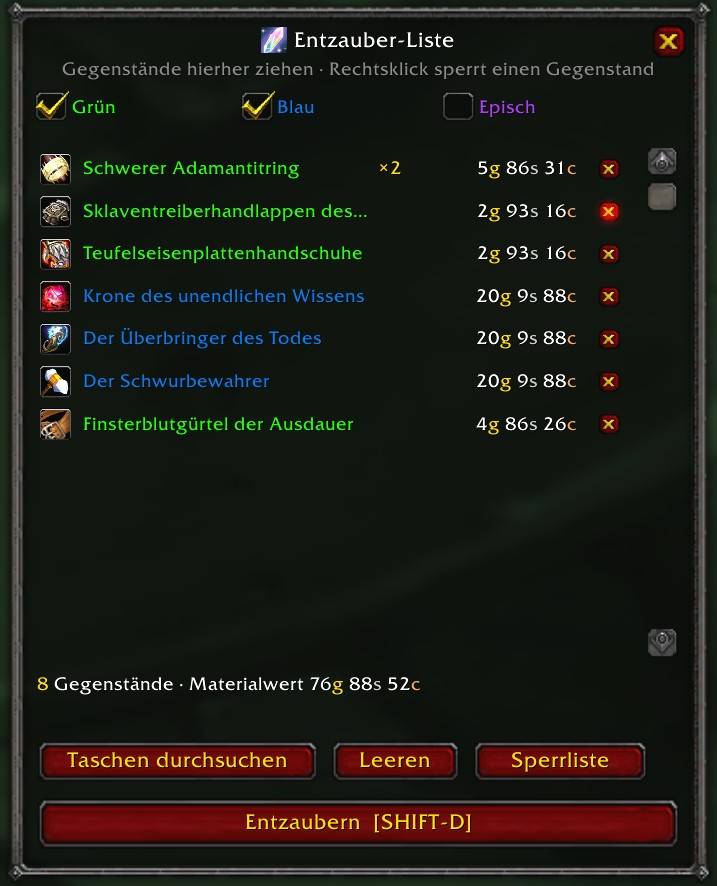
- A queue window that fills in one click with everything the addon already recommends disenchanting — or drag items in by hand
- One keypress per item instead of hunting through your bags
- Quality filter (green / blue / epic), epic off by default
- Gear saved in Outfitter or ItemRack is protected and never queued
- Value limit so an expensive item is never queued by accident
- Blocklist for items you never want to disenchant, with its own management window
Please note: Blizzard requires a real key press or click for every cast, so a fully automatic run is impossible for any addon. Everything around it is automated.
Statistics
- Optionally records your real disenchants and exports them
- Useful for verifying the drop tables against live server data
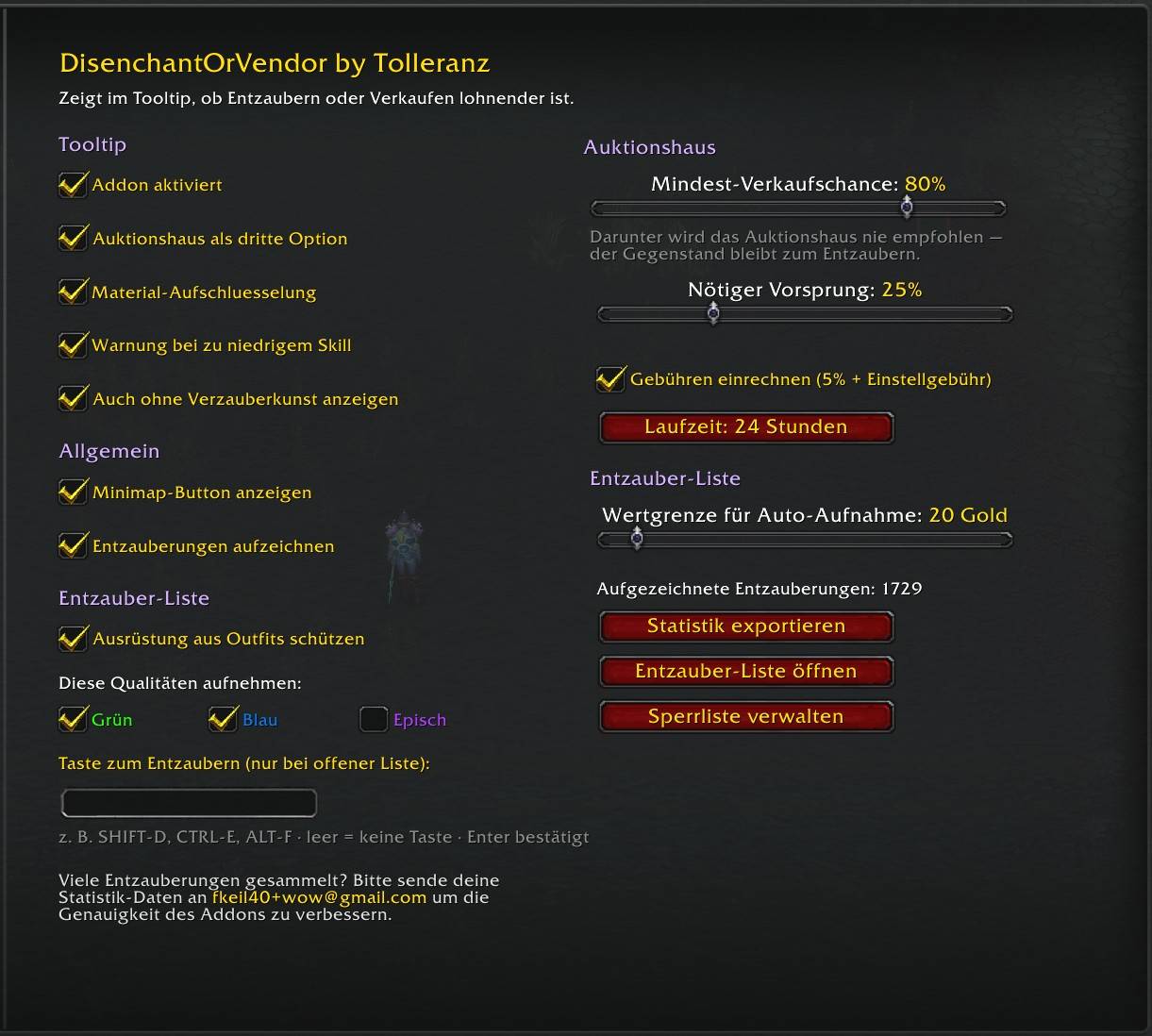
Everything is configurable in the settings panel, including sliders for the minimum sale chance, the required advantage and the value limit.
Languages
English and German, selected automatically from your client language. Any other client language falls back to English rather than showing you German text.
Game terminology — material names, spell names, item qualities — is read from the client itself, so it is correct in every language: an Italian player sees Polvere Arcana even when the surrounding interface is English.
Translations for further languages are welcome — each one is a single file.
Usage
- Just hover over a disenchantable item
- Settings:
/dov config - Disenchant queue:
/dov bulk, or right-click the minimap button
Slash commands
/dov              help
/dov config       all settings
/dov bulk         open the disenchant queue
/dov blocklist    manage the blocklist
/dov ah           auction house price on/off
/dov ahmargin N   required advantage in percent
/dov bulkmax N    value limit for the queue, in gold
/dov mats         material details on/off
/dov skill        skill warning on/off
/dov minimap      minimap button on/off
/dov allchars     show on characters without Enchanting
/dov toggle       addon on/off
/dov key KEY      key for the queue, e.g. /dov key SHIFT-D
/dov track        statistics recording on/off
/dov export       export statistics
/dov ahdebug      price data for the item you last hovered
Requirements
- Auctionator (recommended) — the outlier detection relies on its per-day offer counts, which no other addon exposes.
- TSM works as a fallback, but the confidence rating is coarser: without per-day offer counts a thin market is harder to detect. Prices for gear are looked up suffix-accurately, so "of the Eagle" and "of the Owl" are kept apart.
- BeanCounter (optional) — turns the sale probability from an estimate into a measurement based on your own completed auctions.
- Without any price addon the addon still works, but shows materials without prices and no auction house option.
- The Enchanting profession — or enable "show on all characters" to see the comparison on alts too.
---
Deutsch
DisenchantOrVendor by Tolleranz
Verfügbar auf Englisch und Deutsch — das Addon richtet sich nach deiner Client-Sprache. Für TBC Classic / Anniversary.
Zeigt dir direkt im Item-Tooltip, ob es sich mehr lohnt, einen Gegenstand zu entzaubern, beim Händler zu verkaufen oder ins Auktionshaus zu stellen — basierend auf aktuellen Auktionshaus-Preisen.
Der Dreifach-Vergleich
Entzaubern und Händler sind sicher. Der Verkauf im Auktionshaus ist eine Wette — und genau so behandelt das Addon ihn: Es empfiehlt ihn nur, wenn er deutlich gewinnt und der Gegenstand sich realistisch verkaufen lässt.
Die typische Falle ist ein einzelnes überteuertes Angebot, das nie jemand kauft. Die meisten Werkzeuge nehmen den aktuell niedrigsten Preis für bare Münze und würden zum Verkauf raten. Dieses Addon liest stattdessen Auctionators 21-Tage-Verlauf samt Angebotsmenge pro Tag und nimmt den konservativeren Wert aus „aktuell am günstigsten" und „üblicher Preis im Zeitraum". Ein einzelner Fantasiepreis kann diesen Mittelwert nicht anheben und fällt von selbst heraus.
Die Auktionshausgebühren sind eingerechnet: der Schnitt von 5 % sowie die Einstellgebühren, die bei abgelaufenen Auktionen verfallen. Jeder Abzug steht im Tooltip, statt die Zahl stillschweigend zu verkleinern.
Funktionen
Tooltip
- Vergleich Entzaubern / Händler / Auktionshaus mit klarer Empfehlung
- Material-Aufschlüsselung — welche Mats mit welcher Chance und Menge, und ihr Anteil am Gesamtwert. Laienfreundlich beschriftet.
- Verkaufswahrscheinlichkeit samt Quelle: TSM-Regionsdaten, deine eigene BeanCounter-Historie oder eine Schätzung aus der Marktlage
- Sagt ausdrücklich, wenn im Auktionshaus mehr drin wäre, der Verkauf aber unsicher ist
- Warnung, wenn dein Verzauberkunst-Skill für das Item nicht ausreicht
- „Ungefähr gleichwertig" bei knappen Fällen
Massen-Entzaubern
- Ein Listenfenster, das sich auf einen Klick mit allem füllt, was das Addon ohnehin zum Entzaubern empfiehlt — oder du ziehst Gegenstände von Hand hinein
- Ein Tastendruck pro Gegenstand statt Sucherei in den Taschen
- Qualitätsfilter (grün / blau / episch), episch standardmäßig aus
- Ausrüstung aus Outfitter- oder ItemRack-Sets ist geschützt und landet nie in der Liste
- Wertgrenze, damit kein teures Teil versehentlich aufgenommen wird
- Sperrliste für Gegenstände, die nie entzaubert werden sollen, mit eigenem Verwaltungsfenster
Bitte beachten: Blizzard verlangt pro Zauber eine echte Eingabe, ein vollautomatischer Durchlauf ist deshalb für kein Addon möglich. Alles drumherum übernimmt es.
Statistik
- Zeichnet auf Wunsch deine echten Entzauberungen auf und exportiert sie
- Nützlich, um die Drop-Tabellen gegen echte Serverdaten zu prüfen
Alles ist im Einstellungsmenü konfigurierbar, inklusive Schieberegler für Mindest-Verkaufschance, nötigen Vorsprung und Wertgrenze.
Sprachen
Englisch und Deutsch, automatisch nach deiner Client-Sprache. Jede andere Client-Sprache fällt auf Englisch zurück, statt dir deutschen Text anzuzeigen.
Spielbegriffe — Materialnamen, Zaubernamen, Qualitätsstufen — kommen aus dem Client selbst und sind damit in jeder Sprache korrekt: Ein italienischer Spieler sieht Polvere Arcana, auch wenn die Oberfläche drumherum englisch ist.
Übersetzungen für weitere Sprachen sind willkommen — jede ist eine einzelne Datei.
Bedienung
- Mit der Maus über ein entzauberbares Item fahren
- Einstellungen:
/dov config - Entzauber-Liste:
/dov bulk, oder Rechtsklick auf den Minimap-Button
Slash-Befehle
/dov              Hilfe
/dov config       Alle Einstellungen
/dov bulk         Entzauber-Liste öffnen
/dov sperrliste   Sperrliste verwalten
/dov ah           Auktionshaus-Preis an/aus
/dov ahmargin N   Nötiger Vorsprung in Prozent
/dov bulkmax N    Wertgrenze der Liste in Gold
/dov mats         Material-Details an/aus
/dov skill        Skill-Warnung an/aus
/dov minimap      Minimap-Button an/aus
/dov allchars     Auch auf Charakteren ohne Verzauberkunst anzeigen
/dov toggle       Addon an/aus
/dov key TASTE    Taste für die Liste, z. B. /dov key SHIFT-D
/dov track        Statistik-Aufzeichnung an/aus
/dov export       Statistik exportieren
/dov ahdebug      Preisdaten des zuletzt gezeigten Gegenstands
Voraussetzungen
- Auctionator (empfohlen) — die Ausreißer-Erkennung stützt sich auf dessen Angebotsmengen pro Tag, die kein anderes Addon zugänglich macht.
- TSM funktioniert als Rückfall, die Konfidenzbewertung wird dabei aber gröber: Ohne Angebotsmengen pro Tag lässt sich ein dünner Markt schlechter erkennen. Preise für Ausrüstung werden suffixgenau abgefragt, „des Adlers" und „der Eule" bleiben also getrennt.
- BeanCounter (optional) — macht aus der geschätzten Verkaufschance eine Messung auf Basis deiner eigenen abgeschlossenen Auktionen.
- Ohne Preis-Addon funktioniert das Addon weiterhin, zeigt Materialien dann aber ohne Preise und kein Auktionshaus.
- Verzauberkunst — oder aktiviere „Auch ohne Verzauberkunst anzeigen", um den Vergleich auch auf Twinks zu sehen.
DisenchantOrVendor Team
