
Disenchant Queue
- By
World Of Warcraft Screenshot 2026.10.17 - 13.18.47.82.png
World Of Warcraft Screenshot 2026.10.17 - 13.19.00.64.png
World Of Warcraft Screenshot 2026.10.17 - 13.19.07.06.png
Description
Disenchant Queue
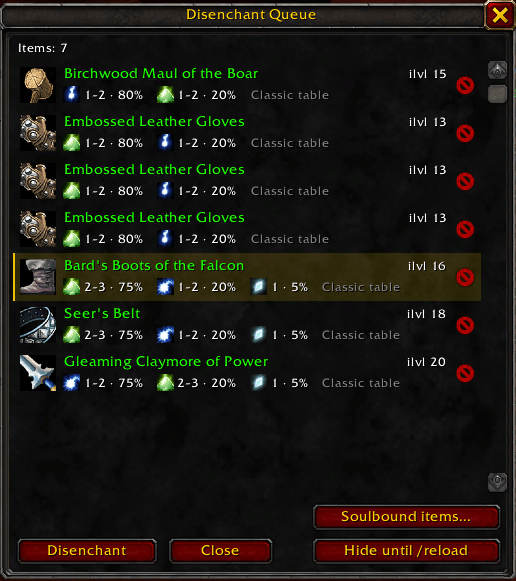
Disenchant Queue keeps track of everything in your bags that can be disenchanted. As soon as a disenchantable item lands in your bags, a small window opens with all of them listed. Click Disenchant to disenchant the selected item, and the next one is selected automatically.
Made for WoW Forever.
Features
- Automatic queue. The window opens when you loot, buy or receive an uncommon, rare or epic weapon or armor piece. Items that are already in your bags when you log in don't open it.
- One click per item. A secure button casts Disenchant directly on the selected item. The slot is checked again right before every click, so the addon never disenchants anything other than what the list shows.
- Raid mode.
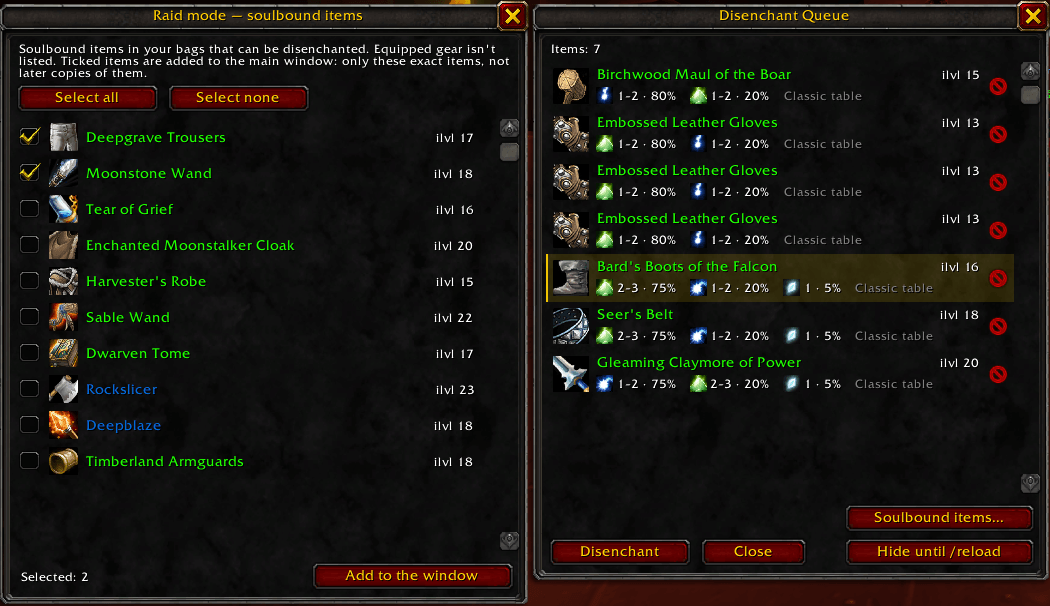
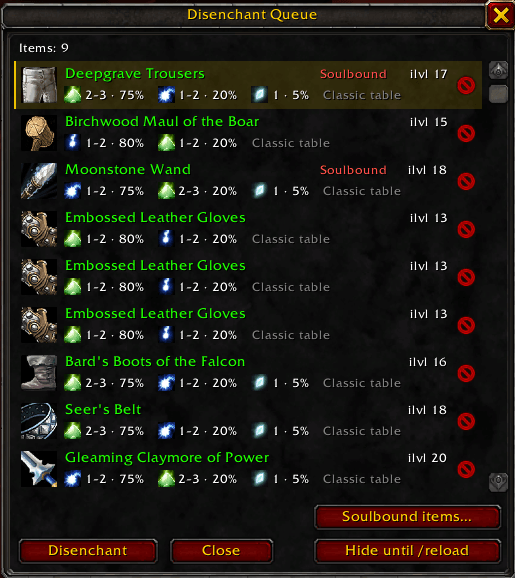
/dq raid, the "Soulbound items..." button or Shift-click on the minimap button opens a separate window next to the main one with the soulbound items in your bags that can be disenchanted; equipped gear is never shown. Tick the items and confirm, and those exact items appear in the main window, where you disenchant them like any other. Only the ticked copies are added: if the same item drops again later, it isn't listed. Made for the guild enchanter who disenchants unwanted raid loot. - Soulbound items are never listed automatically, so your gear can't be disenchanted by accident. The only way a soulbound item gets into the window is if you tick it in raid mode and confirm a warning. If the addon can't tell whether an item is bound, it treats it as bound.
- Key binding. Options → Keybindings → AddOns → Disenchant Queue → "Disenchant the selected item". It only works while the window is open. The game allows one Disenchant per click or key press, so every item takes its own press.
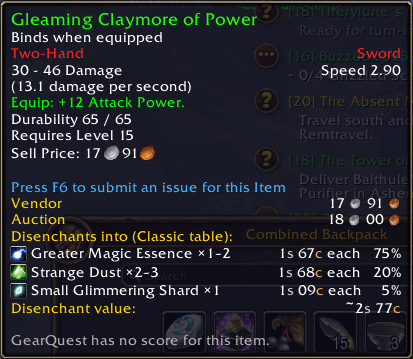
- Expected materials. Every item shows what it disenchants into, with quantities and chances, for example Strange Dust 2–3 · 75%.
- Learns from your results. Forever's disenchant tables may differ from Classic, so every disenchant done through the window records what actually dropped. Once an item level range has 10 results, your real numbers replace the Classic table, including materials that are new in Forever.
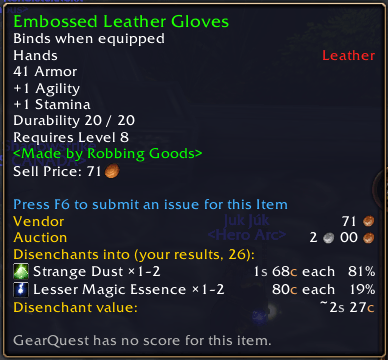
- Item tooltips. The same information is added to the tooltip of any disenchantable item: bags, character sheet, auction house, vendors and chat links. You can turn it off in the options.
- Minimap button. Left-click shows or hides the window, right-click opens the options, and you can drag it around the minimap. A small number on it shows how many items are waiting. It can be hidden in the options or with
/dq minimap. - Ignore list. Click the ✕ next to an item and it won't be listed again. You can review and remove ignored items in Options → AddOns → Disenchant Queue.
- Hide until reload. Close the window and stop the pop-ups for the rest of the session.
/dqstill opens it manually. - Combat-safe. The window hides when combat starts and comes back afterwards.
- Localized: English, Russian, German, French, Spanish, Brazilian Portuguese, Italian, Korean and Chinese (simplified and traditional).
Commands
| Command | What it does |
|---|---|
/dq |
Show or hide the window |
/dq options |
Open the settings and the ignore list |
/dq hide |
Close the window and don't pop it up until /reload |
/dq resume |
Turn the pop-ups back on |
/dq minimap |
Show or hide the minimap button |
/dq raid |
Raid mode: add soulbound bag items to the window |
What gets listed
Uncommon, rare and epic weapons and armor that aren't bound to you. Shirts, tabards and fishing poles are skipped. Raid mode lists the soulbound ones.
Where the numbers come from
Until you have your own results, the chances come from the original (pre-Burning Crusade) disenchant tables, which depend on item level, quality and whether the item is a weapon or armor. Results are only recorded when the loot clearly comes from the disenchant you just cast through the window. Yields from a camp with an Arcane Salvager may differ, and they are recorded together with the rest. You can reset your results in the options.
Bug reports
Please include the error text from BugSack, or turn on Lua errors with /console scriptErrors 1 and copy the message.
Disenchant Queue Team
