
Disenchant Helper
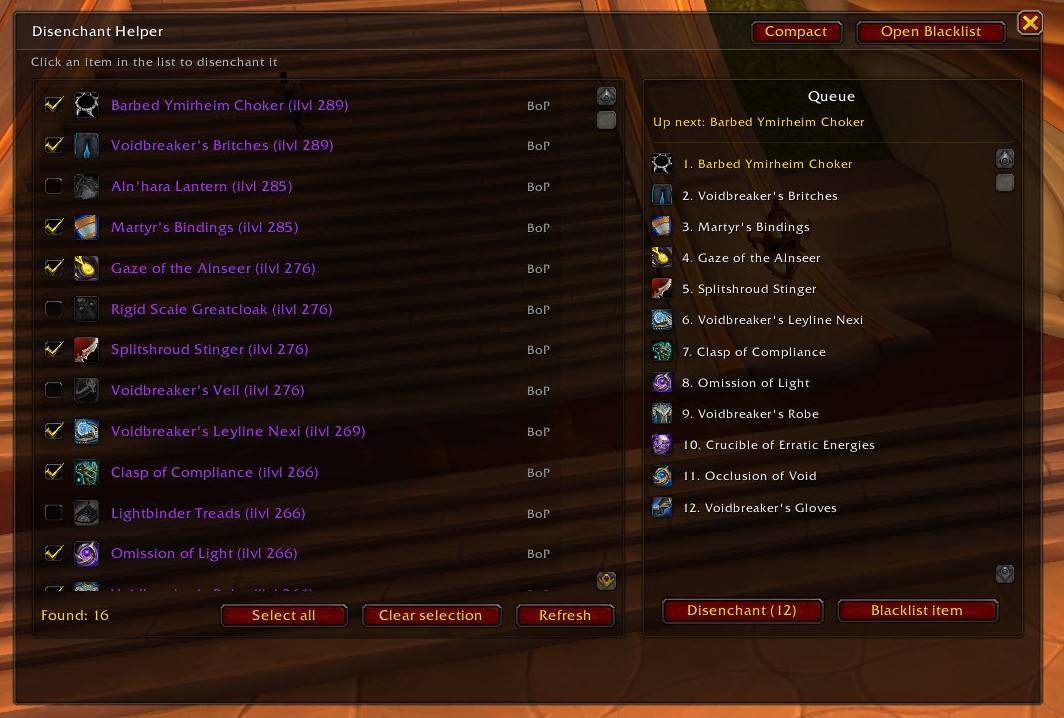
Full.jpg

Compact.jpg
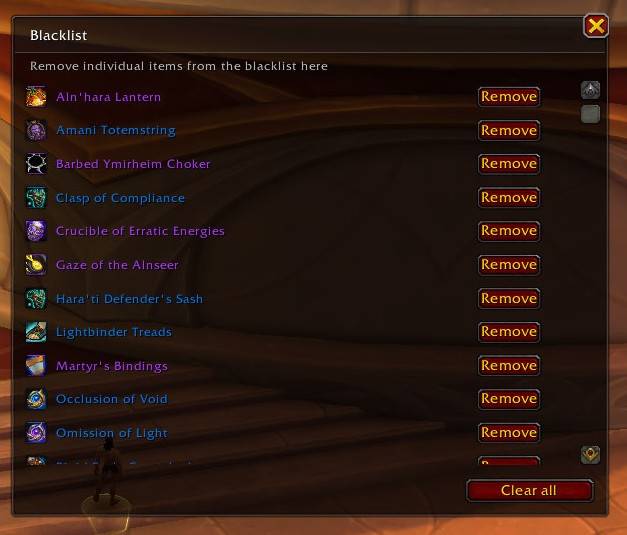
Blacklist.jpg
Description
### Disenchant Helper
Breaking down a full bag — dungeon greens to disenchant, herbs to mill, ore to prospect — is one slow right-click at a time, and one misclick away from destroying something you wanted to keep. **Disenchant Helper** turns it into a single, safe workflow: it scans your bags, builds a queue, and gives you one clean cast button that works through it item by item. Along the way it protects the things you didn't mean to destroy.
It stays out of your way: a slim, semi-transparent interface that matches the rest of your UI, a minimap button that plays nice with ElvUI and friends, and a compact bar you can farm with all evening.
### Processing modes — disenchant, mill, prospect
On top of disenchanting, the helper now handles the two other "break it down in bulk" professions with the exact same one-click flow:
- **Disenchanting** (Enchanting) — turn uncommon–epic gear into shards, dust and essences.
- **Milling** (Inscription) — grind herbs into pigments, five at a time. *(Wrath Classic and later, where Inscription exists.)*
- **Prospecting** (Jewelcrafting, German: "Sondieren") — extract gems from ore, five at a time. Only genuine ore is queued — bars and stones are correctly left alone. *(TBC Classic and later.)*
Switch modes with the text tabs in the main window or the small selector on the compact bar; the addon remembers the mode you used last. Only professions your client actually has appear — a Classic Era character simply sees disenchanting, a Mists of Pandaria jeweler sees all three. Each mode keeps its own blacklist, so excluding an item from milling never touches your disenchant list.
### Key features
- **Queued one-click processing.** The addon scans your bags, builds a queue, and arms a single cast button. One click per item, matched to your "cast on key down" setting — hardware-event compliant and built for the modern API restrictions.
- **Compact bar.** A slim, movable bar showing the next item, a queue counter, the cast button and the mode selector. Leave nothing selected and it automatically works through every eligible item — ideal for a long farm session. Toggle with the "Compact" button or `/deh compact`.
- **Minimap button (LibDBIcon).** Integrates with minimap-button collectors (ElvUI, Leatrix, MBB, …) and Blizzard's addon compartment. Left-click toggles the window, right-click opens the options.
- **Combat auto-hide.** The full window closes the moment combat starts and stays closed — no accidental clicks if someone pulls while you break down loot. Reopen it any time via the minimap button. The compact bar deliberately stays visible and usable, so a farm session isn't interrupted.
### Safeguards — never destroy the wrong thing
- **Value protection.** Set a single gold threshold and any item worth at or above it is kept out of the automatic queue and flagged as valuable (tooltip shows the value and price source). Market values come from **TSM (DBMarket)** or **Auctionator**. *(Disenchanting only.)*
- **Set protection.** Items belonging to an item set get an orange **SET** tag and are never auto-queued — your tier pieces are safe.
- **Item level protection.** Auto-queue only gear below a chosen item level. The "Suggest" button scans your equipped gear and proposes your lowest equipped item level.
- **Binding indicator.** Every item shows its binding at a glance: **BoE** (green — sell it instead!), **WB** (blue — warbound), **BoP** (grey — safe to shred).
- **Quality filter.** Choose which qualities (uncommon / rare / epic) appear in the disenchant list.
- **Automatic blacklist (per mode).** Items that can't be processed are detected and skipped automatically. A blacklist manager lets you review or clear entries, separately for each mode.
- **Stale-target safety net.** The cast button verifies at click time that the armed slot still holds the queued item — if your bags shifted, the click is swallowed and the button re-arms instead of destroying whatever now sits there.
### Slash commands
- `/deh` or `/rde` — toggle the window
- `/deh compact` — switch the compact bar
- `/deh options` — open the settings
- `/deh check` — self-diagnostic (libraries, API paths, available modes, a live bag scan)
- `/deh help` — list all commands
- `/deh show | hide | reset | refresh | clearblacklist`
### Compatibility
Flagged as up-to-date on **Retail, Cataclysm Classic, Mists of Pandaria Classic, Wrath Classic, Burning Crusade Classic and Classic Era**. Milling and prospecting are offered only where the profession exists on that client.
### Localization
Fully localized in **English** and **German (deDE)** — German prospecting uses the in-game term **"Sondieren"**. More languages are easy to add; the strings live in their own file.
### Feedback
Bug reports and ideas are very welcome — please use the CurseForge comments or the issue tracker. `/deh check` opens a copy-paste window so you can drop a diagnostic straight into a report.
Disenchant Helper Team
