


DingChats
- By
Summary: A lightweight, customizable notification addon that plays your favorite sounds for whispers, party, guild, and raid chat, ensuring you never miss an important message.
About Ding Chats
Ding Chats enhances your World of Warcraft chat experience by allowing you to assign unique sound notifications to various chat channels. Tired of missing whispers while focused on combat or gathering? Want a distinct ding for guild chat? Ding Chats provides clear, customizable audio cues so you're always aware of incoming messages without needing to constantly monitor your chat windows.
Features
Assign distinct audio notifications for:
- Whispers (Standard and Battle.net)
- Party & Party Leader
- Guild & Officer Chat
- Raid & Raid Leader
- Instance Chat
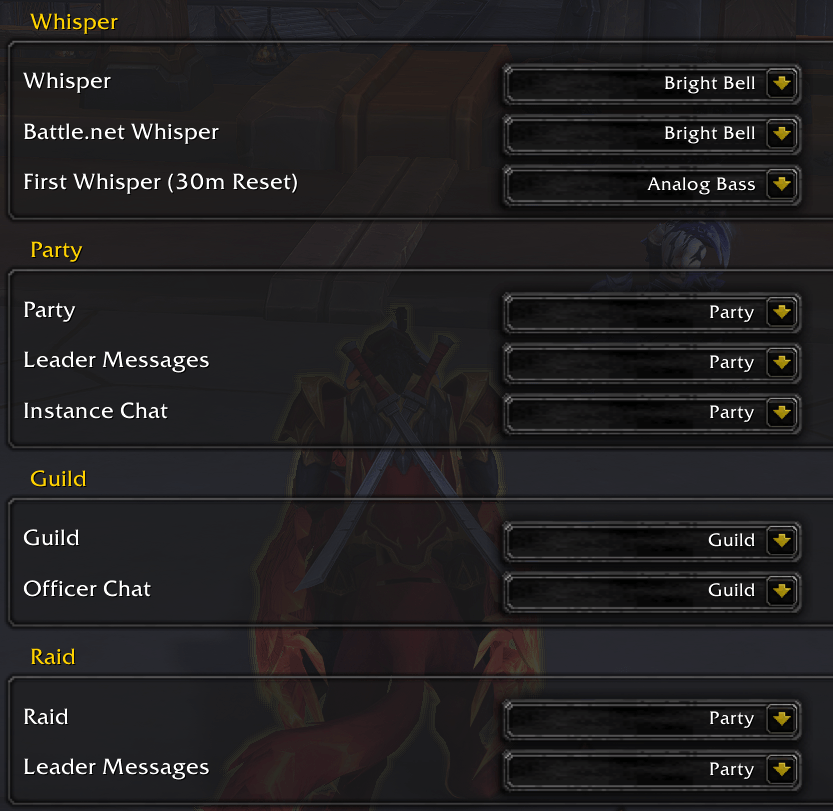
"First Whisper" Notification: Get a special sound the first time someone whispers you in a 30-minute period – perfect for new conversations without being intrusive.
Easy Sound Management: Simply drop your .ogg or .mp3 files into the addon's sounds folder and add their filenames to the Lua list. No complex in-game setup needed for new files!
Lightweight & Efficient: Designed to be minimal and not impact your game's performance.
Localized: Fully translated into Deutsch, Español, Français, Italiano, Português, and Russian.
How to Install & Use Custom Sounds
-
Place Your Sound Files: Drop your
.oggor.mp3sound files into theDingChats\sounds\folder located in your WoWInterface\AddOns\directory. -
Add to List: Open the
DingChats.luafile (located inDingChats\DingChats.lua) with a text editor. -
Edit
customSounds: Find thelocal customSounds = { ... }section near the top of the file and add your sound filenames (e.g.,"my_awesome_sound.ogg",). Remember to include the quotes and the comma! -
Reload UI: Type
/reloadin game or restart WoW. -
Assign in-game: Go to
Game Menu (ESC) > Options > AddOns > Ding Chatsand select your newly added sounds from the dropdown menus for your desired chat events.
Installation
-
Download the latest version of Ding Chats
-
Extract the contents of the
.zipfile into yourWorld of Warcraft\_retail_\Interface\AddOns\folder. -
Ensure the folder structure is
\AddOns\DingChats\withDingChats.toc,DingChats.lua,Localization.lua, and thesoundsfolder inside. -
Restart World of Warcraft or type
/reloadin-game.
Credits & Attributions
Started out as an offshoot of I Hear You by Addondev
Sound Effects Credits
-
Success notification by _lucy — License: CC0
-
System Sound - Interval - M7 by bnlc — License: CC0
-
notification by chesutils — License: Attribution 4.0
-
notification chime by mokasza — License: Attribution 4.0
-
Bright Bell by mokasza — License: Attribution 4.0
-
Analog Bass, Sweeps, and FX-001 by CVLTIV8R — License: CC0
-
Bim - Generic Notification by Demcker — License: CC0
-
Klick - Generic Notification by Demcker — License: CC0
-
Warning sound notification by Froey_ — License: CC0
-
Mobile Phone Notification by TheArbuzikYT — License: CC0
-
Notification by pedr01 — License: CC0
-
Pickup / Videogame UI by Nomagician — License: CC0
-
Bright Synth Ping / UI Bell by subquire — License: Attribution 4.0
The DingChats Team
