Digital Larynx Companion Addon
- By

Digital Larynx App Characters.png

Digital Larynx App Capture.png

Digital Larynx App Config.png
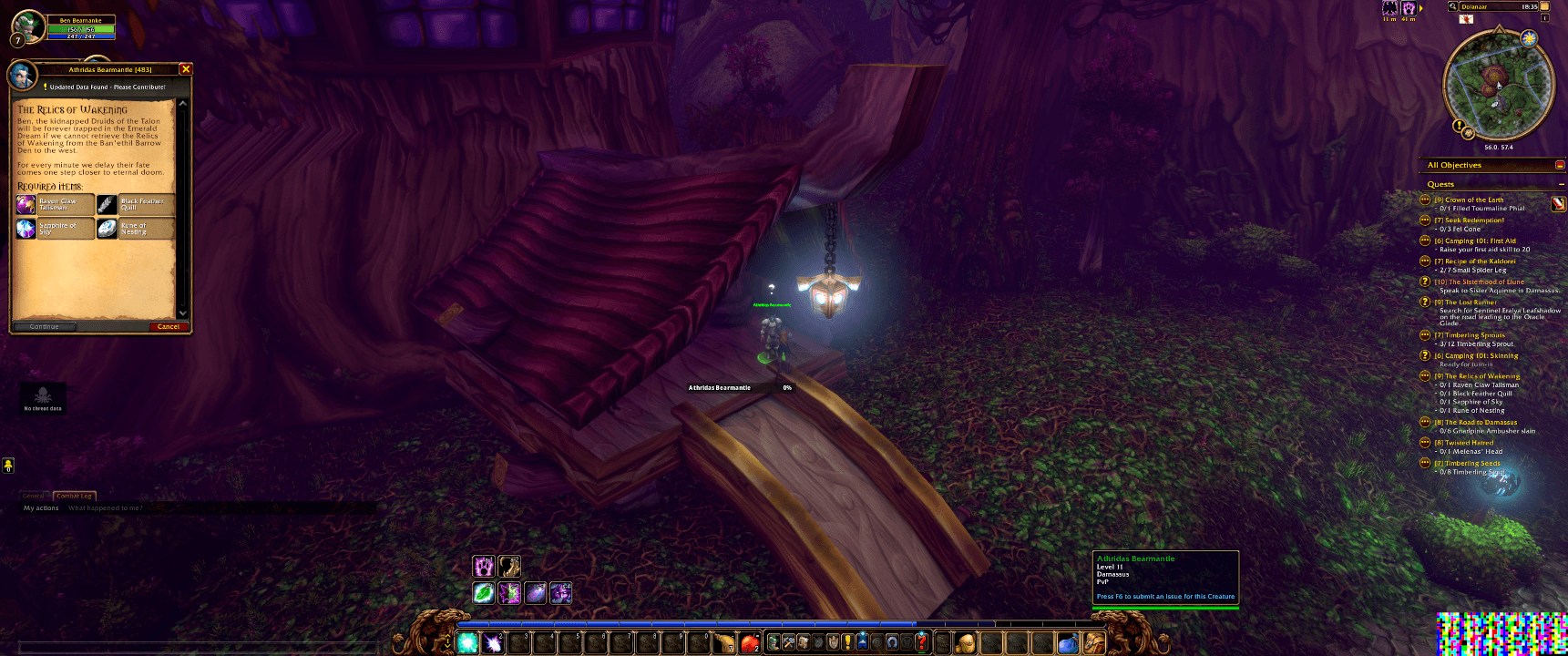
WoW Addon Working Scaled Down.png

WoW Addon Detail.png
Description
🎙️ Digital Larynx Companion Add-on — Real-Time AI Quest Voice Acting for World of Warcraft
Transform your World of Warcraft experience into a fully voiced, immersive cinematic adventure!
The Digital Larynx Companion Add-on is the official in-game bridge for the Digital Larynx Desktop Application. It seamlessly extracts live quest text, NPC gossip, dialogue, and story arcs from World of Warcraft and streams them directly to Digital Larynx for instant, studio-quality AI voice narration.
Say goodbye to reading walls of silent quest text and vocal fatigue—sit back, listen, and let your adventure speak for itself! ⚔️📜
🌟 Key Features
⚡ 3-Bit High-Speed Pixel Barcode Bridge (~10 FPS)
No manual /chatlog commands or disk-heavy file tailing required! The addon encodes live in-game text into an ultra-fast, 3-bit color pixel barcode rendered at ~10 FPS. The Digital Larynx desktop app decodes this visual bridge instantaneously for zero-latency voice triggers.
📖 Gapless Storyteller Queue
Enjoy continuous, seamless audiobook-style narration. The Digital Larynx engine pre-generates the next line of quest dialogue in the background while the current line plays, eliminating pauses between sentences.
🎭 Verified-Text Voice Cascade & Smart Casting
- 100% Exact In-Game Text: Eliminates OCR typos or font reading errors by passing verified text strings directly to advanced voice models (including ElevenLabs v4).
- Dynamic Variable Scrubbing: Automatically detects and handles dynamic player templates like
{Player},{Class}, and{Race}while preserving real player names during live gameplay. - Smart Speaker Matching: Assigns distinct voices to main cast characters, region NPCs, and quest givers, falling back gracefully to the Narrator when needed.
🛡️ Lightweight, Safe & Non-Intrusive
- Zero UI Interference: Built with strict error-trapping (
DLMiner_ErrorLog) to ensure zero Lua error popups or UI frame drops during raid encounters or heavy combat. - Protected Text Handling: Automatically skips protected/secret boss mechanics safely without breaking pipeline execution.
- Auto-Sync Supported: The Digital Larynx desktop client automatically detects, updates, and keeps your addon version in sync across all WoW client installations.
⚡ How It Works (Quick 3-Step Setup)
- Install the Addon: Download and place
DigitalLarynxMinerin your WoWInterface/AddOns/directory (or install via CurseForge/Overwolf). - Launch Digital Larynx: Open the Digital Larynx Desktop Application on your PC.
- Quest & Listen: Open any quest window, NPC gossip dialog, or story panel in-game—Digital Larynx will automatically detect the text and speak the dialogue in real-time!
🔍 Why Addon + Digital Larynx Desktop App?
While the standalone Digital Larynx desktop application uses computer vision (OCR/VLM) to read text off any screen for visual novels and single-player RPGs, this WoW Companion Add-on unlocks direct data extraction specifically for World of Warcraft:
| Feature | Standalone Screen Capture (OCR) | Companion Add-on Bridge |
|---|---|---|
| Text Accuracy | 95–98% (Font dependent) | 100% Exact In-Game Text |
| Setup Time | Draw capture box on screen | Zero capture box needed |
| Audio Queue | Overlapping or manual | Seamless Gapless Queue |
🌐 Connect & Community
The Companion Add-on requires the Digital Larynx Desktop App to handle voice synthesis and audio playback.
- 🏠 Official Website: https://digitallarynx.com
- 🚀 Community Discord: Join our active community to download game scripts, request features, test new updates, and share voice profiles!
- 📺 YouTube Channel: Digital Larynx YouTube
- 🎵 TikTok: @digital.larynx
Note: Digital Larynx Companion Add-on is an independent project and is not affiliated with or endorsed by Blizzard Entertainment.
Digital Larynx Companion Addon Team