


Details! Item Level Display (Bars & some UIs)
- By
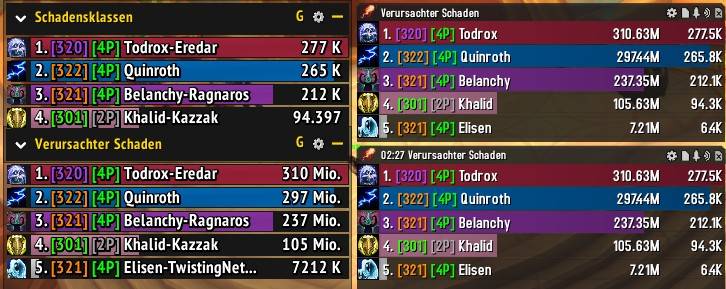
Item level and tier set bonus on both damage meters at once - Blizzard's built-in meter left, Details! right. Colours follow this season's gear upgrade ranks, not fixed numbers: 320 reads purple, 321 orange, moving with the season. (ver. 1.6.1)
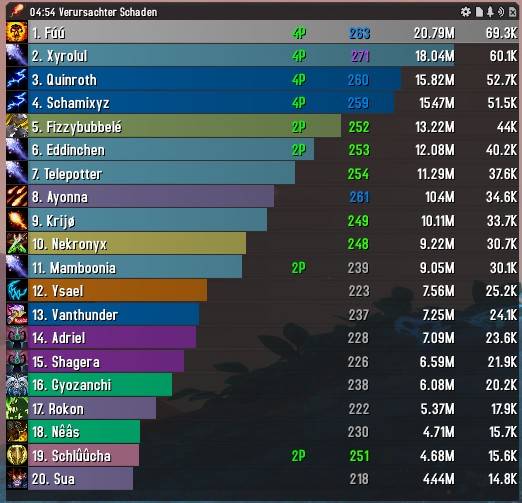
Details! DPS bars with item level and tier set bonus in a 25-man LFR raid
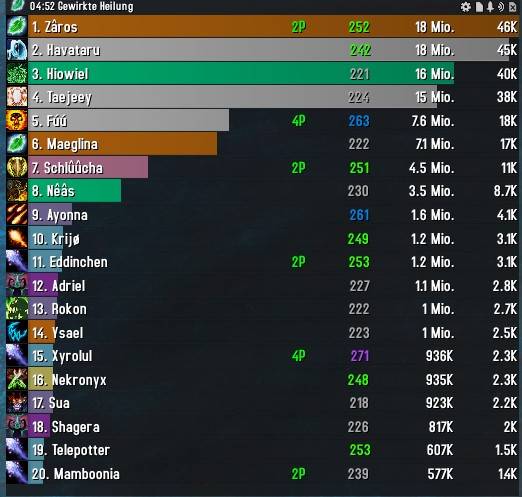
Details! Healing bars with item level display in a raid environment
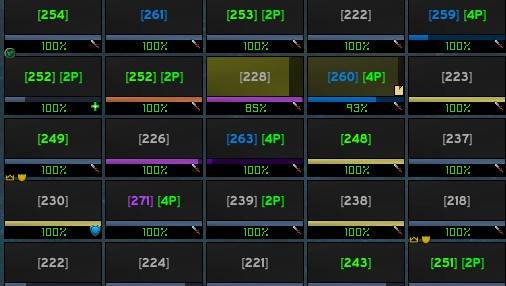
iLvl and tier set on ELvUI Raid Frames Live 25 Man Raid
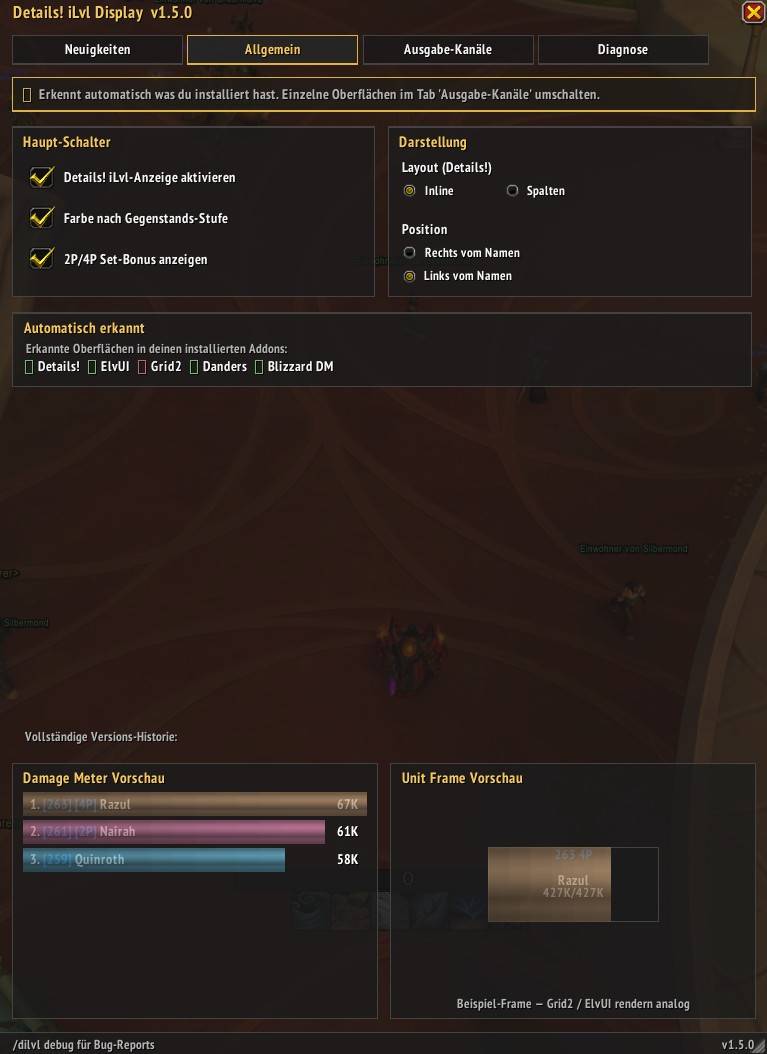
Master toggles, Inline/Columns layout, iLvl position, and live auto-detection of your installed addons — with a live preview below.
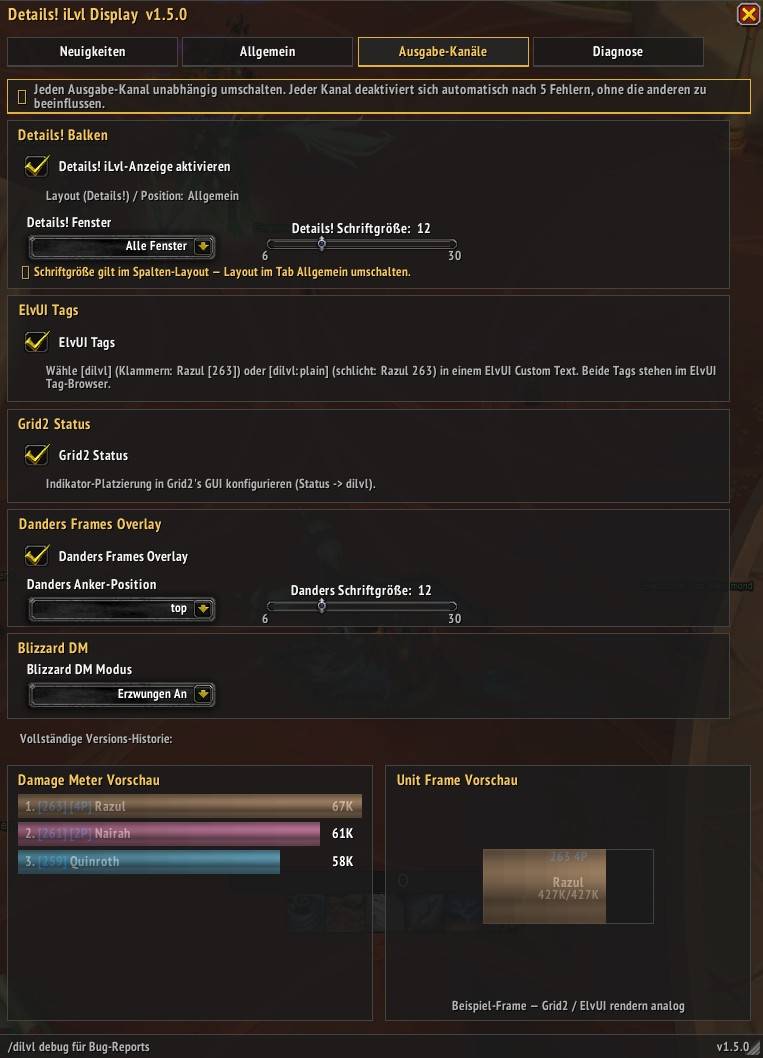
Toggle each surface on its own: Details! bars (new per-window picker + text-size slider), ElvUI, Grid2, Danders, Blizzard DM. Live preview reacts in real time.
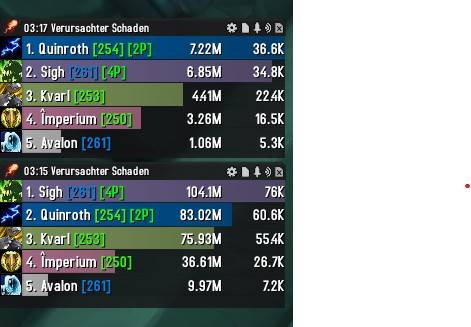
Item level and tier set bonus on Details! Bars 5 Man inline
![ElvUI setup — adding the [dilvl] tag to party frame name text](https://media.forgecdn.net/attachments/1612/610/elvui_setup_dilvl_tag_live-jpg.jpg)
ElvUI setup — adding the [dilvl] tag to party frame name text
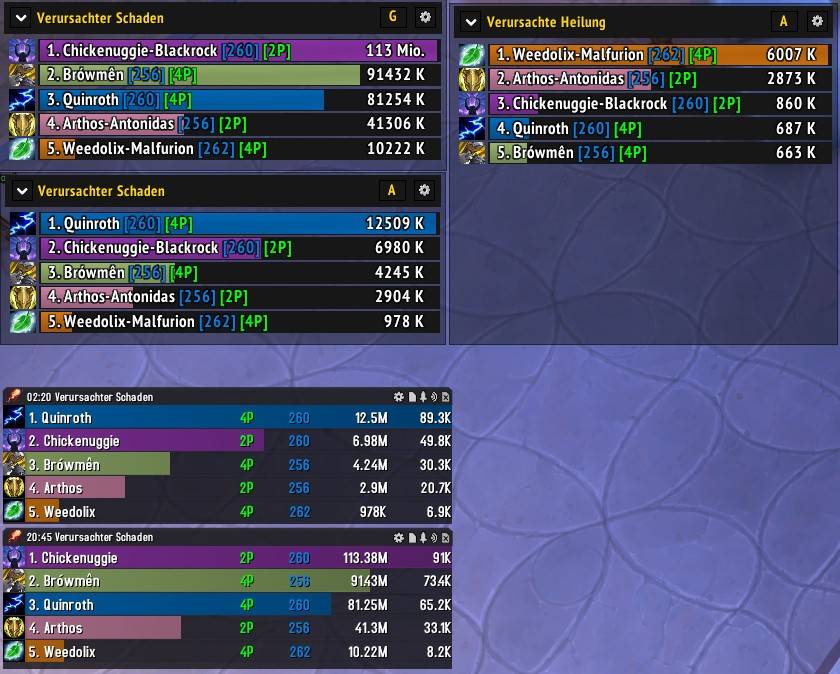
Details!, Blizzard DM on Display Item Level on bars live
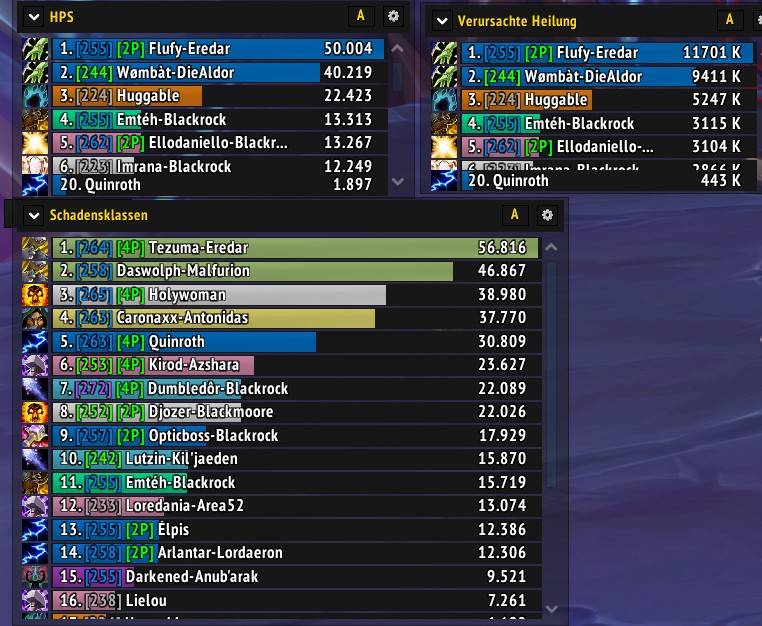
Live Raid -Item Level and tier set bonus on all meter bars — Blizzard Damage Meter (left)
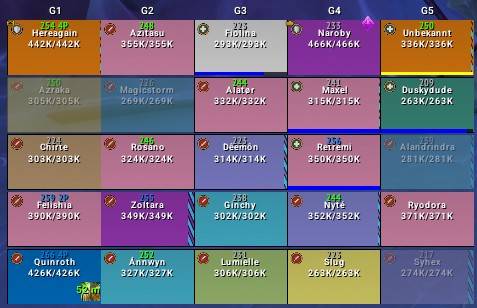
Item Level and Set Info on Danders Frames
Description
Details! Item Level Display shows item level and tier set bonus next to every player name on Details! Damage Meter, ElvUI, Grid2, DandersFrames, and Blizzard's built-in Damage Meter.
Built for WoW: Midnight (12.0+). Five independent output channels — the addon detects what you have installed. Details! and Blizzard's meter come up on their own; the three unit-frame channels are one command away. No dependencies required.
Don't use Details!? No problem — the addon falls back to Blizzard's Damage Meter and works on top of your unit-frame addon of choice (ElvUI / Grid2 / Danders). Force it on with /dilvl blizzdm.
How It Looks
| Mode | Example | Command |
|---|---|---|
| Inline right (default) | 1. Raza [321] [4P] 67K |
/dilvl position right |
| Inline left | 1. [321] [4P] Raza 67K |
/dilvl position left |
| Columns (Details! only) | 1. Raza 4P 321 67K |
/dilvl layout columns |
| ElvUI frame tag | Raza [321] or Raza 321 |
/dilvl elvui on |
| Grid2 indicator | 321 on any text indicator |
/dilvl grid2 on |
| Danders overlay | 321, 13 positions, size 6-30 |
/dilvl danders on |
Item Level Colours — they move with the season
The thresholds are not fixed numbers. At login the addon reads the current season's Mythic+ reward levels from the game itself and places every boundary on a real gear upgrade rank. When the next season raises everything, the scale follows on its own — nothing to update, and no season where half the raid shares one colour.
| Colour | What it takes to reach it |
|---|---|
| Teal | well into Mythic raid gear |
| Gold | past a fully upgraded Hero set |
| Orange | a fully upgraded Hero set — the practical Mythic+ ceiling |
| Purple | what a high Mythic+ vault awards |
| Blue | a mid-range key |
| Green | just under the season's entry level |
| Grey | below that, or an item level that cannot be read |
The tier mark means something else: its green and grey are the season, not the gear tier. Mid tier change a row reads 1. Raza [321] [2P] [2P] 67K — grey for what is being left behind, green for what is being built. Grid2 and Danders show one uncoloured mark instead.
Features
- Item level in brackets next to each player name, colour-coded by gear tier — derived from the live season, never a hardcoded table
- 2P / 4P tier (PvE) set bonus for Midnight Season 1 and Season 2, coloured by season so one look tells you who is still on last season's set
- Instant item levels via LibOpenRaid — anyone in your group who also runs Details! broadcasts their gear, so their number appears with no inspect delay. Those entries are marked
[LOR]in/dilvl cache - Sealed rows still get tagged. In instanced content the game hides most player names from addons; rows are identified by their player ID instead. Where identity cannot be established beyond doubt the row stays blank on purpose — a missing tag is fine, another player's name is not
- In-game Settings UI — four tabs (What's New / General / Output Channels / Diagnostics) with two live preview panes that update as you change settings. Resizable, full EN + DE. Open with
/dilvl, or/dilvl ui diagnosticsfor a bug report - Five output channels, independently toggleable, each fault-isolated: a bug in one cannot take down another, and each recovers on its own toggle
- Two layout modes (Details!):
inlineorcolumns— and columns keeps working during combat, where inline cannot - Position toggle — item level before or after the player name, on Details! and Blizzard's meter
- Two ElvUI tags —
[dilvl](Raza [321]) and[dilvl:plain](Raza 321), listed in ElvUI's tag browser and usable in any Custom Text - Danders Frames overlay — 13 anchor positions (7 inside the frame, 6 above or below it) and live text size, 6-30, no
/reload - Details! fine-tuning — pin the text size with
/dilvl details size <n>and limit the display to a single window with/dilvl details window <n> - First-time login hints — a new feature announces itself once per character in a single chat line, and the What's New tab opens itself once after an update
- Automatic background inspection outside combat, re-inspection after boss kills, on gear changes and on roster changes; timed-out inspects are retried
- Persistent cache — survives
/reload, loads instantly on re-login. Entries re-inspect themselves after two hours and are kept for seven days; the number stays on screen in between, including after that player has left your group - Cross-realm, M+, LFR and LFD support, up to 40 players
Supported Output Channels
| Channel | Default | Toggle | Notes |
|---|---|---|---|
| Details! Damage Meter | ON when installed | /dilvl details |
Full support: inline, columns, position toggle |
| ElvUI | OFF (opt-in) | /dilvl elvui on |
[dilvl] and [dilvl:plain] tags for unit frames |
| Grid2 | OFF (opt-in) | /dilvl grid2 on |
Custom dilvl status, assignable to any text indicator |
| DandersFrames | OFF (opt-in) | /dilvl danders on |
FontString overlay, 13 anchor positions, live text size |
| Blizzard Damage Meter | AUTO | /dilvl blizzdm |
On by itself only when Details! is absent. Inline + position toggle; no columns |
AUTO means on when Details! is not installed. The slash toggle switches between forced on and forced off — use the Settings UI to return to AUTO.
⚠️ Blizzard Damage Meter — What To Expect
Blizzard's Secret Value system in Midnight seals combat data inside instanced content (Dungeons, Delves, M+, LFR/Raid). Tags are stripped at the pull and come back by themselves afterwards; some class colours may briefly reset when combat ends. These are Blizzard restrictions, not addon bugs.
Rows keep their tags through a kill, a wipe and the walk to the next boss — switching segments (A–G) by hand is no longer necessary.
Where the game lifts its combat restriction and no keystone is active, rows that came out of a fight still sealed are filled in automatically: the addon toggles the meter's own enable setting once and Blizzard rebuilds every row itself. The meter blinks briefly when this fires. It runs at most once per fight, never during combat and never inside an active keystone, and switches itself off for the session if it stops helping. /dilvl autorefresh disables it entirely, and inside a keystone the manual A–G switch remains the fallback.
ElvUI, Grid2 and DandersFrames are unaffected — they have no combat gate at all. Details! bars follow the same rule as Blizzard's meter in inline layout; in Columns layout item level and tier stay visible right through the fight.
Slash Commands
| Command | What it does |
|---|---|
/dilvl |
Open or close the Settings UI. In combat it opens by itself once the fight ends |
/dilvl ui [tab] |
Open straight to a tab: whatsnew, general, channels, diagnostics |
/dilvl on / off |
Enable / disable the addon |
/dilvl details |
Toggle Details! bars |
/dilvl details size [n] |
Text size on Details! bars (0 = match Details' own font, or 6-30; Columns layout) |
/dilvl details window [n] |
Show item level on only one Details! window (all or 1-10) |
/dilvl blizzdm |
Toggle Blizzard's Damage Meter overlay |
/dilvl autorefresh |
Turn the automatic post-fight refresh (and its blink) off |
/dilvl elvui / grid2 / danders |
Toggle that channel — bare command means on, or add on / off |
/dilvl danders pos [opt] |
Inside: top, topright, topleft, bottom, bottomright, bottomleft, center. Off-frame: above, aboveleft, aboveright, below, belowleft, belowright |
/dilvl danders size [n] |
Danders text size, 6-30, live, no /reload |
/dilvl layout |
Toggle inline / columns (Details! only) |
/dilvl position |
Item level left or right of the name |
/dilvl color |
Toggle the colour coding |
/dilvl setbonus |
Toggle the 2P/4P mark |
/dilvl inspect |
Re-inspect the group by hand |
/dilvl cache |
List every cached item level and where it came from |
/dilvl debug |
Full status report in a selectable window, ready to paste into a bug report |
Any unrecognised command prints this list in chat, along with the remaining diagnostics.
Full documentation, source code, and issue tracker on GitHub.
Details! Item Level Display (Bars & some UIs) Team
