


Delvin - the delve tracking addon
- By
View detailed Delve progress tooltips within the Great Vault UI, just like you can with Raid and Dungeon progress.
Delvin
Track weekly delve runs and view progress within the Great Vault UI.
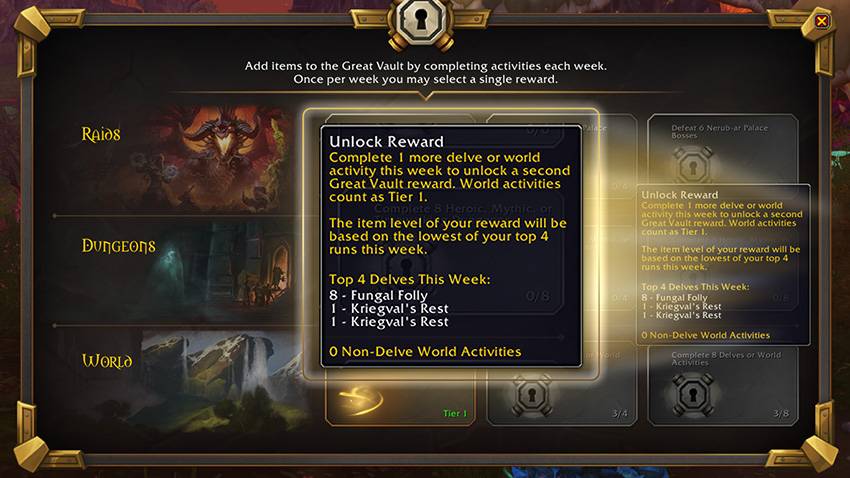
Tired of not being able to tell how many high-tier delves you've run when you hover over Great Vault rewards? Problem solved! Delvin brings weekly progress tooltip information to the World activities row of your Great Vault, just like you're used to for the "Raids" and "Dungeons" vault row tooltips.
Commands:
Typing "/delvin" into the chat box will display all your delve runs for the week in this format in chat:
8 - Kriegval's Rest
8 - Fungal Folly
8 - Earthcrawl Mines
7 - Fungal Folly
1 - The Waterworks
8 - The Waterworks
Features:
- Intuitive tooltip functionality for Great Vault interface
- Tracking information (delve tier and name) for completed delves during the current week
- Information on the number of other Tier 1 World activities completed during the week
**** Important Notes ****
- Delve completion information is stored locally (client-side)
- Because of how Delvin data is tracked and stored, Delvin can only start tracking delve progress once installed. This means if delves have already been completed before Delvin installation, those runs will not be tracked.
- You can manually edit your character's progress, if you know it, by going to ...\World of Warcraft\_retail_\WTF\Account\[ACCOUNT NAME]\[SERVER NAME]\[CHARACTER NAME]\SavedVariables - Delvin.lua and editing the Delvin run table. Format should be:
Delvin_Table = {
{["zone"] = "The Dread Pit", ["tier"] = "1",},
{["zone"] = "The Dread Pit", ["tier"] = "2",},
}
- You can manually edit your character's progress, if you know it, by going to ...\World of Warcraft\_retail_\WTF\Account\[ACCOUNT NAME]\[SERVER NAME]\[CHARACTER NAME]\SavedVariables - Delvin.lua and editing the Delvin run table. Format should be:
- Delvin should automatically reset after the weekly server reset.
Future Plans:
- Add more options for /delvin slash commands
Delvin - the delve tracking addon Team
