Deffar Profession Profit
- By
Gold per hour for every learned profession recipe, using Auctionator and vendor prices.
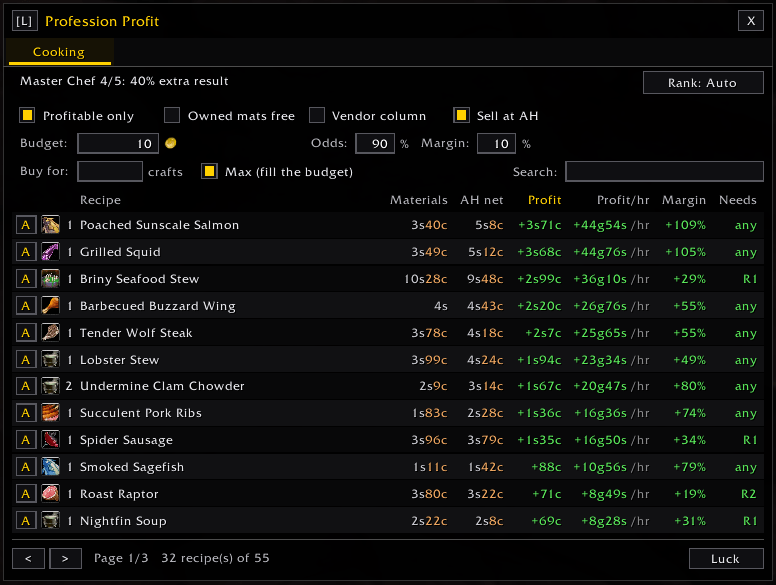
Main window for Cooking tab
Description
Deffar Profession Profit
Find out which profession crafts are actually worth your time. Open it with /dpp. Works with Auctionator, TradeSkillMaster (TSM), or both.
What it does
- Gold per hour: every learned recipe for your professions with its material cost, sale value, profit per craft and profit per hour, using TSM or Auctionator prices and vendor prices.
- Recipes you have not learned: untick Known recipes to list every profession recipe you can still get, with its source (trainer, vendor, quest or drop), whether it binds when picked up or equipped, a Ctrl-click map pin for vendors, and a note when a recipe is not available yet (for example seasonal or not out yet).
- Shopping buttons: one click on a recipe row.
- A (Auctionator): builds a shopping list with price limits that keep the craft profitable, and keeps the amounts in step, so you do not buy far more of one material than you can use.
- T (TSM): types one search into TSM's Browse tab for every material, with the price limit and quantity of each, so TSM opens the buy dialog already set to the right amount.
- Enchanting (Auctionator): ranks disenchants by what they are worth against what the item costs at the auction house, with Quality and Level filters. The list only changes when you press Refresh, and never shows an item that loses money.
- Luck tracker: compares your extra results (like Master Chef procs) with what you should expect, per session, character or lifetime.
- AH sales: shows what your auctions really brought in, with deposits and the auction house cut included. Posts and purchases made through TSM are tracked too.
- Vendor + button: buys the materials your recipes need from the vendor you are visiting, based on what you already hold, starting with the recipe you hold the least for.
- Create All + button: on your profession window, starts Create All on the craft you can make from your bags.
- Recipe change alerts: tells you in chat when a recipe's materials or the number it makes change after a hotfix.
Auctionator and TSM
- Both installed: TSM's prices are used first, and Auctionator fills in when TSM has no price for an item. A small Prices button in the footer switches which comes first.
- TSM only: prices use TSM's lowest buyout price (change it with /dpp tsmsource). TSM does not say how old its prices are. The Enchanting tab points you to TSM's Disenchant search, and T works while TSM's auction window is open.
- Auctionator only: prices, A shopping lists and the Enchanting tab all work, with price ages shown.
Notes
- Made for World of Warcraft: Forever.
- Open each profession window once so your recipes are saved, and visit vendors so their prices are saved.
- Auctionator or TSM is optional but gives the most useful prices. TSM's prices come from the TSM Desktop App.
Commands
- /dpp opens the window.
- /dpp prices auto|auctionator|tsm chooses which addon the prices come from first.
- /dpp help lists the rest.
Deffar Profession Profit Team