DeckUI
A compact, controller-friendly interface for the Steam Deck that also works on the PC with your normal key bindings.
DeckUI_3.jpg
DeckUI_2.jpg
DeckUI_1.jpg
Description
DeckUI
A compact, controller-friendly interface for World of Warcraft on the Steam Deck – that also works on the PC with your normal key bindings.
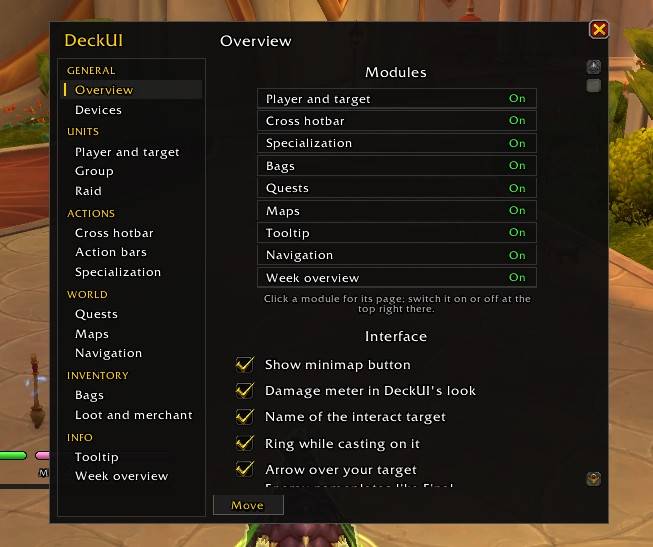
DeckUI is a hub with nine load-on-demand modules; switch each one on or off on its own page in /deck.
New in 2.1: your debuffs as bars, and frames shaped to your liking. A window with the DoTs, bleeds and poisons your specialization keeps up, one capsule each – what is missing shows red, the last 30% gold – for your target and your focus. The Final Fantasy frames can be shaped: width, bar height, where buffs and debuffs go; the bosses take whichever look you like. The settings window folds into sub-pages, and the FFXIV nameplates keep their distance. See "DeckUI Orbs" below.
New in 2.0: Mists of Pandaria Classic. The same download runs in Retail (Midnight) and in MoP Classic – see "In Mists of Pandaria Classic" below for what each game gets.
New in 1.7: Final Fantasy XIV's look – capsule bars for you and your target, FFXIV's hotbars, nameplates, enemy list, scenario guide, round minimap and main menu, all as options to tick. And the Steam Deck now sets itself up again by itself after you played on the PC.
The module list below describes Retail.
DeckUI Orbs – round unit frames
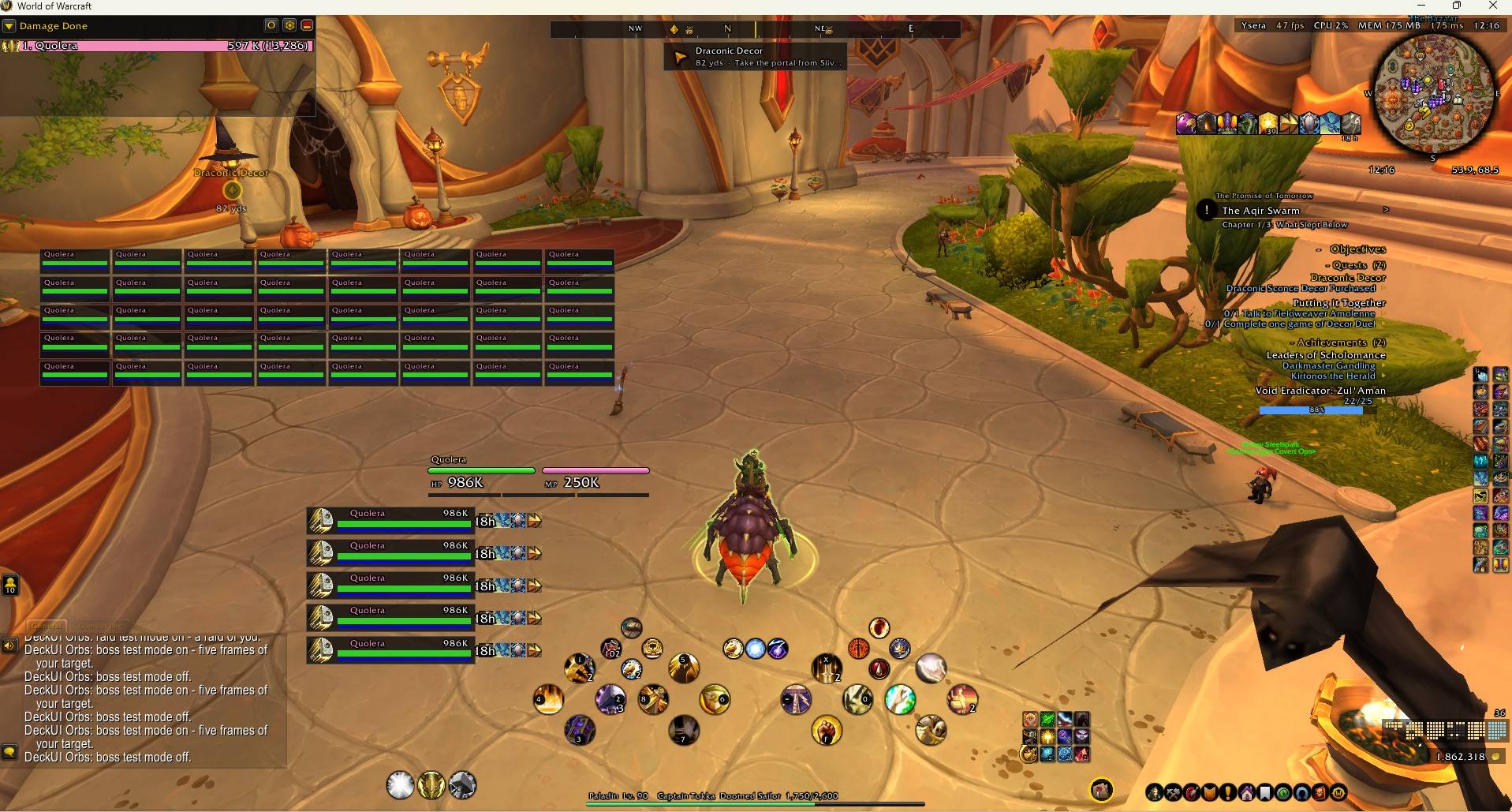
- Player and target as large orbs: health fills the orb, power runs as a ring around it, cast bar inside the orb
- Focus (medium), target-of-target and pet (small, docked), up to five boss orbs
- Round buff/debuff icons, own-debuffs filter, buff duration filter
- Health text as percent, absolute, short (1.2M) or short + percent
- Class resource dots (combo points, holy power, runes, ...) around the player orb
- Big target name announce on every target change
- Class and reaction colours
- Own buff bar in Final Fantasy XIV style (optional): status icons shaped like FFXIV's, the time below each, buffs from the right and debuffs from the left; in combat only short buffs, out of combat all of them - in place of Blizzard's buff frame
- Or in Final Fantasy style: HP/MP bars with numbers for you, a wide target bar at the top with cast, status icons and the target's target – and the bosses as FFXIV's enemy list: health, whom the boss is after, a red edge while it is you, its cast (grey when it cannot be interrupted) and your debuffs
- Or closer still to Final Fantasy XIV (new in 1.7): rounded glossy bars without a box, HP and MP side by side with large numbers, the target as one long bar with its own target beside it, the focus as FFXIV's small focus box – and FFXIV's experience bar in place of Blizzard's (class, level and EXP; at the level cap the reputation you watch). Your cast can move to the middle of the screen with its icon and the time left
- Enemy list (optional): the enemies fighting you or your group, one row each – a square that turns red while it targets you, raid marker, name and health, your current target lit
- Your debuffs as bars (optional, new in 2.1): the debuffs your specialization keeps up – a warlock's DoTs, a rogue's poisons, bleeds – one capsule bar each in a fixed order, a column for your target and a smaller one for your focus. A missing one is an empty bar with a red edge while you fight, the bar turns gold in its last 30% where refreshing loses nothing, your other debuffs follow below, and a rogue sees his weapon poisons. What runs here as a bar leaves the target frame's icons. As a window of its own, or bare rows above or below the target frame; names on or off; width to taste. Page "Your debuffs" under "Player and target"
- Boss look of your own (new in 2.1.1): the bosses as orbs, as Final Fantasy's enemy list on dark panels, or as capsule bars without a box - apart from what your own frames look like
- Player, Target and Target of target pages (new in 2.1): the Final Fantasy frames shaped to your liking – width and bar height as a percentage of the shipped look, buffs and debuffs above, below or off, each, their icon size and how many; the target's buffs sit from the right edge, apart from its debuffs
Group – party list and raid frames
- Party list in Final Fantasy XIV style: class icon, role, health and resource bars, your buffs and all debuffs (dispellable ones marked), your target highlighted, faded out of range – stacked or side by side
- Raid frames in the same style: every member a small parameter bar – name in class colour, a thin health bar, debuffs, your heals over time and shields, mana for healers. The tile is framed in the debuff's colour when you can dispel it and edged red while the member has aggro; Blizzard's raid tools stay
- Raid frames your way: width, height and size per device, groups as columns or rows, sorted by group, role or class, health text, how many debuffs and buffs, opacity
- Both with a test button to set size and place without a group
DeckUI Cross – FFXIV-style cross hotbar
- Two halves of round buttons: LT = left, RT = right, LT+RT = the small middle crosses (24 slots)
- Mirrors Action Bar 1 (with stance/vehicle paging) and Action Bar 2, so you fill your bars as usual
- Steam Deck: D-pad and A/B/X/Y with glyphs on the buttons
- PC: your own key bindings for bars 1 and 2, with the bound keys shown on the buttons
- Keys are bound to Blizzard's native commands, so press-and-hold casting and the single-button assistant work, including its changing icon
- Dimmed out of combat, full brightness in combat or whenever you touch it; size slider
- Hides Blizzard's bars 1 and 2 (optional), and brings its own leave-vehicle button so you are never stuck in a vehicle
- Steam Deck: zoom the camera with LB + D-pad up/down (optional)
- Optional quick menu on RB (Steam Deck): hold RB and the D-pad or A/B/X/Y opens what you chose for each button – map, bags, quest log, character, talents, spellbook, professions, group finder, adventure guide, collections, mounts, achievements, guild, friends, calendar, the week overview or the game menu
- Optional ability menu on B (Steam Deck, still being tested): tap B and the first seven slots of Action Bar 4 appear – your mounts, toys or anything else you put there – the D-pad and Y/A/X use one
- The Deck sets itself up (still being tested): the game shares gamepad settings and key bindings between your devices, so the PC used to take the Deck's away. DeckUI puts the gamepad settings back by itself and gives every controller button you have not bound yourself its default key for the session – no more pressing "Set up gamepad" after every PC session
- Optional stance bar between the middle crosses: forms, stances and auras as round buttons; on the Steam Deck LB + A/B/X/Y picks one and LB + D-pad left/right steps through them, in combat too
- Optional assistant indicator: shows the spell the single-button assistant wants next – green ring when you can cast it now, grey with a cooldown swirl when waiting is right
Action bars in Final Fantasy XIV's look (new in 1.7, still being tested)
- Action Bars 3 to 8 can be DeckUI's own: square slots with rounded corners like FFXIV's hotbars, your key in the corner, empty slots as dark squares
- One row, one column or anything between, size per device; your keys keep working as before
- Tick each bar on the "Action bars" page
DeckUI Spec – spec switcher
- One round icon per specialization, click to switch (out of combat), gold ring on the active spec
DeckUI Bags – bags and banks (off until you switch it on)
- All bags in one window that opens wherever Blizzard's would; right clicks use, sell, post and deposit as always
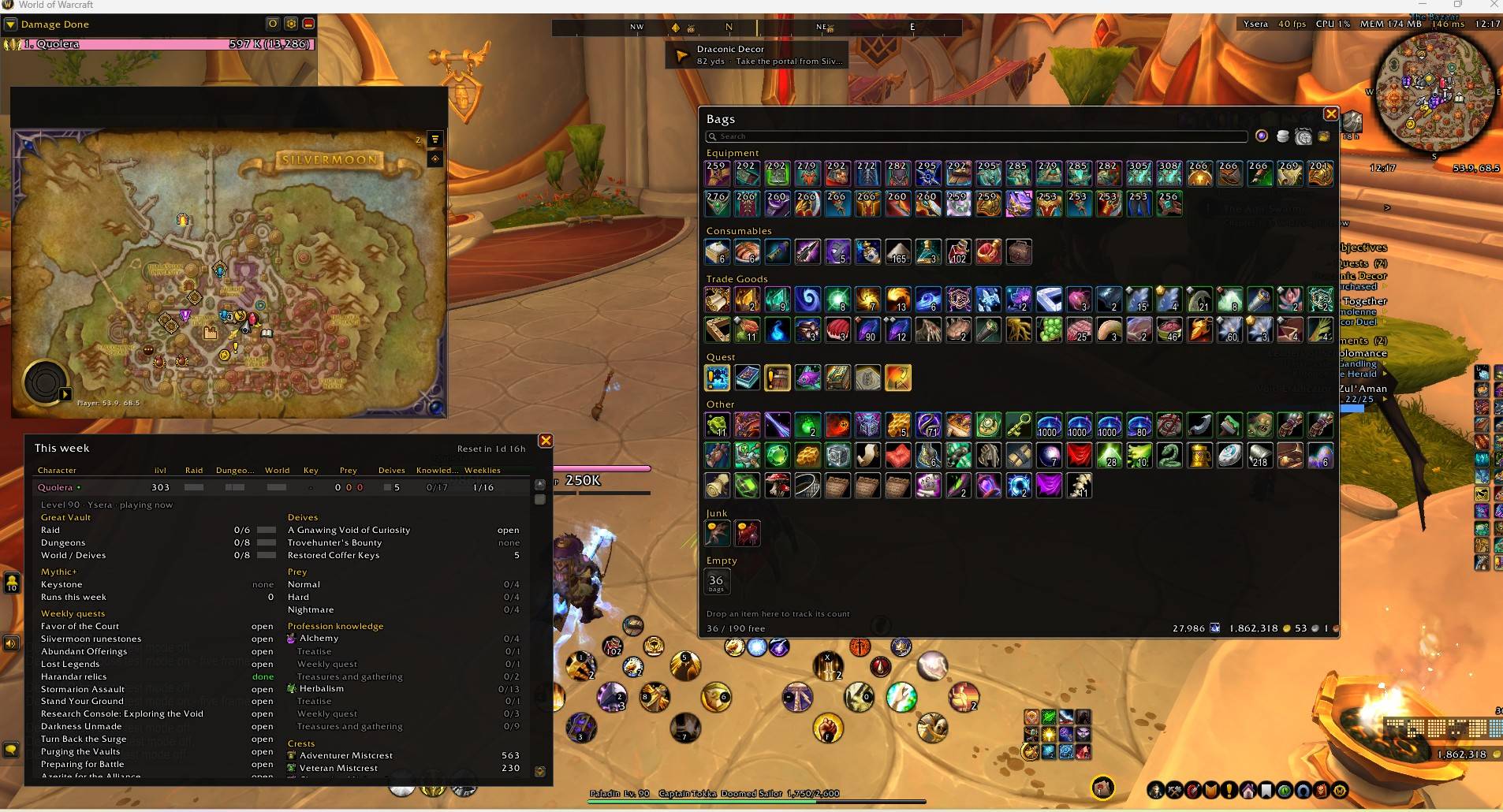
- Categories: New, Equipment, Consumables, Trade Goods, Quest, Other, Junk – all free slots folded into one with a count; or a plain grid, one click away
- Character bank and warband bank in one window: one tab at a time, deposit everything, buy tabs, move warband gold
- Search, sorting, gold and tracked currencies, item level on gear, junk marked even away from a merchant
- Track any item like a currency: drop it on the row above the gold to see its count there
- Old-expansions filter: dims everything from the current expansion so leftovers stand out
- Auction filter: dims everything the auction house would not take
- Auction value: the window shows what its contents would fetch, and valuable slots get a gold coin (from your last auction house scan)
- Columns and size per device (Steam Deck / PC)
DeckUI Quests – objective tracker (off until you switch it on)
- Takes over everything Blizzard's "All Objectives" window shows, in one compact, scrollable list
- Quests and campaign with progress bars; left-click makes a quest your navigation target, shift-click untracks, right-click menu (focus, share, abandon)
- Quest item and scenario spell buttons beside their line, usable in combat, and the find a group eye
- World quests and bonus objectives of your zone, with time left
- Dungeons, delves, scenarios: stages, delve header with lives, treasure and the Nemesis count, bonus steps – and in Mythic+ the timer, time left for +3/+2, deaths and affixes
- Delves: a single power on offer is taken for you (optional), and a bar shows your Delver's Journey gains
- The hunt: the active hunt at the top of your quests; on the hunt table a star marks the targets an achievement still needs
- Achievements, Traveler's Log, neighbourhood endeavors, collections and recipes (reagents counted across bags, bank and warband bank), zone widgets such as capture bars
- Fold single sections or the whole tracker; width, size, text size and height limit per device
- As FFXIV's task list (optional): no box, everything right-aligned, the objectives in light blue with an arrow and a tick once done
- Scenario guide (optional): a small banner at the top left with the current expansion's campaign quest – or, while the story waits, the next step and what it needs. A click follows it with a waypoint, a right click picks another campaign
DeckUI Map – minimap and world map (off until you switch it on)
- Square minimap in a plain frame: zone name, clock and your coordinates on its edges – or round like FFXIV's, in a gold ring with N, E, S and W that turn with you
- Tracking, calendar, addon menu, zoom and addon minimap buttons appear under the mouse; mail, crafting orders and instance difficulty always visible
- World map as a movable window, never full screen, controls under the mouse, quest log closed by default and restyled to match
- Switches for Blizzard's own map extras: player and cursor coordinates, fade while moving (no option for it in the game)
- Size and position per device
DeckUI Tooltip – the mouse-over window (off until you switch it on)
- DeckUI's look: dark with a thin edge in the item's quality or the player's class colour, slim health bar
- At a place of its own, moved with
/deck unlock– separately for the Steam Deck and the PC; tooltips of buttons stay beside them - Players: class colour, spec and item level
- Whom the unit is targeting, with a warning when it is you
- Hold Shift for item, spell and NPC IDs
- Extras: the quest an item in your bags starts, your unspent profession knowledge, the keys a delve's rare chest wants, and the auction price of any item from your last scan
- Reputation items and currencies show the faction and your standing with it; transmog ensembles how much of the set you already have
DeckUI Nav – finding your way (off until you switch it on)
- Compass bar at the top: cardinal points, your navigation target, party members, rares and treasures from the minimap
- Your target's name with an arrow, the distance and arrival time
- DeckUI's own beacon in the world instead of Blizzard's diamond: the target's name above it, distance and arrival time below
- Key bindings step through your tracked quests, nearest first – on a controller button, no map needed
- Waypoints and routes: as many as you like – Ctrl-click the world map or type
/way 45.2 67.8 name(decimal commas work too). Numbered pins on the world map, the minimap and the compass, and a list to pick, rename or remove them (/way list, or a click on the compass). Reaching one moves on to the nearest – or with Route on to the next in order, for farming and gathering rounds
DeckUI Week – your week at a glance (off until you switch it on)
- Every character in one table: Great Vault, keystone, prey hunts, delves, profession knowledge and weekly quests at a glance
- Click a character for the details: vault item levels, lockouts, upgrade crests, currencies, renown, the week's profession knowledge source by source
- Midnight's important weekly quests are listed from the start, others are learned as they show up; right click hides one
- Characters you are not playing show what they had when last seen – marked once the weekly reset has passed
- Open it with a round button on screen you can drag anywhere (its number counts your unlocked vault slots),
/week, a key binding or Shift-click on the minimap button
Auction house prices
- "Scan now" below the auction house reads every listing (at most every 15 minutes, the game's limit) and keeps the cheapest buyout of each item
- From then on, anywhere: the price in every item tooltip, a stack's value in your bags, the total value of your bags
- The auction house window itself can wear DeckUI's dark, flat look (optional)
Final Fantasy XIV around the screen (optional, new in 1.7)
- Enemy nameplates like FFXIV's: level, marker and name with a thin red health bar under it – Blizzard's plate stays underneath, so clicking still targets; the game keeps them apart instead of letting them overlap (new in 2.1.1, switchable)
- An arrow over your target, bobbing, red for enemies and green for friends
- Main menu as round buttons with a gold ring that lights up when a button has news
- Server info: realm, frame rate, addon CPU share, memory, latency, waiting mail and the time – each value on its own switch, the busiest addons on mouse-over
- Gold and a bag overview (a block of dots per bag for used and free slots, a click opens the bags); Blizzard's bag buttons can be hidden
Quality of life (optional)
- Name of the interact target: the object the interact key would use (chest, ore, herb) gets its name below the game's icon - gold in reach, grey out of it - and a ring while you gather
- Talking head as a subtitle: the quest speaker's box with its portrait becomes a quiet line of text; the voice plays as before
Loot and merchant (optional)
- Fast auto loot, and DeckUI's loot window: a compact list with "Take all" (also a key binding); with auto loot a short list shows what you picked up
- Sell junk and repair at every merchant, with guild funds first
Blizzard's damage meter in DeckUI's look
One checkbox on the Overview page gives the game's built-in damage meter flat bars, a dark background and a thin edge, matching the rest of DeckUI.
In Mists of Pandaria Classic (new in 2.0)
All ten modules run in MoP Classic too, from the same download. What differs is the game's content:
- Orbs and Final Fantasy bars with MoP's class resources – shadow orbs, burning embers, demonic fury, eclipse, chi, combo points and runes by type; party list, raid frames, buff bar and enemy list as in Retail
- Cross hotbar with stances, forms and vehicles, the stance row, Action Bars 3–8, quick menu and ability menu
- Spec bar: one button per talent group (dual spec)
- Bags and the old bank with its bank bags (no sorting – MoP has none)
- Quest tracker with quest item buttons, achievements, scenarios and challenge modes with their medal times
- Minimap square or round, the world map as a movable window in Blizzard's look
- Tooltip with spec and item level of other players
- Compass and waypoints: Ctrl-click the world map or
/way, routes, the waypoint list - Week overview made for MoP: raid lockouts with Raid Finder wings, valor and conquest of their weekly caps, the world bosses, your challenge-mode medals, charms, seals and coins
- Not in MoP, because the game has none of it: the damage meter style, the talking head subtitle, delves, world quests, hunts, the scenario guide and the beacon in the world
Everything was played on the PC. The Steam Deck parts are all there in MoP but not yet tested on the Steam Deck – please report what does not work.
The settings window
/deck opens one window with the pages in a sidebar, grouped by theme, and every page scrolls. Pages with many options have sub-pages, which open under the page while it is on show (a ">" marks a page that has some). Each module is switched on or off at the top of its own page; modules that are off are listed in grey and say what they do. Explanations sit in the tooltips, and a bar at the bottom says when a change needs a reload – with a button that does it. At the bottom of every page, Move unlocks just that page's frames and Defaults puts its settings back. /deck raid, /deck bags, /deck week and so on open a page directly.
Steam Deck and PC
DeckUI detects the device automatically (1280x800 screen or an active gamepad = Steam Deck) and switches input accordingly. Override it in /deck → Devices → Device, or with /deck deck, /deck pc and /deck auto.
Frame positions and sizes are kept per device anyway. Three switches on the Devices page keep what the game otherwise shares between every computer you play on:
- Key bindings stay on the device you set them on
- Action bar layouts – a different layout on the Deck and on the PC, per character and spec, put back at login
- Edit Mode layout – one layout per device, switched automatically
Works alongside ConsolePort
Most of ConsolePort works fine next to DeckUI – its radial menus, camera targeting, interface navigation and inventory menus. Its action bar does not: it sits on the same LT/RT plus D-pad and face button combinations, it re-asserts its own key overrides over ours, and it unregisters the events on Blizzard's action buttons that DeckUI reads the pushed state from.
ConsolePort ships as several separate addons, so the fix is one checkbox: uncheck Console Port Action Bar in the addon list and keep Console Port itself. DeckUI tells you in chat when it sees the bar module enabled. If you would rather keep ConsolePort's bar, switch the Cross module off on its page in /deck.
Commands
/deck– settings,/deck <page>– open a page (/deck raid,/deck loot, ...),/deck unlock/lock– move frames,/deck reset– reset positions/deck device– show the detected device,/deck deck/pc/auto– force one/deck ah– what the auction scan stored,/deck softtarget– the interact target settings/orbs,/dc,/spec– jump to a module page/bags– open or close the bags,/bags config– the Bags page/quests– fold or unfold the tracker,/quests config– the Quests page,/quests reset– bring it back into view/deckmap– the Map page,/deckmap reset– bring both maps back to their default places/decktip– the Tooltip page/decknav– the Nav page,/way x y name– a waypoint,/way list– the waypoint list,/way clear– remove them all/week– the week overview/orbs test/raid/boss– test modes for party list, raid frames and boss frames (also buttons on their pages)/deck errors– every Lua error caught, ready to copy
Setup on the Steam Deck
Since 1.7 there is nothing to do: on the Deck DeckUI switches the gamepad on (LT = Shift, RT = Ctrl) and gives every controller button you have not bound yourself its default for the session – A jump, B menu, X interact, Y character, D-pad up/down cycles enemies, left/right friends. Nothing is written into your key bindings, so the PC cannot take it away. Both are switches on the Cross page.
You can still write the defaults into your saved key bindings with /dc → "Default bindings". That asks first and lists exactly which of your bindings it would replace; there is no undo.
Reporting a bug
Please open an issue at https://github.com/JonasAudren/DeckUI/issues – that keeps reports in one place with a history. Comments here are fine for short questions.
The quickest way to a good report: /deck errors (or the "Lua errors" button on the Overview page) collects every Lua error with its details – select all, copy, paste it into the issue.
DeckUI ships diagnostic commands whose output makes a report much easier to act on. Run the fitting one and paste what it prints in chat:
/deck device– which device DeckUI detected and why/dc page– the active action bar page and the slot behind a button (use this when buttons are blank or show the wrong thing)/dc bars– which Blizzard bars were found and hidden/dc overlay– the visible parts of a cross button/dc quick– the quick menu's button and commands/bags debug//bags bank– what the bag and bank windows are built from/quests debug– whether Blizzard's tracker is off, and the state of the tracker's buttons/deckmap debug– where the minimap sits, the world map's scale and the map options/deck bars//deck layout– the action bar and Edit Mode layout saved for this device/decktip debug– the tooltip's anchor, size and what it is waiting for/decknav debug– map, position, facing and the navigation target's angle/orbs bosses– what the boss frames see/quests hunts– the hunt targets still open and what the hunt table marked/quests guide– the campaigns the scenario guide sees, with their state and next step/orbs enemies– what the enemy list sees for each nameplate/deck plates//deck targetarrow– the FFXIV nameplates and the target arrow
Turning on Lua errors with /console scriptErrors 1 before reproducing the problem gives you the actual error text, which is worth more than any description.
Libraries (embedded)
oUF, LibStub, CallbackHandler-1.0, LibActionButton-1.0 and LibButtonGlow-1.0 – all under permissive licences, listed with their authors and terms in THIRD-PARTY.txt inside the DeckUI folder.
DeckUI Team